BeMyDisplay
second display for Windows PC
Designed for iPhone, iPad, iPod touch
Free · In-app purchases
- Age rating4+
- CategoryProductivity
- Developer一康 樊
- LanguagesEnglish+ 1 more
- Size29.2 MB
Links to the official App Store page
Download.org hosts no file of BeMyDisplay. The button opens its official App Store page, published by 一康 樊. Listing last checked on Nov 16, 2026.
Screenshots
About
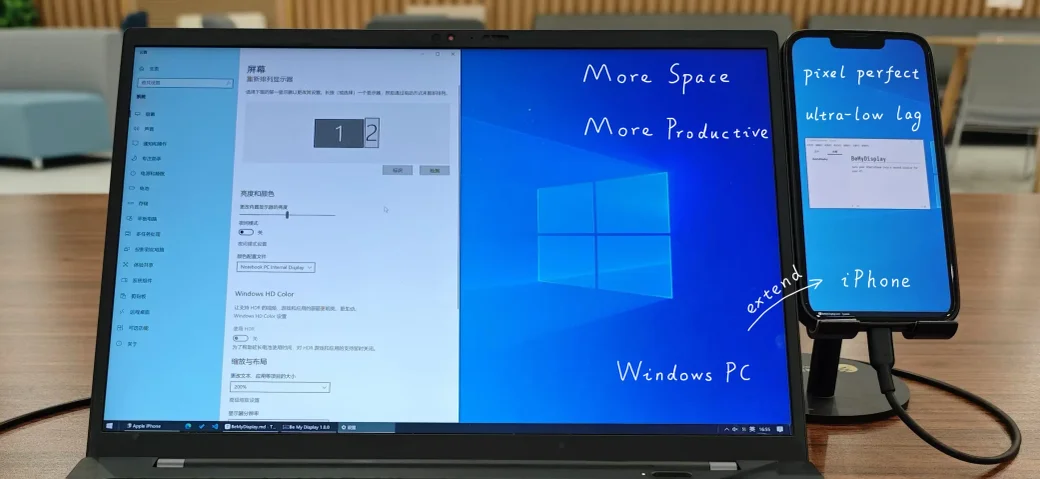
BeMyDisplay turns iPad/iPhone into a second display for Windows PC.
The advanced design let BeMyDisplay provide unparalleled display effect: pixel perfect + ultra-low latency (free of trial).
To get started, plug your iPad/iPhone into your Windows PC with USB cable, and run BeMyDisplay on both windows and iOS side, then BeMyDisplay will turn your iPad/iPhone into a high-performance second display for your PC automatically.
BeMyDisplay Works With:
All iPad/iPhone with iOS 12.0 and later
All PC with Intel/Nvidia graphics card and Windows 10 (Version 2004 or newer) or Windows 11
Learn more at:
https://starry-sky-workshop.github.io/BeMyDisplay/
or at:
https://gitee.com/starry-sky-workshop/BeMyDisplay
[Annual Subscription Information]
Subscription Benefits: Enjoy all app features for one year
Subscription Period: 1 year
Subscription Price: Please refer to the iAP application information, for example, a continuous annual subscription is $1 per year.
Payment: Upon confirming purchase and payment, the amount will be charged to the iTunes account.
Cancellation of Renewal: To cancel renewal, please manually turn off the automatic renewal feature in your iTunes/Apple ID settings at least 24 hours before the current subscription period expires.
Renewal: The Apple iTunes account will attempt to charge the fee within 24 hours prior to the expiration date, and upon successful payment, the subscription period will be extended for one year.
Terms:
https://www.apple.com/legal/internet-services/itunes/dev/stdeula/
Privacy Policy:
https://github.com/starry-sky-workshop/BeMyDisplay/blob/main/PrivacyPolicy/PrivacyPolicy-en.md
What’s new
Version 1.0.2 · Aug 17, 2025
Fixed an issue where the navigation bar did not automatically hide when displaying frames in the app on iOS 18;
Other minor refinements
App privacy
What 一康 樊 declares on the App Store about how this app handles data.
-
Data not linked to you
May be collected but is not linked to your identity.
- Identifiers
- Usage data
- Diagnostics
Privacy practices may vary, for example with the features you use or your age.
Information
- Seller
- 一康 樊
- Category
- Productivity
- Version
- 1.0.2
- Updated
- Aug 17, 2025
- Released
- Jan 16, 2025
- Size
- 29.2 MB
- Requires
- iOS 12.0 or later
- Age rating
- 4+
- Price
- Free
- In-app purchases
- Yes
- Languages
- English, Simplified Chinese
- Copyright
- © 2024 Fan Yikang
You might also like
-
 Tab Display-Expand Your TabletAs Second Display&Video Player
-
 Any Display: Second MonitoriPad as Screen, Pen & Webcam
-
 EO.workspaceProductivity
-
 Slate: Second MonitorDual Display for Windows PC
-
 Luna DisplayHardware enabled second screen
-
 Duet Air - Remote DesktopThe fastest Remote Desktop
-
 XeOS: External Display DesktopPro Full Screen Desktop Mode
-
 InfiniteX2P Pro — Desktop ModePro Desktop for Your iPhone
-
 Connect My ComputerDesigned for Mac computers
-
 OpenDisplayUse your iPad as a Mac Monitor