Calendar Briefing
Morning, evening, week ahead
Designed for iPhone, iPod touch
Free
- Age rating4+
- CategoryProductivity
- DeveloperSangGwon Park
- LanguagesEnglish+ 7 more
- Size50.1 MB
Links to the official App Store page
Download.org hosts no file of Calendar Briefing. The button opens its official App Store page, published by SangGwon Park. Listing last checked on Nov 16, 2026.
Screenshots



About
Open your eyes, check one notification, and know how your day looks.
Calendar Briefing reads the calendars already on your phone and sends you a short, plain-language summary at a time you choose. No more scrolling through a grid to work out when your first meeting starts.
WHAT YOU GET, AND WHEN
A readable summary, not a grid
"Three events today. Your first is the 10:00 design review." That is the whole point — a sentence you can take in half-awake, not a wall of coloured blocks.
Warnings that matter
When two events overlap, or when you have twenty minutes to get across town between them, the briefing says so. These are the things you want to know before the day starts, not during it.
All your calendars, together
Work, personal, shared, subscribed — every calendar account on your device is included. Pick exactly which ones count toward your briefing and leave the rest out. Subscribed calendars, the holiday and birthday ones, start switched off: they make a briefing long without making it more useful. Give a calendar a nickname — "Work", "Family" — and that is the name you see on every event.
Tonight or tomorrow, your call
Get a briefing for today when you wake up, or for tomorrow the evening before so you can prepare. Turn on either, or both, at whatever times suit you.
The week ahead, on Sunday evening
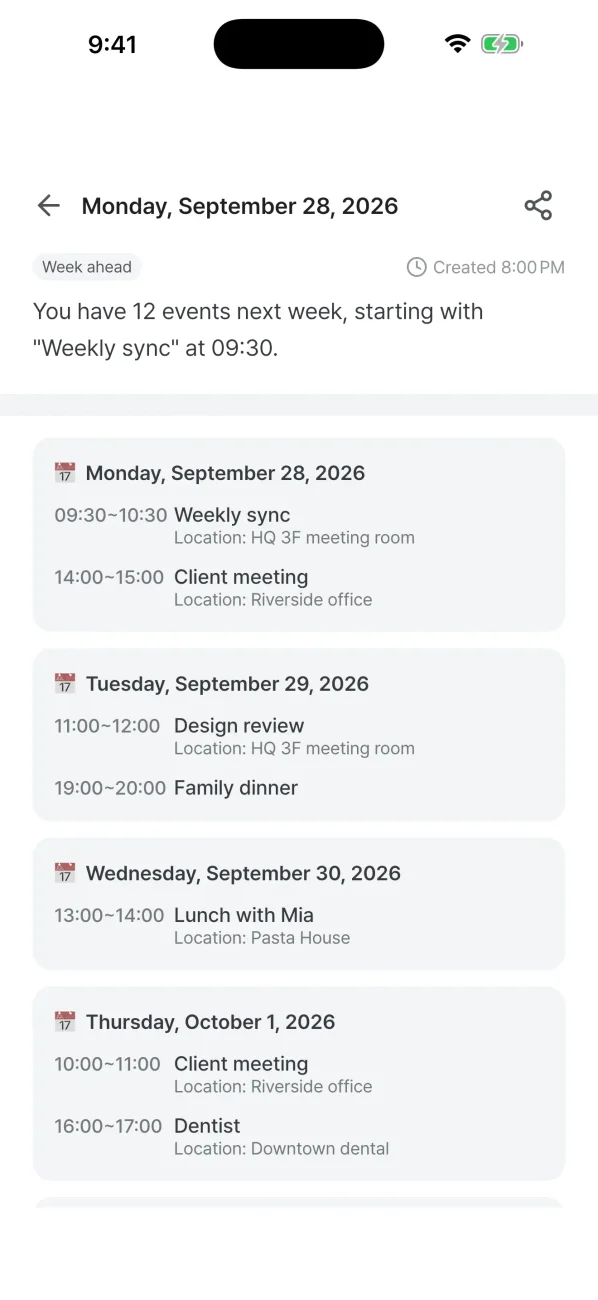
Turn on the weekly preview and the next seven days arrive in one briefing before the week starts. On or off, at the time you choose, like the others.
Not a good moment? Remind me in an hour
The briefing lands while you are still in the shower. Tap "Remind in 1 hour" on the notification and it comes back when you can actually read it.
ON YOUR PHONE
Today and tomorrow, one tap apart
The home screen holds both. Switch to tomorrow whenever you want to look ahead, instead of waiting for the evening briefing to arrive.
Look back whenever
Every briefing is kept in the app for 30 days, so you can check what a past day held.
Straight into the calendar app you use
Tap an event and it opens in Apple Calendar, Google Calendar, Naver Calendar or Outlook. Choose your default once in Settings.
BUILT TO STAY OUT OF THE WAY
No account. No sign-up, no password, no email address — install it and it works. Reinstall it later and your briefing times and calendar choices come back on their own.
Your language, automatically. The app follows your phone's language setting, and briefings are written in that language too.
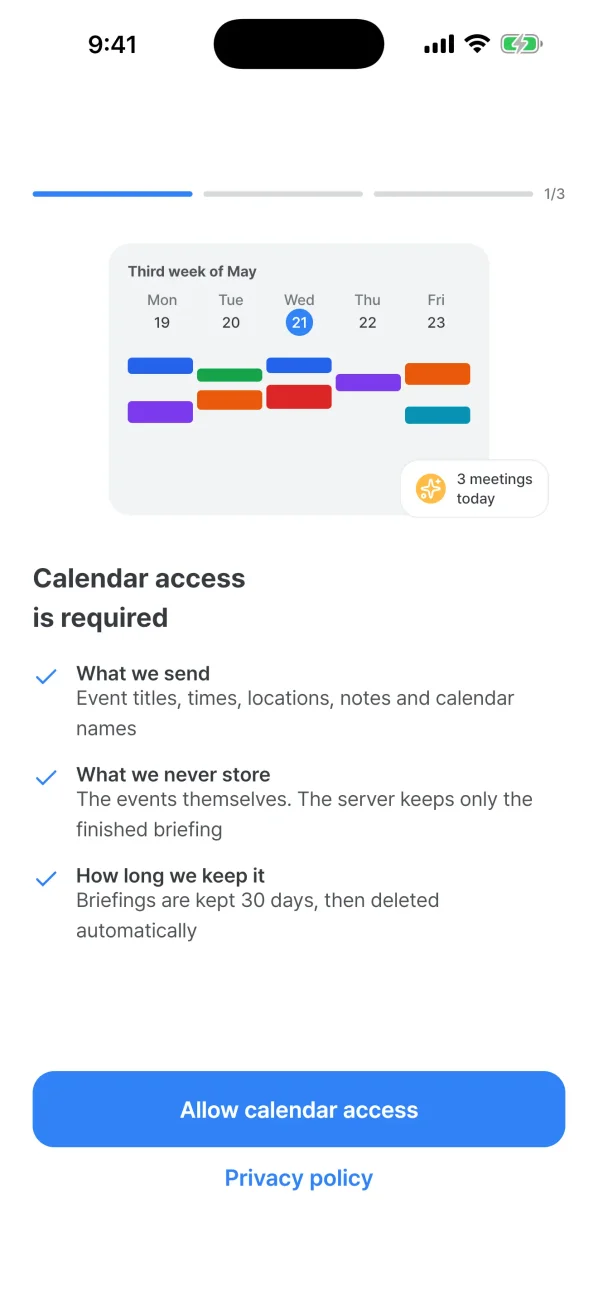
Straightforward about your data. Your events are used to write the briefing and are not stored on our servers. Briefings themselves are kept for 30 days and then deleted. Full details are in the privacy policy.
Calendar Briefing needs permission to read your calendar and to send notifications. That is all it asks for.
App privacy
What SangGwon Park declares on the App Store about how this app handles data.
-
Data linked to you
May be collected and linked to your identity.
- User content
- Identifiers
Privacy practices may vary, for example with the features you use or your age.
Information
- Seller
- SangGwon Park
- Category
- Productivity
- Version
- 1.1.1
- Updated
- Oct 16, 2026
- Released
- Oct 16, 2026
- Size
- 50.1 MB
- Requires
- iOS 15.0 or later
- Age rating
- 4+
- Price
- Free
- Languages
- English, Bengali, French, Hindi, Korean, Portuguese, Russian, Spanish
- Copyright
- © 2026 ParkSangGwon
You might also like
-
 ThisDay: Planner & RemindersTasks, habits and reminders
-
 Remember Names: Name ReminderRemember Names, People & Faces
-
 AM GPTAI Email & Calendar Assistant
-
 AI Calendar - Pocket CalDaily Planner, Tasks & Widgets
-
 TapCal: Calendar & WidgetsMonth Widgets & Reminders
-
 Pocketify – Save & Read LaterBookmarks, highlights, RSS
-
 Email Dual Space - MailNestAll Mailbox, Parallel Login
-
 AI Keyboard: AI Writer by AiKyAI voice writing: email, work
-
 Genesys TempoProductivity
-
 That Girl: Routine PlannerCute Daily Calendar Schedule