- Age rating4+
- CategoryDeveloper Tools
- Developerjaehyun jang
- LanguagesEnglish+ 1 more
- Size5.9 MB
Links to the official App Store page
Download.org hosts no file of Cmux Remote. The button opens its official App Store page, published by jaehyun jang. Listing last checked on Nov 12, 2026.
Screenshots



About
Cmux Remote is a private remote-control client for the cmux terminal multiplexer running on your own computer. Connect over your Tailscale network — your traffic never touches a third-party relay.
WHAT IT IS
Cmux (https://cmux.com) is a modern terminal multiplexer with native splits, workspaces, and rich integrations for AI agents like Claude Code, Codex, omx, and Cursor. Cmux Remote mirrors the cmux surface you choose, lets you type into it, send keys,
manage workspaces, upload photos and documents, preview images, and receive notifications — all from this mobile app.
WHO IT IS FOR
- Developers who run long-lived agents such as Claude Code, Codex, and omx and want to check or control them away from their desk
- People who access their own development machine remotely and want a focused terminal experience
- Anyone already using Tailscale and looking for a private way to reach their terminal
HOW IT WORKS
1. Install the open-source cmux-relay binary on the computer that runs cmux.
2. Make sure that computer is connected to Tailscale.
3. Open this app, enter the computer’s Tailscale hostname, and tap Connect.
4. Your cmux workspaces appear. Select a surface and start working.
The relay communicates directly with cmux through its local Unix socket. This app communicates with the relay over a WireGuard-encrypted Tailscale tunnel. Nothing leaves your private network.
FEATURES
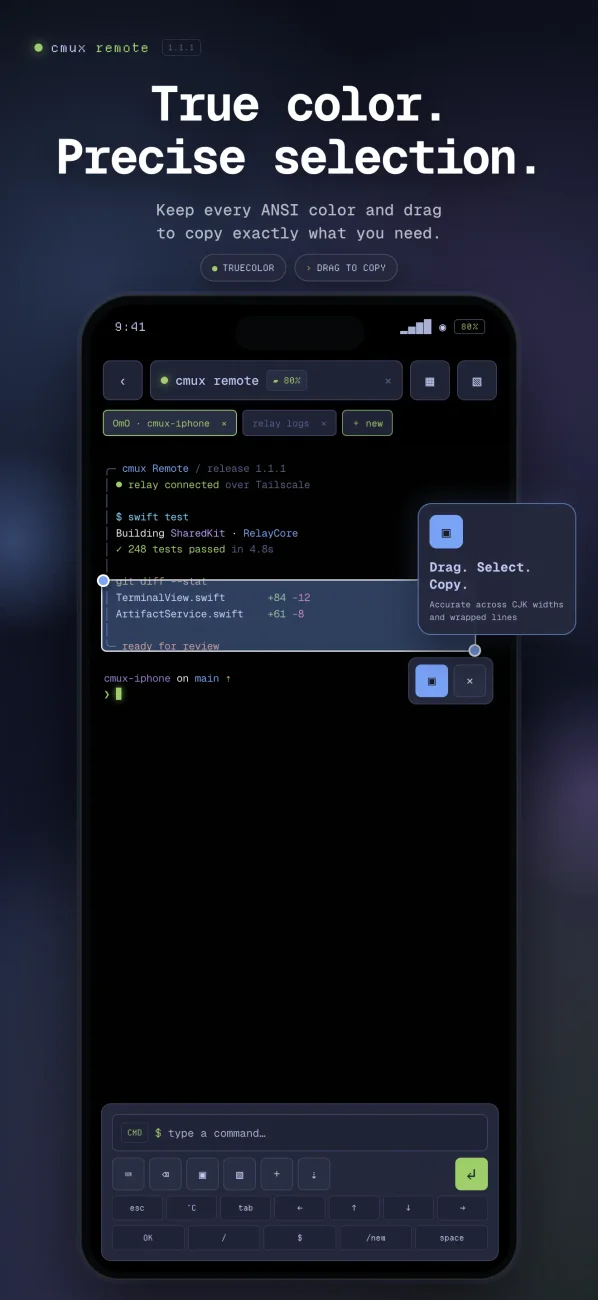
- Performance-tuned live mirroring of cmux terminal surfaces with Korean/CJK width support, an opaque-black viewport, and ANSI truecolor
- Long-press drag selection with adjustable handles and one-tap copy
- Keyboard accessory controls for Esc, Enter, Tab, arrows, Ctrl-C, other Ctrl combinations, /new, and Space
- Keyboard-safe command layout with automatic dismissal after sending and an inline scroll-to-bottom control
- Paste text and securely upload photos or documents to Downloads/cmux-remote
- Browse recent uploads and terminal-visible files with image thumbnails and a full-screen zoom viewer
- Local notifications and a native Inbox for cmux events and AI-agent needs-input prompts
- Create, rename, and close workspaces and switch between multiple surfaces
- Connected computer battery status when provided by the relay
- Pinch-to-zoom terminal font sizing
- Demo Mode with populated sample data so you can try the app before setting up a relay
PRIVACY
No analytics. No advertising. No third-party tracking SDKs. The bearer token issued by your relay is stored only in secure credential storage on your device.
Source code and privacy details:
https://github.com/NewTurn2017/cmux-remote
REQUIREMENTS
- A personal computer running cmux 0.64 or later and cmux-relay
- Both devices signed in to the same Tailscale tailnet
- iOS 17 or later
Cmux Remote is open source under the MIT license. Issues and pull requests are welcome.
What’s new
Version 2.0.0 · Nov 9, 2026
- The relay on your computer can now update itself from official GitHub releases. It restarts only when no phone is connected, and Settings has an Update Now button.
- Settings shows the app and relay versions, and the app tells you when a newer version is on the App Store.
- Open cmux markdown tabs and text files on your phone, and see cmux browser tabs as screenshots (read-only).
- New AGENTS tab: answer Claude questions, permission requests, and plan approvals from your phone, and read Claude conversations.
- Notification title and text now show in the Inbox and in banners. Clearing notifications on your computer clears them on your phone.
- In fullscreen terminals such as Claude Code, pulling past the top or bottom edge sends Page Up or Page Down.
- Large images and documents open reliably.
- The surface tab row stays visible while you type, and Korean and English text was reviewed.
App privacy
What jaehyun jang declares on the App Store about how this app handles data.
-
Data not collected
The developer does not collect any data from this app.
Privacy practices may vary, for example with the features you use or your age.
Information
- Seller
- jaehyun jang
- Category
- Developer Tools
- Version
- 2.0.0
- Updated
- Nov 9, 2026
- Released
- May 17, 2026
- Size
- 5.9 MB
- Requires
- iOS 17.0 or later
- Age rating
- 4+
- Price
- Free
- Languages
- English, Korean
- Copyright
- © 2026 cmux Remote contributors. MIT licensed.
You might also like
-
 TelecmuxRemote control for cmux
-
 Remote Pi - Coding AgentPair your phone to Pi Code
-
 AgentsRoom: Dev Remote Controlfor Claude Code, Codex & more
-
 Heeler for herdrYour herdr agent console
-
 rootshell: Local Terminal, SSHVPN over SSH and tssh
-
 Reattach - tmux remoteYour terminal, on your phone
-
 Tmux BridgeConnect to your sessions!
-
 amux - agent multiplexerAI Coding Agent Dashboard
-
 Moshi: herdr/tmux on SSH/MOSHAgent terminal for Codex CLI
-
 SSHHIP: SSH Client & TerminalMosh, tmux & herdr on the go