- Age rating4+
- CategoryProductivity
- DeveloperValters Grisans
- LanguagesEnglish
- Size2.3 MB
Links to the official App Store page
Download.org hosts no file of Daily Markdown. The button opens its official App Store page, published by Valters Grisans. Listing last checked on Nov 15, 2026.
Screenshots

About
Daily Markdown is a minimalist journaling app designed for one simple purpose: write every day.
SIMPLE BY DESIGN
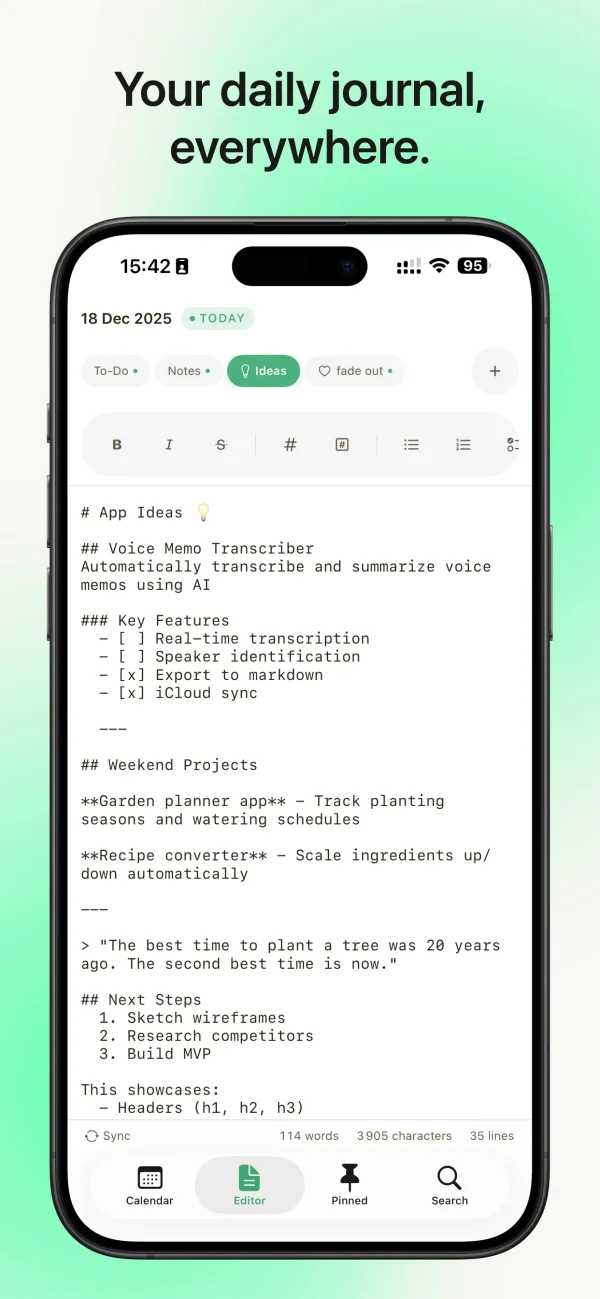
One note per day. No folders, no tags, no complexity. Just open the app and start writing. Yesterday's notes become read-only, keeping you focused on today.
MULTIPLE TABS
Organize each day with separate tabs - To-Do, Notes, Ideas. Create custom tabs on-the-fly to structure your thoughts however you like.
MARKDOWN, YOUR WAY
Write in familiar Markdown – bold, italic, headers, lists, checkboxes, and code blocks. Switch between Rich and Plain mode with a single click: Rich renders headings, emphasis, and lists as you type for distraction-free reading; Plain shows every Markdown character for precise editing. Your files stay plain .md either way.
FOCUS MODE
Hide distractions and enter a clean, minimal writing environment. Just you and your words.
EVERYWHERE YOU ARE
Available on Mac, iPhone, and iPad. Your notes sync automatically via iCloud across all your devices. Start on your Mac, continue on your iPhone, finish on your iPad.
FEATURES
• One note per day format
• Multiple tabs per day
• Rich and Plain Markdown modes with live syntax highlighting
• Distraction-free focus mode
• Pin important notes for quick access
• Full-text search across all notes
• iCloud sync across Mac, iPhone, and iPad
• Light, dark, and auto themes
• Multiple accent colors
• Daily task templates
• Word and character count
• Keyboard shortcuts
Daily Markdown respects your privacy. Your notes stay on your devices and in your personal iCloud. We never see your data.
Start your daily writing habit today.
What’s new
Version 1.4 · May 7, 2026
Rich text view
A new Rich mode renders your notes as you write — proportional font, scaled headings, and softened formatting markers – while the underlying file stays plain Markdown. Switch back to Plain anytime with the new toggle next to the focus button. No conversion, no lost cursor.
Live syntax highlighting
Headings, code blocks, inline code, quotes, lists, bold and italic are now styled directly in the editor. Code blocks read like code; prose reads like prose.
Refined editor header
The TODAY/READ ONLY badge now leads the header, with the date set in a smaller, lighter weight. The tab bar and controls share a single row, so there's more room for your writing.
Bug fix
Fixed a rare issue where switching tabs while typing could save the previous tab's content into the newly selected tab.
App privacy
What Valters Grisans declares on the App Store about how this app handles data.
-
Data not collected
The developer does not collect any data from this app.
Privacy practices may vary, for example with the features you use or your age.
Information
- Seller
- Valters Grisans
- Category
- Productivity
- Version
- 1.4
- Updated
- May 7, 2026
- Released
- Dec 17, 2025
- Size
- 2.3 MB
- Requires
- iOS 17.6 or later
- Age rating
- 4+
- Price
- Free
- Languages
- English
- Copyright
- © 2026 Valters Grisans
You might also like
-
 WivloThink. Connect. Build.
-
 Marginalia: Markdown EditorLive preview, LaTeX & code
-
 SnapLinesDisappearing Notes
-
 Nought SpreadsheetNative, offline spreadsheet
-
 Markdown Prompt ClipperClip pages into AI prompts
-
 SayBetter AI WriterAI Message Writer
-
 EveryJotFast notes in Markdown
-
 Senko: AI Assistant & ComputerBrowser, tasks & research
-
 Takt - Notes & Tasks togetherA secure place for your notes
-
 Birthday ScheduleProductivity