
Digital Habits: Focus
Hide distractions on any site
Designed for iPhone, iPad, Mac, iPod touch
Free
- Age rating4+
- CategoryProductivity
- DeveloperCENTRE FOR DIGITAL HABITS CIC
- LanguagesEnglish
- Size3.8 MB
Links to the official App Store page
Download.org hosts no file of Digital Habits: Focus. The button opens its official App Store page, published by CENTRE FOR DIGITAL HABITS CIC. Listing last checked on Nov 27, 2026.
Screenshots




About
*NOTE: WORKS WITHIN SAFARI, NOT THE APPS*: This app lets you control how YouTube, LinkedIn, etc. appears in the Safari browser. It does NOT change the apps, as this is not possible.
To make using e.g. Instagram in the browser as convenient as the app, create an icon on your home screen to take you directly to the site in the browser. You can find instructions for how to do so when you open the app.
----
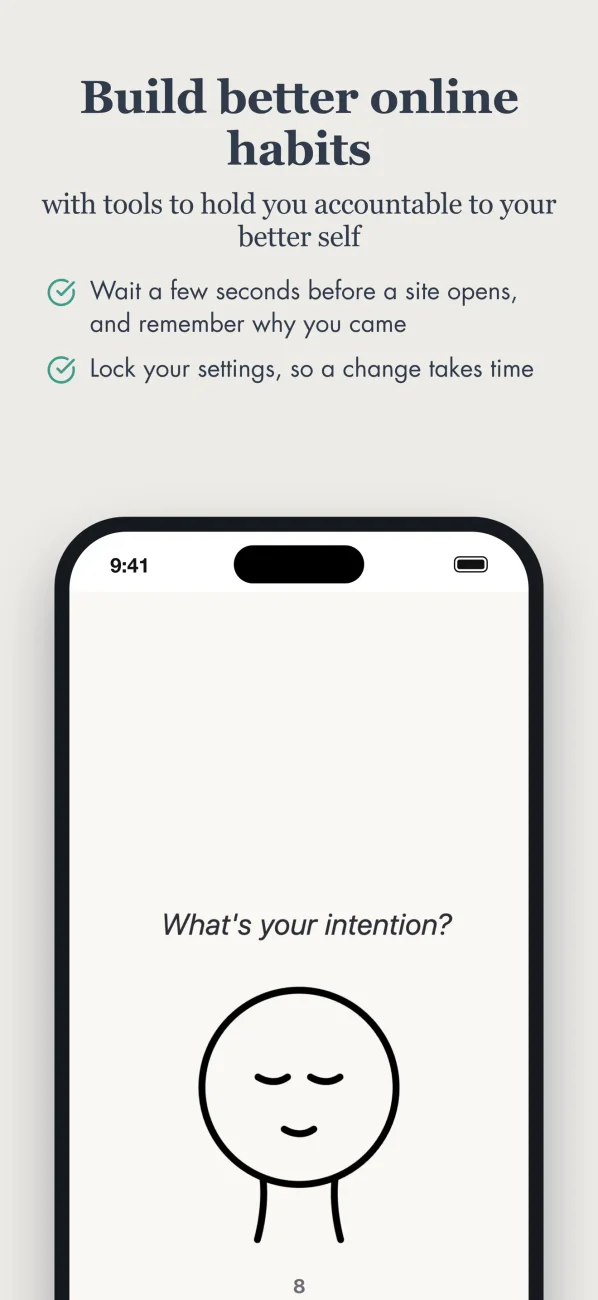
Digital Habits: Focus (formerly known as 'ReDD Focus', 'Viking Focus' and 'MindShield') is a browser extension for Safari we built to help ourselves be less distracted online.
It primarily lets you hide distracting elements on any website, with ready-made options for YouTube, Facebook, Twitter, Instagram, LinkedIn, Reddit, Google Search, and WhatsApp Web. For example, on YouTube you might want to hide recommended videos, on Facebook you might hide the newsfeed, and on Google Search you might want to hide AI summaries.
You have full control over what is hidden. Simply click the extension icon in the browser toolbar to select elements to hide, and save your preferred settings. To help hold yourself accountable, you can also add a delay time to change the settings.
You can also delay opening of distracting websites, make any website greyscale to reduce its allure, and set up redirects from one website to somewhere else to keep your online use intentional.
Everywhere you go on the internet, something tries to grab your attention. This extension gives you back control. Enjoy!
- Ulrik, Konrad, Tiago, and the Centre for Digital Habits Team (see what we're up to at digitalhabits.org)
NOTE: the extension is open source and collects no personal data. In Chrome, Edge and Safari, it sends one anonymous count a day, with an ID that changes every month, so we know how many people use it. You can turn this off in Settings. See the source code, flag bugs, or submit suggestions for improvement at https://github.com/digitalhabits/dh-focus
What’s new
Version 6.10.0 · Oct 23, 2026
Hi folks,
This update comes with some useful new features, design improvements, and under-the-hood improvements.
Hide Distracting Elements
- Each of your own picks now has a tick box, like the built-in options. Untick a pick to show that part of the page again without deleting it.
- Editing a pick has a new design. On iPhone it fills the extension sheet at its current size, and the help icon next to Selector shows a short tip with a link instead of leaving the page.
- Long lists of picks show the first four, with "Show more" for the rest. Picks without a name show their selector, cut short at the end.
- Facebook: fixed hiding Stories, Reels and People you may know in the feed, and the Reels carousel and Reels button in search, and added Suggested groups.
- Google: fixed the sponsored products background
- Instagram: Reels now also hides the Reels tab and reels in the posts grid on profiles, and the remaining posts close the gaps.
- LinkedIn: fixed hiding notification dots on small screens.
- Reddit: fixed Popular, which no longer leaves an empty gap in the sidebar, and the feed now stays hidden when you switch to Best, Hot, New, Top or Rising.
- WhatsApp: fixed hiding message previews, profile pictures, and the Status, Channels and Communities buttons.
- X: fixed Who to follow, and added Grok AI selector.
- YouTube: fixed the voice search button, which now hides with the search bar, and the thumbnail setting, which now also covers Playables, and added Playables and Explore more topics on the home page.
Accountability
- While settings are locked, your ticked picks can't be unticked or removed, and only their name can be edited. Undo in pick mode is greyed out.
Remember that the app is open source — keep your feedback and suggestions coming at https://github.com/digitalhabits/dh-focus
Cheers,
Ulrik & all of us at Centre for Digital Habits
App privacy
What CENTRE FOR DIGITAL HABITS CIC declares on the App Store about how this app handles data.
-
Data not linked to you
May be collected but is not linked to your identity.
- Usage data
Privacy practices may vary, for example with the features you use or your age.
Information
- Seller
- CENTRE FOR DIGITAL HABITS CIC
- Category
- Productivity
- Version
- 6.10.0
- Updated
- Oct 23, 2026
- Released
- Dec 17, 2022
- Size
- 3.8 MB
- Requires
- iOS 15.0 or later
- Age rating
- 4+
- Price
- Free
- Languages
- English
- Copyright
- © 2026 Centre for Digital Habits CIC
You might also like
-
 NeatNotes : Notes and listsnotepad, stickies, reminders
-
 "No Distractions" for YouTubeTake control of your attention
-
 Habit Time Tracker - FlowticFocus Insight Timer & Reports
-
 Focus: Lofi Study MusicPomodoro : Study Timer
-
 Character CounterWord, letter & text count tool
-
 PDF Converter Scanner PrinterConvert Photo to PDF,Scan PDF
-
 Fuel MPG & Vehicle Expense LogMileage Consumption Calculator
-
 Documents & PDF Scanner - FyleScan Receipts, OCR & Organize
-
 Word Count ™Productivity
-
 TimeTill: Countdown WidgetTrack Events & Count Up Days