
- Age rating4+
- CategoryUtilities
- DeveloperKENICHI AOMI
- LanguagesEnglish+ 10 more
- Size2.9 MB
Links to the official App Store page
Download.org hosts no file of Dual SIM Data Usage. The button opens its official App Store page, published by KENICHI AOMI. Listing last checked on Nov 13, 2026.
Screenshots



About
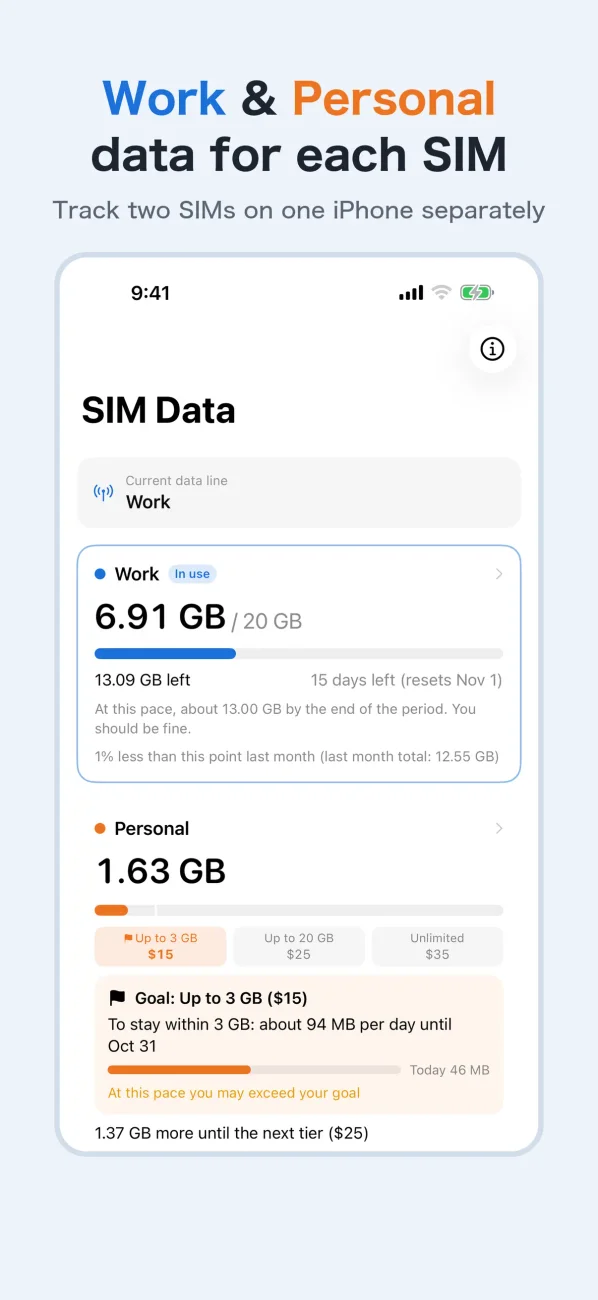
A data usage tracker for people who use two SIMs (eSIMs) on one iPhone.
The Settings app doesn't make it easy to see how much each SIM has used this period, or how much is left. This app records your cellular data separately for each SIM, based on which line was in use at the time.
■ Great for
• Using a work SIM during the day and a personal SIM at night
• Juggling two personal SIMs
• Tiered plans where you want to stay in the cheaper tier but keep going over
■ Features
• Usage, remaining data and days left for each SIM
• Forecast for the end of the period at your current pace
• Comparison with the same point last month
• Monthly plans with a reset day, and plans valid for a fixed number of days (30/90/180/365)
• Tiered plans (price depends on usage): see your current tier and how much more until the next one
• Set a goal tier to see a daily allowance and today's usage
• Count limited-time add-ons (e.g. for travel) separately
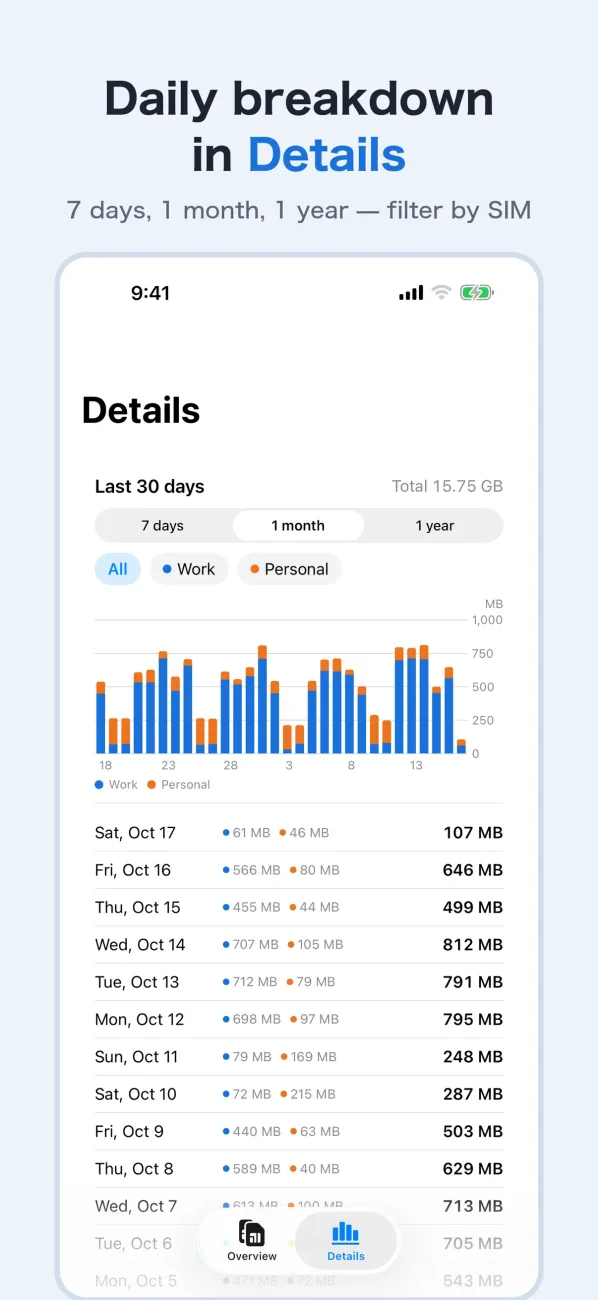
• Charts for the last 7 days, 30 days and 12 months, filterable by SIM
• Home Screen and Lock Screen widgets
• Optional: track Wi-Fi by network (SSID) too — handy for capped pocket or travel Wi-Fi
• Notifications at 80%/100%, before the next tier, and when you're on pace to exceed your goal
• Match the numbers to your carrier's app
■ How it counts
The app reads the iPhone's cellular data counter and adds the increase since the last count to the line that was in use. With the widget added, it counts automatically every 15–30 minutes. Usage while you switch lines between counts is estimated, so numbers may differ slightly from your carrier's. Prices are estimates — check your carrier's app or website for exact usage and charges.
■ Privacy
No account needed. Records stay on this iPhone and are never sent anywhere. The app does not look at the content of your traffic or which apps you use.
What’s new
Version 1.2 · Oct 28, 2026
• New: track Wi-Fi by network (SSID), with an optional monthly cap and alerts (off unless you turn it on)
• Bug fixes
App privacy
What KENICHI AOMI declares on the App Store about how this app handles data.
-
Data not collected
The developer does not collect any data from this app.
Privacy practices may vary, for example with the features you use or your age.
Information
- Seller
- KENICHI AOMI
- Category
- Utilities
- Version
- 1.2
- Updated
- Oct 28, 2026
- Released
- Oct 19, 2026
- Size
- 2.9 MB
- Requires
- iOS 17.0 or later
- Age rating
- 4+
- Price
- Free
- Languages
- English, Hindi, Indonesian, Japanese, Korean, Portuguese, Simplified Chinese, Spanish, Thai, Traditional Chinese, Vietnamese
- Copyright
- © 2026 KENICHI AOMI
You might also like
-
 Which WiFiKnow which network connection
-
 Alarm Clock: Skins & SoundsWorld Clock, Timer, Stopwatch
-
 Today's 3 Tasks | Lock Widget3 tasks: items, shopping, meds
-
 LinkMeBDALinkBermuda
-
 SMS Forwarder - 2nd PhoneYour other phone's texts, here
-
 MozcCo - サイズ調整できる日本語キーボードUtilities
-
 GigaGuard: Data Usage WidgetMulti-SIM tracker & pace alert
-
 NetUsageLogData Usage-Daily eSIM Quota
-
 极简日历 · ToDay 版本Utilities
-
 通信量メーター - 残りギガ表示Utilities