
Easy QR Code Reader - Scanner
QR Scanner - Fast and Simple
Designed for iPhone, iPad, iPod touch
Free
- Age rating4+
- CategoryProductivity
- DeveloperSeiji Hashizume
- LanguagesEnglish+ 21 more
- Size51.6 MB
Links to the official App Store page
Download.org hosts no file of Easy QR Code Reader - Scanner. The button opens its official App Store page, published by Seiji Hashizume. Listing last checked on Nov 23, 2026.
Screenshots
About
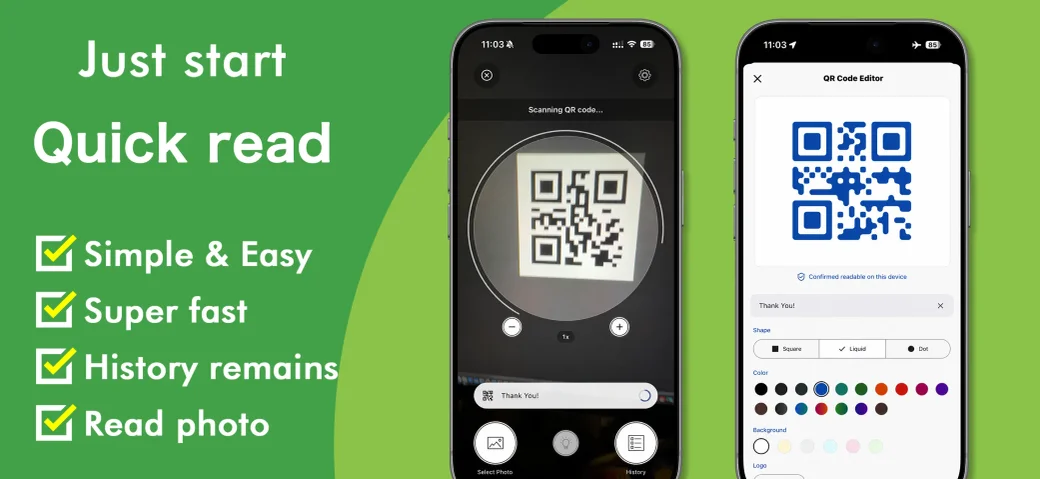
A simple QR code reader that scans the moment you point your camera. QR codes and barcodes are read just by aiming, and every scan is saved to your history automatically.
Open the app and point your camera — no shutter button, no mode switching. Scanned URLs and email addresses open with a single tap.
■ Ideal for
- Reading QR codes on posters, flyers, and in stores
- Looking up products by their barcode (EAN/UPC)
- Scanning ISBN barcodes on books
- Reading a QR code inside a screenshot someone sent you
- Scanning campaign and event entry QR codes
■ Main features
- Automatic scanning — just point
The reader starts as soon as the app opens. No button to press.
- Read multiple codes at once
Detect several QR codes and barcodes on the screen in a single sweep. No more re-aiming at each code one by one.
- Scan from photos and screenshots
Can't point your camera at it? Pick a photo or screenshot from your album and the QR code inside is read right away.
- Zoom in for confident reads
Bring distant posters or tiny label codes right up close with a single tap. Small print and far-away codes both stay within reach.
- Show & save the code you scanned
Re-display any scanned code inside the app. Pick a color and module shape (square / dot / rounded), then save it to your photo library or share it through the system share sheet.
- Flashlight for dark places
Turn on the light and scan cleanly, even in low light.
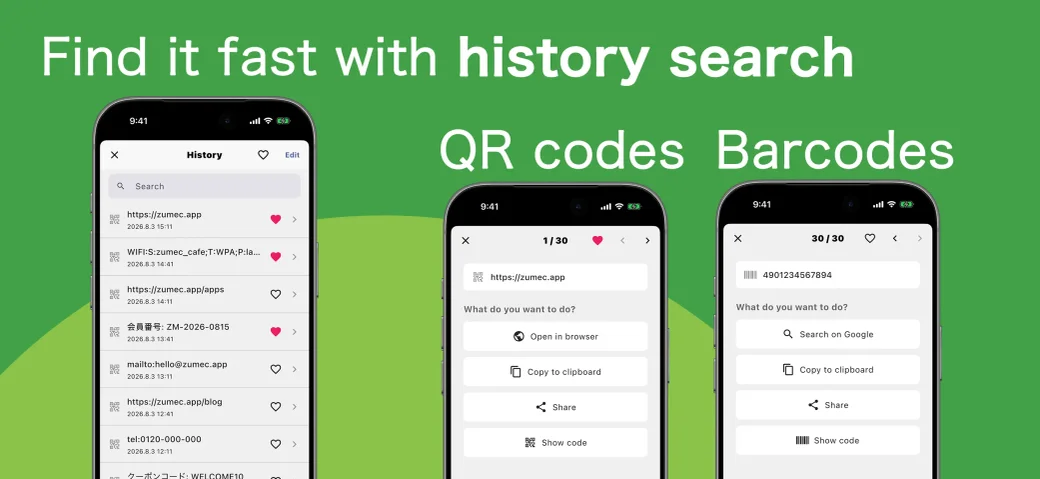
- Automatic history
Every scan is saved locally on your device. Search or star to keep favorites organized.
- Built-in browser
Scanned URLs open right inside the app — or in your external browser if you prefer.
■ Supported code types
- 2D codes: QR Code, Data Matrix, PDF417, Aztec
- 1D barcodes: EAN-13, EAN-8, UPC-A, UPC-E, Code 128, Code 39, Code 93
From product barcodes to book ISBNs, one app covers the codes you meet every day.
■ Privacy
Your scan history is stored only on your device. No account or sign-in required. The camera permission is used solely for reading codes.
■ FAQ
Q. Is the app free?
A. Yes — every feature is free to use (the app shows ads).
Q. Can I use it as a barcode reader?
A. Yes. Besides QR codes, it reads EAN/UPC product barcodes and more.
Q. Does scanning work offline?
A. Scanning itself works offline. An internet connection is only needed to open scanned URLs.
Q. Can I delete my scan history?
A. Yes — delete entries one by one, or all at once.
What’s new
Version 2.0.13 · Nov 13, 2026
- Minor bug fixes and performance improvements.
App privacy
What Seiji Hashizume declares on the App Store about how this app handles data.
-
Data used to track you
May be used to track you across apps and websites owned by other companies.
- Location
- Identifiers
- Usage data
- Diagnostics
-
Data linked to you
May be collected and linked to your identity.
- Location
- Identifiers
- Usage data
- Diagnostics
-
Data not linked to you
May be collected but is not linked to your identity.
- Diagnostics
Privacy practices may vary, for example with the features you use or your age.
Information
- Seller
- Seiji Hashizume
- Category
- Productivity
- Version
- 2.0.13
- Updated
- Nov 13, 2026
- Released
- Aug 14, 2018
- Size
- 51.6 MB
- Requires
- iOS 15.0 or later
- Age rating
- 4+
- Price
- Free
- Languages
- English, Arabic, Bengali, Dutch, French, German, Hindi, Indonesian, Italian, Japanese, Korean, Marathi + 10 more
- Copyright
- Copyright © 2018-2025 zumec apps All Rights Reserved
You might also like
-
 QRCode BarcodeFast, easy reader & creator.
-
 Qrafter: QR Code ReaderCreate and Design QR Codes
-
 QR Code Reader: Quick ScanSimple QR Code Scanner app
-
 QR Code & 2D Barcode ScannerUPC Reader app, Fast Scan
-
 QR Code Reader & Generator AppQR Barcode Scanner & Creator
-
 QRQR - QR Code® ReaderQR Code® and Barcode Reader
-
 Barcode Scanner: Bar Code ReadBarcode & QRCode Reader
-
 QR Scanner PRO - ReaderQR & Barcode Generator- Reader
-
 QR Creator: Scan & Make QRCodeQR Code scanner and creator
-
 QRCode Simple QR Code ScannerQR Code Reader - Barcode Scan