
EdgeWatch
Network Camera Monitor & Cast
Designed for iPhone, iPad, iPod touch
In-app purchases
- Age rating4+
- CategoryPhoto & Video
- DeveloperVadym Vasylaki
- LanguagesEnglish
- Size5.8 MB
Links to the official App Store page
Download.org hosts no file of EdgeWatch. The button opens its official App Store page, published by Vadym Vasylaki. Listing last checked on Nov 12, 2026.
Screenshots

About
EdgeWatch turns any iPhone into a professional local-network camera hub. Watch every camera on your WiFi from one live grid, or turn this device into a camera server that streams to all of them. No accounts. No cloud. No subscriptions. Everything happens on your local network.
WATCH:
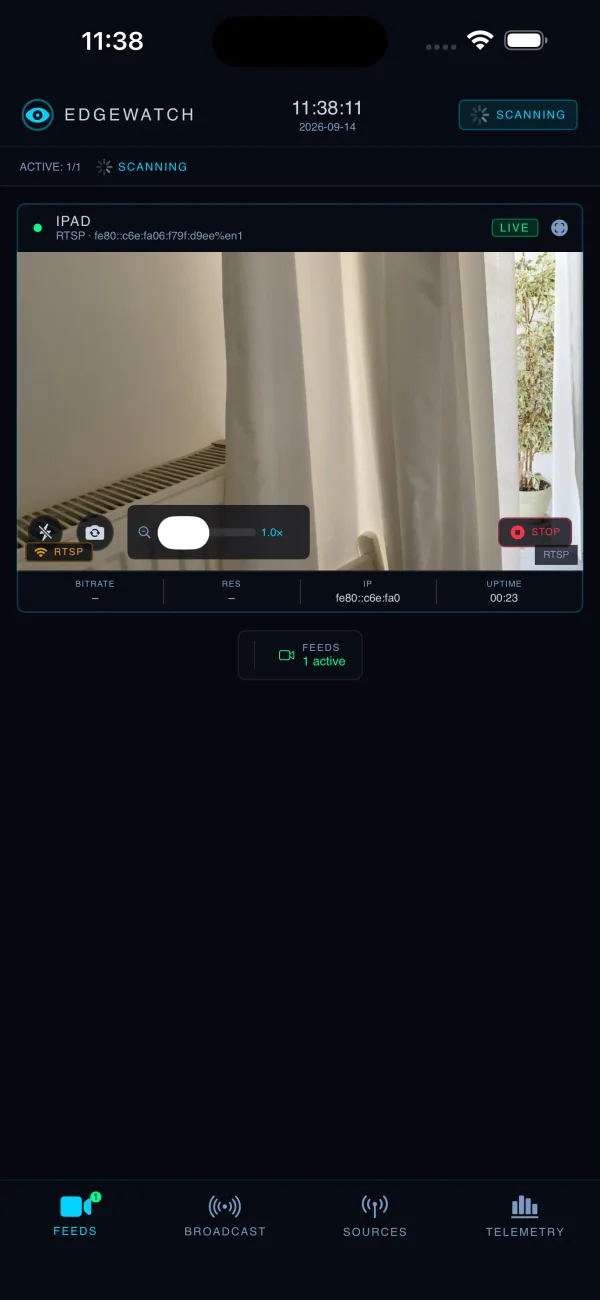
EdgeWatch automatically discovers other Edge Watch devices on your WiFi using Bonjour zero-config networking. The moment a camera comes online, its live feed appears in your grid real-time video, zero manual setup.
- Live grid of all discovered cameras on your network
- Tap any feed for fullscreen view with full remote control
- Remotely adjust zoom, focus, torch, and front/back camera flip
- Green badge shows exactly how many feeds are currently live
- Switch between 1-column and 2-column grid layouts
BROADCAST:
One tap turns this device into a live camera server. Edge Watch streams as both an H.264 RTSP feed and a browser-viewable MJPEG feed simultaneously and every other Edge Watch device on your network picks it up instantly.
- H.264 over RTSP (:8554) - compatible with VLC, OBS, and NVRs
- MJPEG browser preview (:8080) view from any web browser on the network
- Share stream URLs instantly via QR code
- Dual-camera compositing merge front and back into one stream
- Side-by-side, picture-in-picture, or full-frame layout options
- Motion detection with adjustable sensitivity
- HTTP webhook notifications triggered by motion events
- Broadcast Lock mode prevents accidental navigation mid-stream
SOURCES:
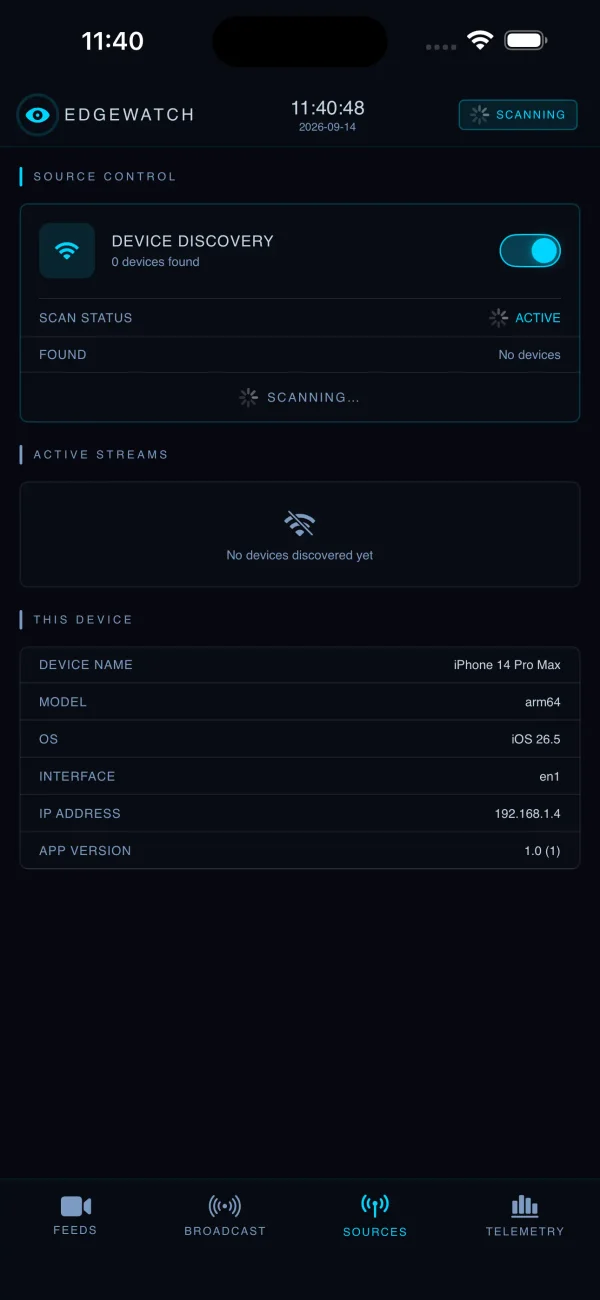
Control exactly how Edge Watch finds cameras on your network. Toggle Bonjour scanning, force a manual rescan, or switch to Camera Mode for efficient monitoring without the full encoder.
- Bonjour discovery for _rtsp._tcp and _ewcam._tcp devices
- Camera Mode: lightweight ~12fps MJPEG feed with remote controls — no H.264 encoder needed
- Live status list of all discovered devices (online, connecting, offline)
- See this device's own local IP address and Bonjour service identifiers
TELEMETRY:
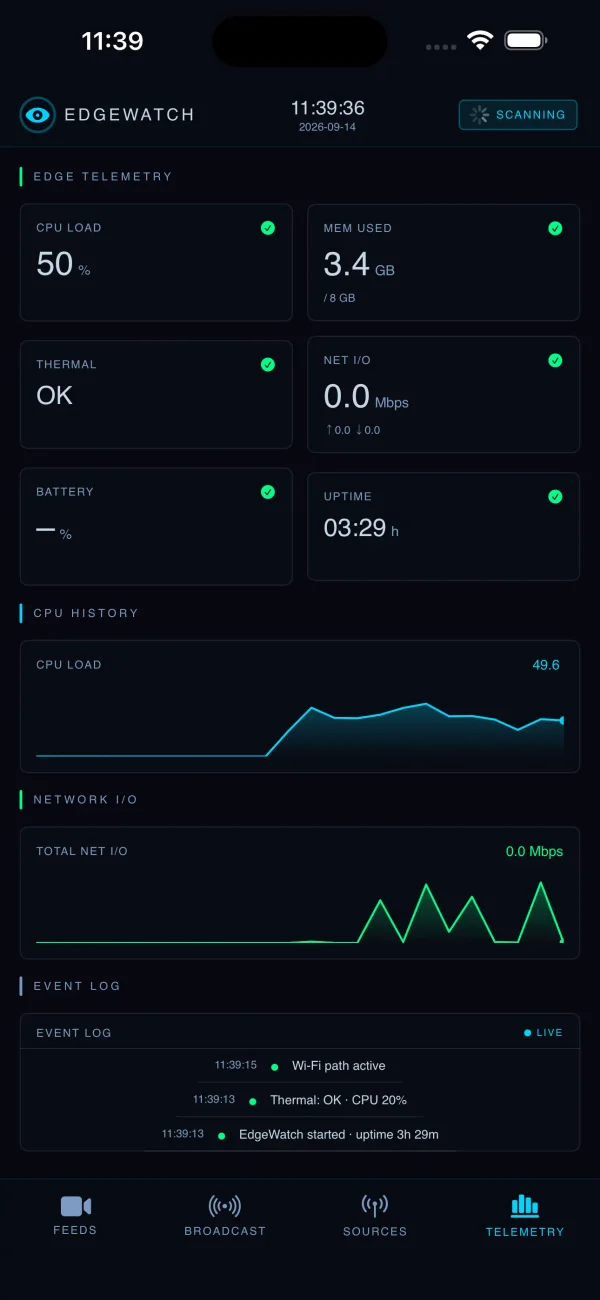
A live system health dashboard with rolling sparklines, broadcast metrics, and a complete session event log.
- CPU load and network I/O sparklines, updated every second
- Live bitrate, frame rate, and connected client count while broadcasting
- Timestamped event log covering the full session
PRIVACY FIRST:
Edge Watch collects zero personal data. No account is required. No internet connection is needed at any point. All video streams travel exclusively over your local WiFi network and never reach the internet or any external server.
Terms of Use: https://doc-hosting.flycricket.io/edgewatch-terms-of-use/e2e79890-0e9a-4cdf-8f68-0904cd03075d/terms
Terms of Use (EULA): https://www.apple.com/legal/internet-services/itunes/dev/stdeula/
App privacy
What Vadym Vasylaki declares on the App Store about how this app handles data.
-
Data not collected
The developer does not collect any data from this app.
Privacy practices may vary, for example with the features you use or your age.
Information
- Seller
- Vadym Vasylaki
- Category
- Photo & Video
- Version
- 1.0
- Updated
- Sep 25, 2026
- Released
- Sep 24, 2026
- Size
- 5.8 MB
- Requires
- iOS 16 or later
- Age rating
- 4+
- In-app purchases
- Yes
- Languages
- English
- Copyright
- © 2026 Vadym Vasylaki
You might also like
-
 Videk DirectorLive Multi-Camera Studio
-
 Videk CameraLive Multi-Cam Studio
-
 MirrorLive – Camera MonitorWireless video assist & remote
-
 CamMonitor: Live ViewfinderBig-screen viewfinder over LAN
-
 PeerCam Live MonitorTwo devices. One live camera.
-
 CamPlot Director's ViewfinderReal Cine Cameras & Lenses
-
 SlideBookCreate photo books like a pro!
-
 Phonitor: Home Security CameraOld iPhone baby & pet monitor
-
 Teleport by VarjoTurn the World into 3D
-
 SR3H Video ConverterSmooth 60 FPS for TikTok