Envelope Printer Labels
Shipping address print
Designed for iPhone, iPad, Mac
Free · In-app purchases
- Age rating4+
- CategoryProductivity
- DeveloperJordan Zeleny
- LanguagesEnglish
- Size37.3 MB
Links to the official App Store page
Download.org hosts no file of Envelope Printer Labels. The button opens its official App Store page, published by Jordan Zeleny. Listing last checked on Nov 17, 2026.
Screenshots


About
Design and print beautiful envelopes in minutes with Envelope Printer!
From wedding invitations to business mail, Envelope Printer gives you a full design studio for the front of your envelope — start from a professional template or a blank canvas, make it yours, and print right from your iPhone, iPad, or Mac. Designing is completely free; the app has a limited free plan for printing and exporting, and a paid subscription for unlimited output.
Key Features:
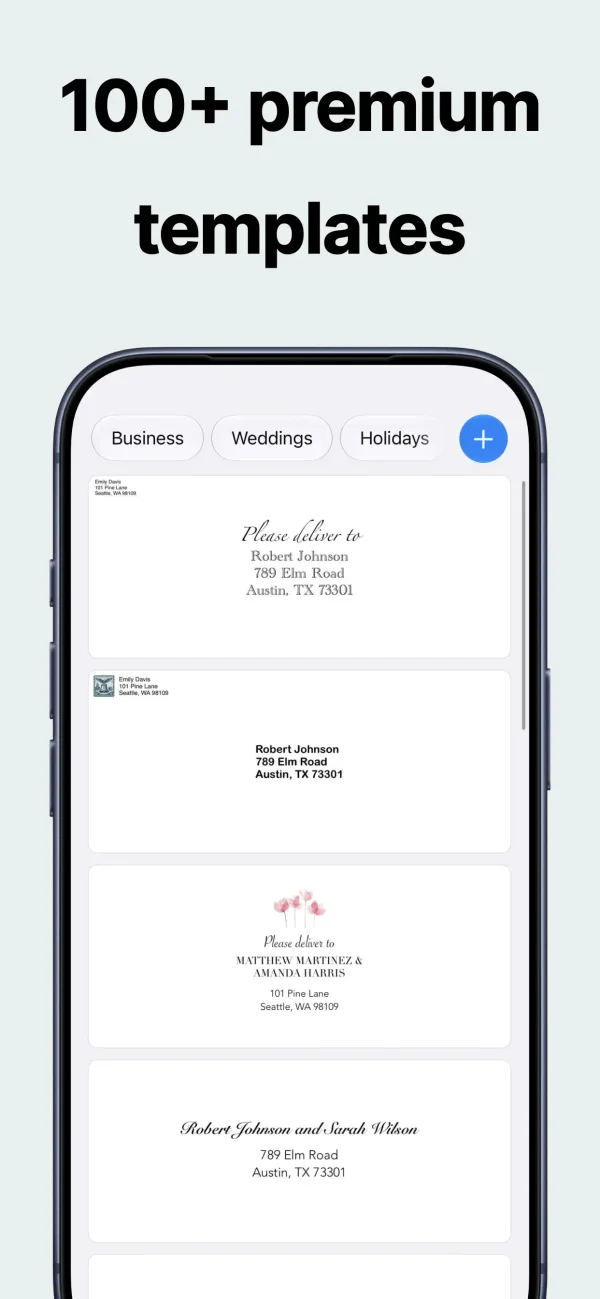
• 100 Professional Templates: A curated library across Business, Weddings, Holidays, and Birthdays — elegant scripts, modern type, wax seals, florals, borders, and more. Tap one and start editing.
• A True Design Editor: Move and resize anything. Hundreds of beautiful typefaces, rich text styling (color, size, bold, italic, underline, alignment, line spacing), center-snap guides, and full undo/redo.
• AI Envelope Assistant: Describe what you want and watch it design your envelope — restyle layouts, generate logos, monograms, and artwork, or add a QR code, all from a simple chat.
• Bulk Addressing in Seconds: Paste a list of names or a CSV and the AI creates one addressed envelope per contact, keeping your return address on every one. Perfect for invitations and holiday cards.
• Add Images and QR Codes: Insert photos, logos, stamps, AI-generated art, or scannable QR codes for a personal or professional touch.
• Every Envelope Size: #10, #9, DL, A7, A6, square, catalog, baronial, and many more — or enter custom dimensions in inches, centimeters, or millimeters.
• Print-Perfect Output: Print directly to any AirPrint printer at full print resolution, or export a crisp PDF (one page per envelope) to share or print anywhere. Built-in guidance helps you load envelopes and match paper sizes.
• Favorites: Save your designs and reopen them anytime — your go-to layouts are always one tap away.
• Made for iPhone, iPad, and Mac: One app, everywhere you work.
Free Plan:
• Every template, the full editor, and all AI features — free
• A limited number of free exports (print, PDF, share)
Pro (subscription):
• Unlimited printing, PDF export, and sharing
Whether you're addressing a single letter or a whole guest list, Envelope Printer turns a chore into something you'll actually enjoy.
Download Envelope Printer today and make every envelope worth opening.
Enjoying the app? We'd love to hear from you! Please consider leaving a review to help others discover Envelope Printer.
Contact:
jordanzeleny@gmail.com
Terms:
https://www.apple.com/legal/internet-services/itunes/dev/stdeula/
Privacy:
https://sites.google.com/view/envelopeprinter-privacy-policy/home
What’s new
Version 2.0.8 · Jul 29, 2026
Access contacts directly from the AI envelope assistant.
Bug fixes and performance improvements.
App privacy
What Jordan Zeleny declares on the App Store about how this app handles data.
-
Data not linked to you
May be collected but is not linked to your identity.
- Purchases
- Contact info
- User content
- Identifiers
- Other data
Privacy practices may vary, for example with the features you use or your age.
Information
- Seller
- Jordan Zeleny
- Category
- Productivity
- Version
- 2.0.8
- Updated
- Jul 29, 2026
- Released
- Jun 11, 2023
- Size
- 37.3 MB
- Requires
- iOS 16.0 or later
- Age rating
- 4+
- Price
- Free
- In-app purchases
- Yes
- Languages
- English
- Copyright
- © Jordan Zeleny 2024
You might also like
-
 Envelope Printer: Label MakerPrint Shipping Address
-
 Barcode & LabelEnvelope Mailing Address Print
-
 Envelope Printer & TemplatesPrint Address for Cards & Mail
-
 Label Printer: Address StickerAvery Design and Print
-
 Posthaste: PWE Envelope PrintPlain White Address Labels
-
 Envely: Envelope PrinterNo.10, A7, A2 or custom size
-
 Templates for Pages - DesiGNExpert documents and designs.
-
 Letter: just write lettersPerfectly formatted letters
-
 Cloud Ready printerPrint to canon, brother, HP ..
-
 EZ Calendar MakerProductivity