
Farroom: Remote Desktop
VNC, RDP & Sunshine streaming
Designed for iPhone, iPad, Mac
Free · In-app purchases
- Age rating17+
- CategoryUtilities
- DeveloperDaniel Rentz
- LanguagesEnglish+ 9 more
- Size44.7 MB
Links to the official App Store page
Download.org hosts no file of Farroom: Remote Desktop. The button opens its official App Store page, published by Daniel Rentz. Listing last checked on Nov 12, 2026.
Screenshots


About
Your computers and PC games, on iPhone and iPad. Use touch controls on iPhone or a spacious workspace with keyboard and pointer support on iPad. On iPhone Duo with iOS 27.1, unfold for a larger desktop or partially fold for a desktop above a trackpad or keyboard.
FOUR WAYS TO CONNECT
• Mac Screen Sharing: Apple High Performance streaming on compatible Apple-silicon Macs, with physical or virtual desktops and host-supported computer audio. Choose all physical displays or an individual monitor.
• RDP: connect to supported Windows and Linux desktops, with text and image clipboard sharing and host-supported audio. Transfer files and folders with Pro when the server supports clipboard file redirection.
• VNC: connect to compatible Mac, Windows and Linux servers. Adjust image quality and compression on supporting servers and choose a monitor when the server supplies its layout.
• Sunshine: stream a desktop or configured app from a separately installed Sunshine host. Use a compatible controller or the on-screen gamepad. Choose HEVC or H.264 and adjust stream size, frame rate, bitrate and stereo audio quality. Optional HDR needs a compatible host, decoder and display.
CONTROLS THAT FIT
Click, drag, scroll and type. Use touch gestures, an extra-key strip, standard shortcuts, and supported keyboards and pointing devices. Fit the desktop or zoom in. Desktop previews, Compact view and quick-access widgets help you find your computers. Built-in setup and gesture guides help you get connected.
START FREE
One saved computer, every connection type, full connection settings, supported audio and text clipboard, RDP image sharing, Sunshine HDR and game controllers, standard shortcuts, desktop previews and backup export. No ads, session timers or artificial quality limits.
MORE ROOM WITH PRO
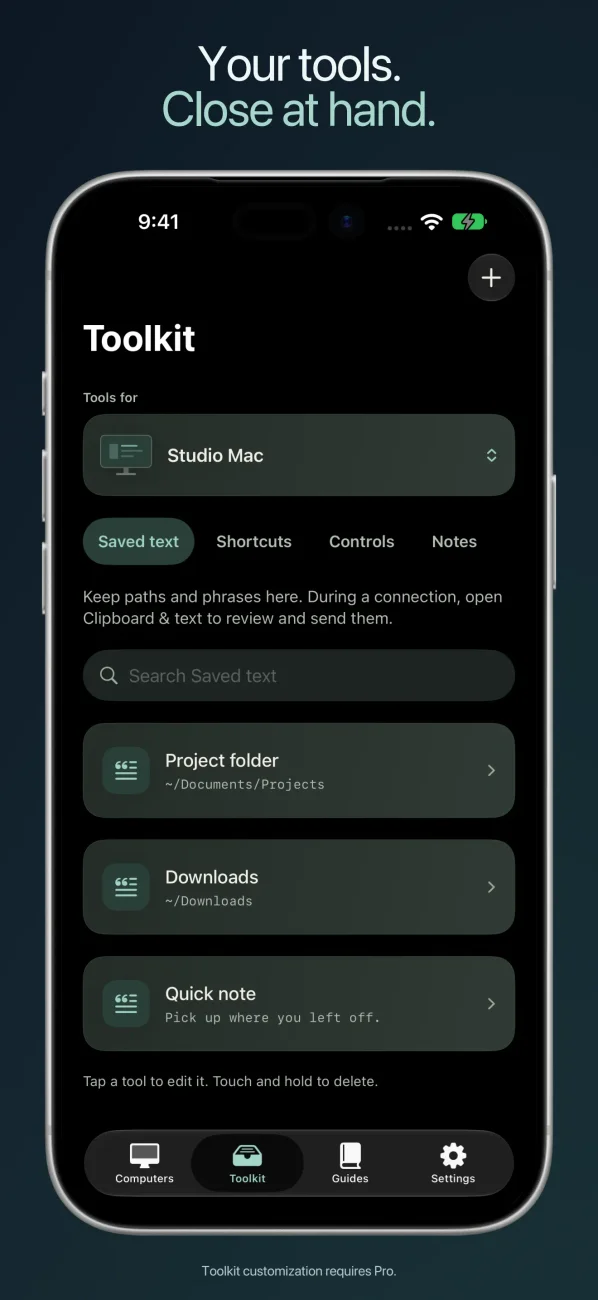
Unlimited saved computers, folders, notes, reusable text, custom and pinned shortcuts, control presets, saved workspaces, desktop captures, screen-text recognition, RDP file and folder transfers, and connection-library import. Choose what to sync through iCloud, automatically or manually, with a Wi-Fi/Ethernet-only option. Open up to eight session windows on iPad or Mac. Customize the Duo control strip.
Monthly, yearly and lifetime plans include the same Pro features across iPhone, iPad and Mac using the same Apple Account. Existing lifetime owners keep access. Restore Purchases is on the Pro page.
YOUR CONNECTION, YOUR SETUP
No Farroom account, relay or Farroom helper app. Your computer needs a supported remote-access server and a reachable address. Away from home, you can use a separately installed private-network app such as Tailscale. Farroom does not provide a VPN.
KNOW YOUR CONNECTION
Quality, frame rate, HDR, sound and available controls depend on the host, network and viewing device. Sunshine display selection is managed on the host; it has no clipboard or file transfer. Controller rumble depends on controller and host support. Unicode text input depends on the host; a US keyboard compatibility mode is available. VNC has no audio and supports Latin-1 text clipboard only. RDP images and files need host clipboard support; Windows Home cannot host built-in RDP. Linux support depends on its desktop and server. Microphone forwarding and session recording are unavailable. Mobile systems may suspend background sessions.
Saved passwords stay in device Keychain. Optional iCloud setup sync excludes passwords, certificate approvals, desktop images, audio and clipboard contents.
SUBSCRIPTIONS
Monthly and yearly Pro renew automatically unless canceled. Eligible yearly subscribers receive a 14-day free trial. Local prices and eligibility appear before purchase. Manage or cancel through Apple Account subscriptions. Expiry returns to Free without deleting saved data. Lifetime does not renew.
Privacy: https://farroom.danielren.tz/privacy/
Terms: https://www.apple.com/legal/internet-services/itunes/dev/stdeula/
What’s new
Version 1.2.2 · Nov 10, 2026
- Improved Mac Screen Sharing and VNC performance and image quality.
- Better Duo alignment, folding and Fit sizing.
- Easier RDP sign-in, optional legacy compatibility and RD Gateway settings.
- Clearer clipboard controls and easier access to Pro tools and multiple sessions.
- Improved sheet layouts, scrolling and accessibility.
App privacy
What Daniel Rentz declares on the App Store about how this app handles data.
-
Data not linked to you
May be collected but is not linked to your identity.
- Purchases
Privacy practices may vary, for example with the features you use or your age.
Information
- Seller
- Daniel Rentz
- Category
- Utilities
- Version
- 1.2.2
- Updated
- Nov 10, 2026
- Released
- Sep 28, 2026
- Size
- 44.7 MB
- Requires
- iOS 18.0 or later
- Age rating
- 17+
- Price
- Free
- In-app purchases
- Yes
- Languages
- English, French, German, Italian, Japanese, Korean, Portuguese, Simplified Chinese, Spanish, Traditional Chinese
- Copyright
- © 2026 Daniel Rentz
You might also like
-
 RemoteX: Remote DesktopRemote desktop, both ways
-
 Glassy Desk: Remote DesktopScreen Sharing for Mac & VNC
-
 Telkino: VNC Remote DesktopRemote desktop, no cloud
-
 Headroom: Remote DesktopYour AI agent, from the sofa
-
 Scry: Remote Desktop for PCAccess & Control Any Computer
-
 Remio Remote DesktopAccess & Control PC or Laptop
-
 QuickRemote - Desktop ManagerFast VNC, RDP & Screen Share
-
 Mirage – Remote DisplayRemote display for computers
-
 OutSpan - Fullscreen BrowsingWide web pages and ad blocker
-
 Wider - Fullscreen BrowsingMore room for the internet