
FileDeck: Column File Manager
Fast Column File Manager
Designed for iPhone, iPad
Free · In-app purchases
- Age rating4+
- CategoryUtilities
- DeveloperSHIGEKE CHIYO
- LanguagesEnglish+ 1 more
- Size5.4 MB
Links to the official App Store page
Download.org hosts no file of FileDeck: Column File Manager. The button opens its official App Store page, published by SHIGEKE CHIYO. Listing last checked on Nov 20, 2026.
Screenshots
About
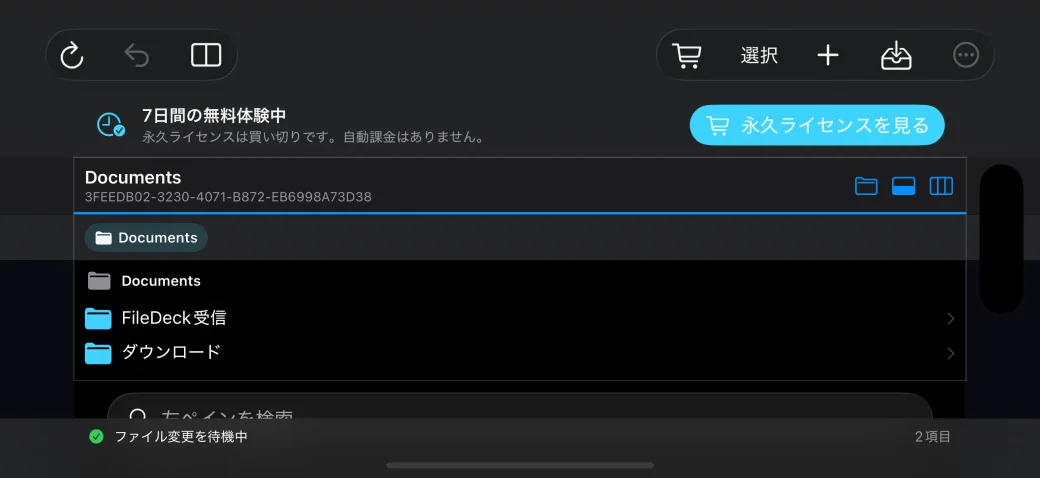
FileDeck is a powerful, privacy-first file manager designed for fast, visual file organization.
Try every feature free for 7 days. The trial does not convert automatically. Continue with a one-time lifetime license—no subscription.
WORK WITH FLEXIBLE COLUMNS
Browse folders in column, list, or compact icon views. Open different folders in two adjustable panes and drag files or folders freely between any column or into exact positions.
ORGANIZE MORE IN FEWER STEPS
• Multi-select with touch, keyboard, or pointer
• Batch rename with sequence numbers, prefixes, suffixes, and find and replace
• Copy, duplicate, cut, paste, move, and share
• Resolve name conflicts by keeping both, replacing, or skipping
• Add favorites, recent locations, and seven color tags
PREVIEW AND CREATE
• Preview images, PDFs, plain text, Markdown, JSON, CSV, and rich text
• Create folders, text files, Markdown, JSON, CSV, rich text, PDFs, and ZIP archives
• Compress to ZIP and extract archives
• Scan documents and import up to 50 photos or videos at once
SAFE FILE WORKFLOWS
• Long operations show progress and can be canceled
• Deleted items remain in FileDeck's Trash for 30 days and can be restored in batches
• Duplicate Guardian identifies matching files and moves only confirmed duplicates to a safe review folder
• A widget shows duplicate-review status
BUILT FOR iPHONE AND iPAD
On iPhone, including iPhone Duo, browse one full-width column at a time and swipe horizontally through the folder hierarchy. The compact outer display collapses naturally, while regular-width and inner displays expand to show more workspace and the optional second pane.
On iPad, use FileDeck with the Files app in Split View, Slide Over, and multiple windows. Import by drag and drop, Share Sheet, or “Open in.” FileDeck also appears in “On My iPhone” or “On My iPad” for easy access from other apps.
PRIVATE BY DESIGN
File processing and duplicate detection happen entirely on device. FileDeck includes no ads, tracking, or analytics SDKs, and never sends file names or contents to an external server.
What’s new
Version 1.1.1 · Oct 12, 2026
FileDeck 1.1.1 adds iPhone support, including a responsive layout for iPhone Duo. On compact displays, each folder column fills the available width and the hierarchy moves with a natural horizontal swipe. Regular-width and inner displays expand without clipping.
Drag and drop is now more consistent between every visible column, including the first column. This update also improves reliability in narrow iPad windows, Split View, and Slide Over, and adds English App Store product information for international users.
App privacy
What SHIGEKE CHIYO declares on the App Store about how this app handles data.
-
Data not collected
The developer does not collect any data from this app.
Privacy practices may vary, for example with the features you use or your age.
Information
- Seller
- SHIGEKE CHIYO
- Category
- Utilities
- Version
- 1.1.1
- Updated
- Oct 12, 2026
- Released
- Sep 6, 2026
- Size
- 5.4 MB
- Requires
- iOS 17.0 or later
- Age rating
- 4+
- Price
- Free
- In-app purchases
- Yes
- Languages
- English, Japanese
- Copyright
- © 2026 SHIGEKE CHIYO
You might also like
-
 Cove: Private Document VaultSnap. Recognize. Never expire.
-
 Color AlertsAlerts triggered by color
-
 ReelPort: Video PlayerFormats, Subtitles & Wi-Fi
-
 SSL Certificate MonitorSSL Expiry & Renewal Alerts
-
 SnapSort-A New Way to OrganizeNew Photo Organization
-
 Domain Checker: DNS & SSLLocal-First DNS & SSL Sentinel
-
 RecallRoll: Photo CleanerRandom Photo Review & Cleanup
-
 ScanLan: Network ScannerOn-Device AI Insights
-
 Photo Album Organizer OfflineMass Delete Photos & Cleaner
-
 PDF Editor: Merge, Sort & SignOne purchase. No subscriptions