- Age rating4+
- CategoryPhoto & Video
- DeveloperKEISUKE TONE
- LanguagesEnglish+ 1 more
- Size4.8 MB
Links to the official App Store page
Download.org hosts no file of JSlate: Production Timer. The button opens its official App Store page, published by KEISUKE TONE. Listing last checked on Nov 17, 2026.
Screenshots

About
[Elevate Your Workflow. High-Precision Timer for the AI Era.]
JSlate is a high-precision timer and logging tool built for professional video production - from live broadcast to film and commercial sets. Featuring a minimalist "equipment-grade" UI, it provides advanced logging capabilities optimized for next-generation AI analysis.
[Key Features]
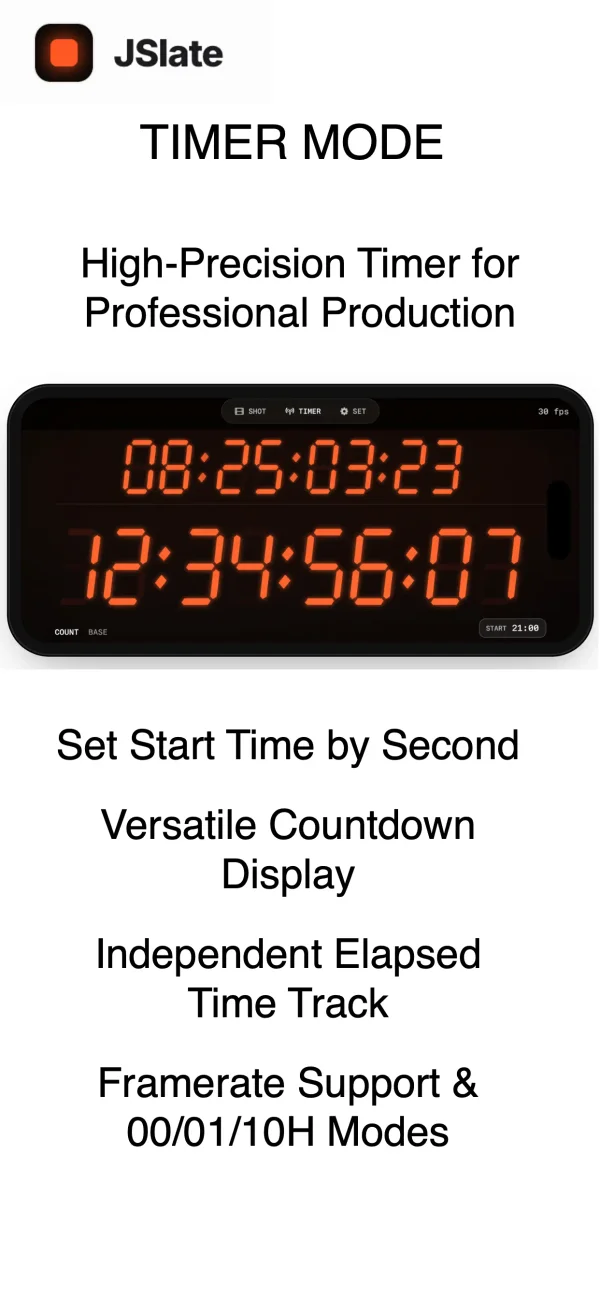
(1) TIMER Mode: Precise Progress Management
High-Precision Timecode: Professional digital font for maximum on-set visibility.
Flexible Time Settings: Configure start time by the second and countdown modes.
Independent Tracking: Measure time independently from the real-time clock - ideal for broadcast segments.
Industry Standards: Supports multiple frame rates (24/30/60fps) and 00/01/10H display modes.
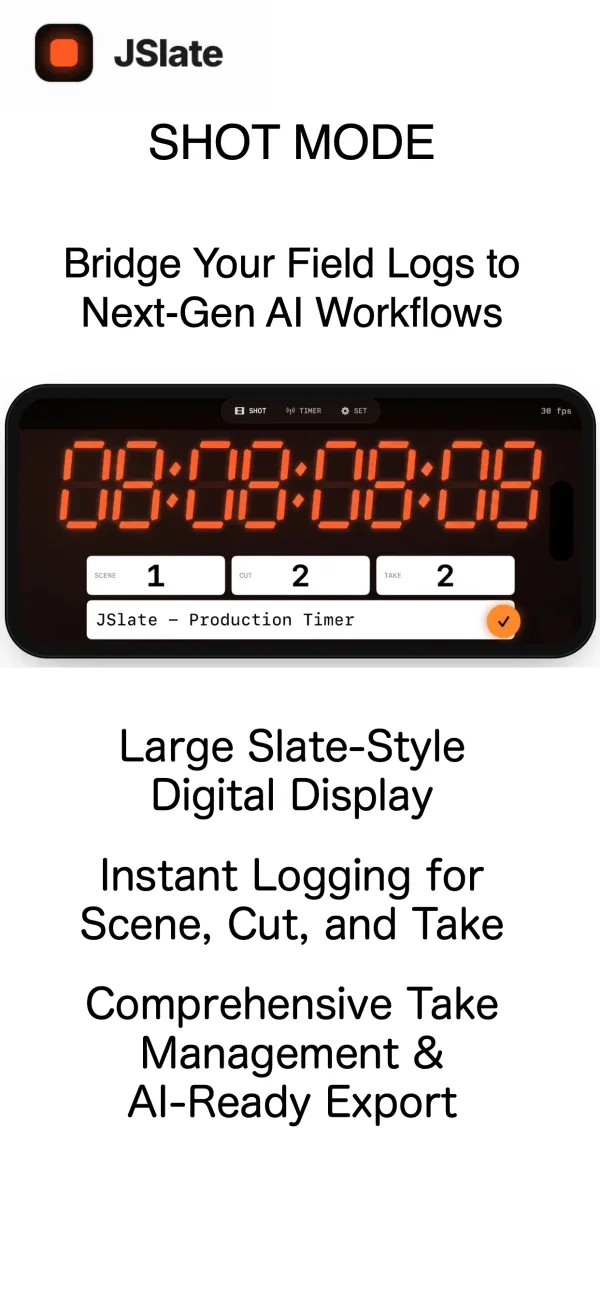
(2) SHOT Mode: Next-Gen Field Logging
Digital Slate: Large, intuitive Scene/Cut/Take display for fast identification.
One-Tap Logging: Instantly record every take with a single tap.
AI Workflow Integration: Manage all take logs in a comprehensive list for seamless export to AI analysis or post-production.
Smart Auto-Reset: Automatic reset function linked to the start of recording (REC).
[Built on Professional Trust: Three Zeros]
Confidentiality and speed are our priorities.
Zero Setup: No account creation or login. Ready to use immediately after installation.
Zero Data Leaks: 100% local design. No server communication ensures your sensitive data stays on your device. *Note: Location data used for local logging only.
Zero Cost: Completely free. No ads or in-app purchases to interrupt your professional work.
[Target Users]
Broadcast Directors & Timekeepers
Cinematographers & Script Supervisors
Independent Creators pursuing professional quality
Editors building AI-driven post-production workflows
What’s new
Version 1.52 · Apr 29, 2026
Added a simple clock mode (CLOCK) and optimized SHOT mode for better readability on iPad and Mac.
Updated TIMER countdown logic to use a 12-hour window as the reference.
App privacy
What KEISUKE TONE declares on the App Store about how this app handles data.
-
Data not collected
The developer does not collect any data from this app.
Privacy practices may vary, for example with the features you use or your age.
Information
- Seller
- KEISUKE TONE
- Category
- Photo & Video
- Version
- 1.52
- Updated
- Apr 29, 2026
- Released
- Apr 14, 2026
- Size
- 4.8 MB
- Requires
- iOS 18.0 or later
- Age rating
- 4+
- Price
- Free
- Languages
- English, Japanese
- Copyright
- © FLICKER
You might also like
-
 LTC Detective MSMPTE LTC reader and analyzer
-
 Clapperboard Film Slate: ClapClapboard, timecode & shot log
-
 Take Slate: Film ClapperboardDigital clapper and shot log
-
 Cinema SlateWhere every great take begins
-
 Timecode Shot LogTimecode stopwatch & shot log
-
 TC Calculator - TimecodeFast drop-frame & SMPTE math
-
 ClappyBoard: Digital SlateClapperboard for indie crews
-
 LutaroPicture Profile manager
-
 DOPro: Director's ViewfinderClapperboard, Shot List & DoF
-
 Holly TimecodeSMPTE Timecode Generator