
Lose Control: PC Controller
Your phone as a PC controller
Designed for iPhone, iPad
Free · In-app purchases
- Age rating4+
- CategoryUtilities
- DeveloperJOSE KELVIN NICOLAS PEREZ MONTEZA
- LanguagesEnglish+ 4 more
- Size2.0 MB
Links to the official App Store page
Download.org hosts no file of Lose Control: PC Controller. The button opens its official App Store page, published by JOSE KELVIN NICOLAS PEREZ MONTEZA. Listing last checked on Nov 13, 2026.
Screenshots
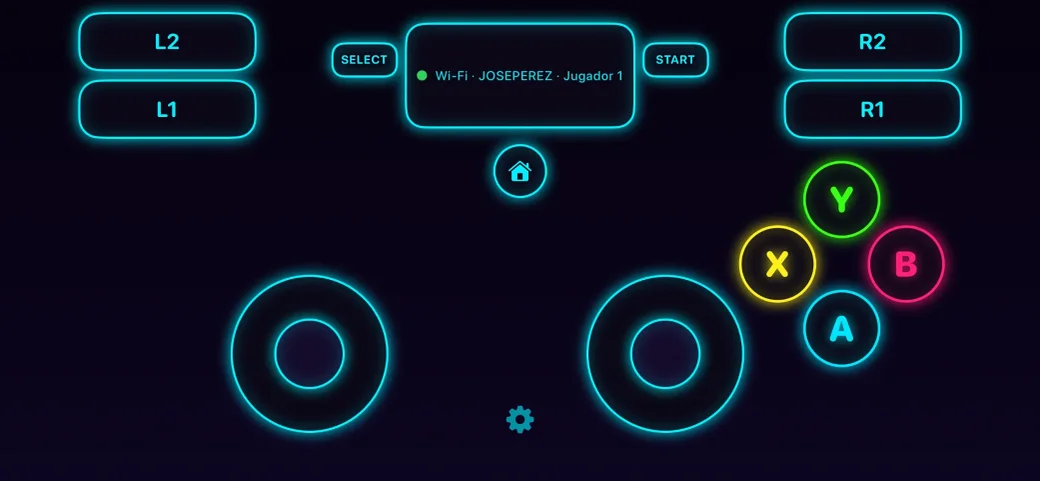
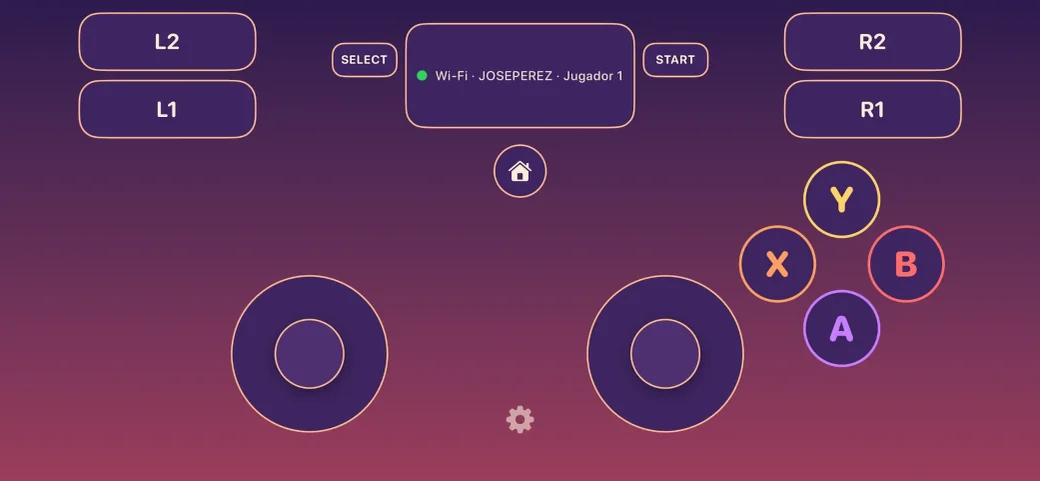

About
Turn your iPhone into a controller for playing on your Windows PC. Windows sees it as a DualShock 4 or Xbox 360 controller, so it works with Steam games, emulators and any game that supports controllers.
PLAY SMOOTHLY: INSTALL LOSE CONTROL HOST
For a smooth experience in your games, Lose Control Host must be installed on your Windows PC. It's free at montezajose.github.io/losecontrol. Install it once and it sets everything up (gamepad driver, Firewall and start with Windows) so your iPhone connects by itself every time you open the app, with no cables or setup.
FEATURES
• Automatic connection over Wi-Fi and Bluetooth: finds your PC on the network by itself.
• Up to 4 players at once, each iPhone is a separate controller.
• Customizable controls: move, resize or hide any button.
• Profiles for every game.
• 8 styles: Dark, Light, Neon, Wood, Pastel, Achromatic, Ocean and Sunset.
• Floating stick: appears wherever you put your finger.
• Steering wheel mode: tilt the iPhone to drive, with brake and gas pedals.
• Haptic feedback.
• In English, Spanish, Portuguese, Chinese and Japanese.
SUBSCRIPTION
3-day free trial. Then Lose Control Annual for US$4.99 per year (price may vary by country). The subscription renews automatically unless cancelled at least 24 hours before the end of the period, in Settings > Apple ID > Subscriptions.
Terms of Use: https://www.apple.com/legal/internet-services/itunes/dev/stdeula/
Privacy: https://montezajose.github.io/losecontrol/privacidad.html
What’s new
Version 1.3 · Oct 22, 2026
- Lose Control now works on iPad.
- On iPad the controls sit at the bottom, within reach of your thumbs while you hold it.
- Playing with the iPad on a table or stand? Turn on Full screen in Settings.
- Stability improvements.
App privacy
What JOSE KELVIN NICOLAS PEREZ MONTEZA declares on the App Store about how this app handles data.
-
Data not collected
The developer does not collect any data from this app.
Privacy practices may vary, for example with the features you use or your age.
Information
- Seller
- JOSE KELVIN NICOLAS PEREZ MONTEZA
- Category
- Utilities
- Version
- 1.3
- Updated
- Oct 22, 2026
- Released
- Oct 9, 2026
- Size
- 2.0 MB
- Requires
- iOS 16.0 or later
- Age rating
- 4+
- Price
- Free
- In-app purchases
- Yes
- Languages
- English, Japanese, Portuguese, Simplified Chinese, Spanish
- Copyright
- © 2026 José Pérez Monteza
You might also like
-
 Phone ControllerWireless Gamepad for Windows
-
 V-Pad: Virtual GamepadYour phone is the gamepad
-
 Gamepad Pro – Remote for PCPhone as PC Game Controller
-
 Console Controller - CustomizePhone into Custom Controller
-
 TapDeck - PC ControllerThe Ultimate Touch Controller
-
 PadLink RemoteTurn your phone into a gamepad
-
 BLE JoystickUtilities
-
 RojX: PC Gaming ControllerYour Phone as a PC Gamepad
-
 Virtual Steering ControllerTurn Phone Into PC Controller
-
 PX Controller - Remote PlayVirtual Controls & Library