Master Page: Design & Graphics
Books Layout & Publishing
Designed for iPhone, iPad, Mac
Free
- Age rating4+
- CategoryGraphics & Design
- DeveloperRainbowFactory LTD
- LanguagesEnglish+ 11 more
- Size202.7 MB
Links to the official App Store page
Download.org hosts no file of Master Page: Design & Graphics. The button opens its official App Store page, published by RainbowFactory LTD. Listing last checked on Nov 26, 2026.
Screenshots
About
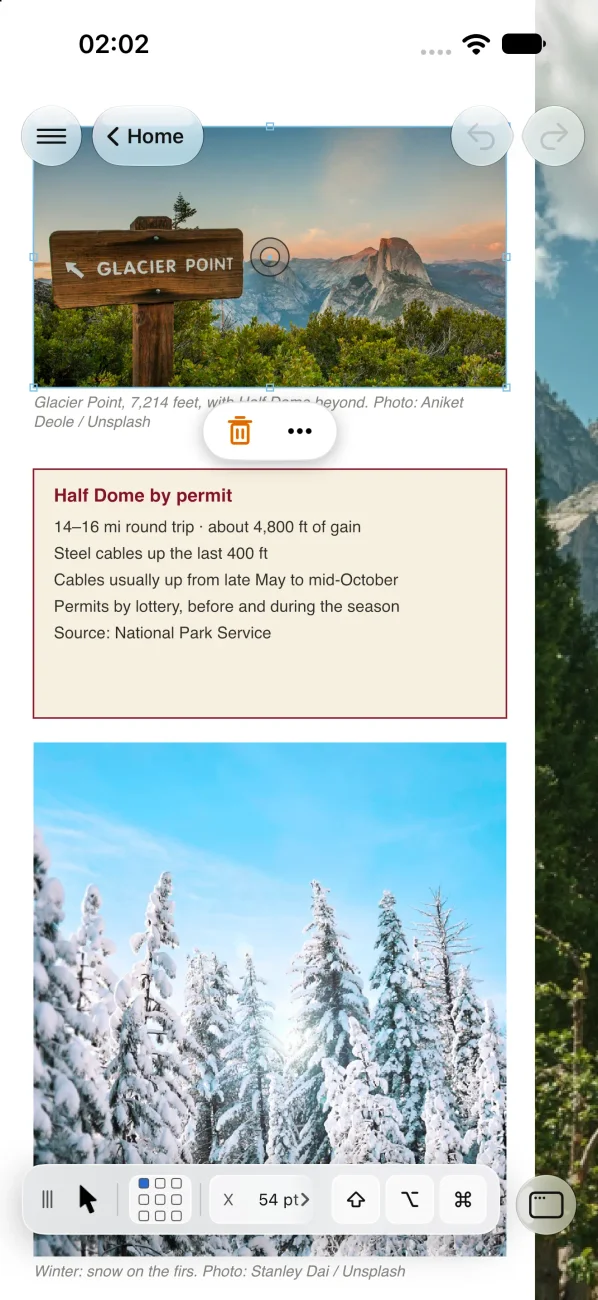
Master Page is a page layout app for iPhone and iPad. Design brochures, magazines, newsletters, catalogues, books and flyers: arrange the pages, flow the text across frames and export a PDF ready to share or print. Master Page opens, edits and saves IDML layout files natively.
PAGES AND MASTER PAGES
• Set the page size, margins, columns, bleed and facing spreads
• Add, duplicate, move and delete pages from the Pages palette
• Put headers, footers and page numbers on a master page and apply it to the pages that need it
• Sections and page numbering
TEXT THAT FLOWS
• Thread text frames so a story runs through columns and pages; overset text is flagged
• Character and Paragraph palettes: font, size, leading, tracking, alignment, indents and tabs
• Paragraph, character and object styles, with overrides and style groups
• Text wrap, tables, footnotes, Find/Change with GREP, spell checking and the Story Editor
COLOR
• Swatches palette with process and spot colors, CMYK and RGB, color groups and gradients
• A color picker for fill and stroke
IMAGES AND OBJECTS
• Place photos and artwork, fit them inside frames and keep track of them in the Links palette
• Shapes, lines, pen paths, strokes, fills and layers
• Rulers, guides and smart guides, with Apple Pencil support
LONG DOCUMENTS AND OUTPUT
• Books, table of contents, index, hyperlinks and bookmarks
• Export to PDF, PNG, JPEG and TIFF, and to IDML
• Print, Preflight for missing links and overset text, and Package
OPEN, EDIT, SAVE
• Native IDML files: open, edit and save them — only the parts you changed are rewritten
• Also opens SVG and PDF documents
• Unsaved work is recovered after an unexpected quit
MADE FOR iPHONE AND iPAD
• A compact layout on iPhone, floating palettes on iPad, light and dark appearance
• iCloud Drive and the Files app, and Handoff between your devices
• Shortcuts: hundreds of actions to automate your layouts
• Share and Action extensions, Quick Look previews and thumbnails in Files
• A Recent Documents widget and Control Center controls
• An AI assistant to help with your layout
• Every action is one undo step
Questions or ideas? Use Send Feedback inside the app — we read every message.
What’s new
Version 27.1 · Nov 25, 2026
• Rainbow Factory account: sign in with your email, Apple, Google or Microsoft to get updates, and soon the sync of your files and settings across all the Rainbow Factory apps. Settings ▸ Account.
• Creator Suite: every Rainbow Factory app, one tap away from the welcome screen.
• Fixes and improvements.
App privacy
What RainbowFactory LTD declares on the App Store about how this app handles data.
-
Data not linked to you
May be collected but is not linked to your identity.
- Diagnostics
Privacy practices may vary, for example with the features you use or your age.
Information
- Seller
- RainbowFactory LTD
- Category
- Graphics & Design
- Version
- 27.1
- Updated
- Nov 25, 2026
- Released
- Nov 2, 2026
- Size
- 202.7 MB
- Requires
- iOS 17.3 or later
- Age rating
- 4+
- Price
- Free
- Languages
- English, Dutch, French, German, Italian, Japanese, Korean, Portuguese, Russian, Simplified Chinese, Spanish, Traditional Chinese
- Copyright
- © 2026 Rainbow Factory LTD
You might also like
-
 Tracevelle: Tracing LightboxEmbroidery, Stencils & Art
-
 N-up LayoutsStep-and-Repeat Tool
-
 Tracer: AR TracingTrace any image, anywhere
-
 Grid - LayoutPlan and preview image grids
-
 Snap Draw IsoVector drawing with sound
-
 Font Space for Cut MachinesFont Design for Joy, Air Maker
-
 Zen Brush 3Freely draw beautiful zen art.
-
 Trace Drawing - DrawLensDrawing Projector for Tracing
-
 HEAVYPAINTRaw Digital Painting
-
 ImgRefReference board, OCR Scanner