Needlepoint Studio Designer
Design needlepoint charts
Designed for iPad, Mac
Free · In-app purchases
- Age rating4+
- CategoryGraphics & Design
- DeveloperLanding NYC Designs, LLC
- LanguagesEnglish
- Size16.0 MB
Links to the official App Store page
Download.org hosts no file of Needlepoint Studio Designer. The button opens its official App Store page, published by Landing NYC Designs, LLC. Listing last checked on Nov 14, 2026.
Screenshots

About
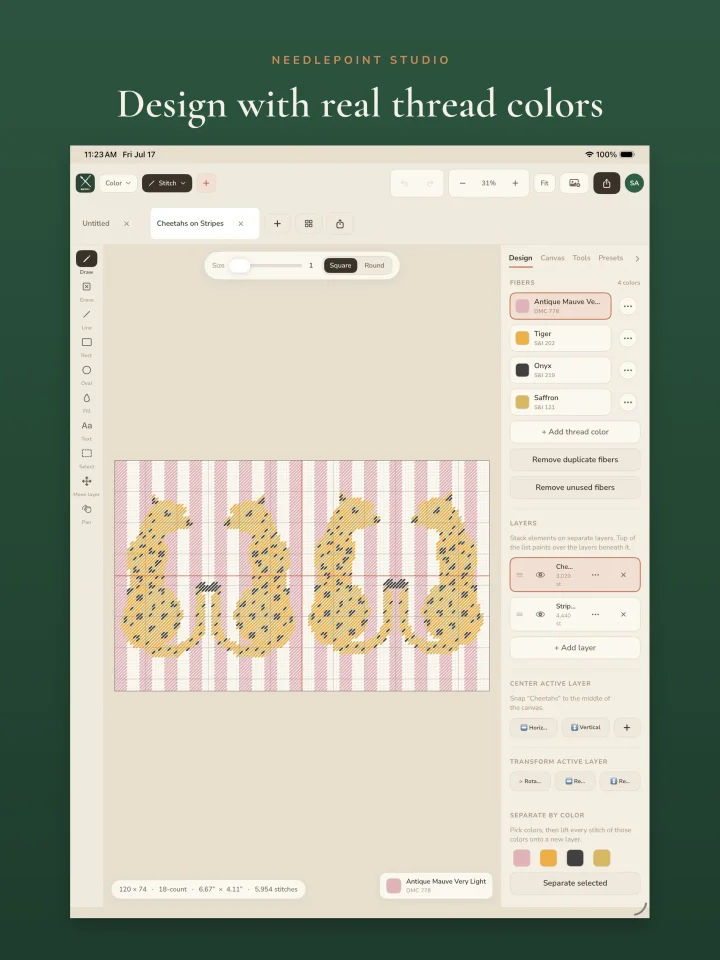
Turn any idea into a needlepoint chart. Needlepoint Studio is a professional charting studio for Mac and iPad - paint on the grid, match real thread colors, chart from a photo, and export print-ready patterns, all in sync across your devices.
Made by needlepoint designers, for needlepoint designers.
BRING YOUR EXISTING WORK
- Open MacStitch and WinStitch (.chart) files, so the pieces you've already made come with you.
- Open Open Cross Stitch (.oxs) files too, so work from other charting software comes with you as well.
DESIGN WITHOUT LIMITS
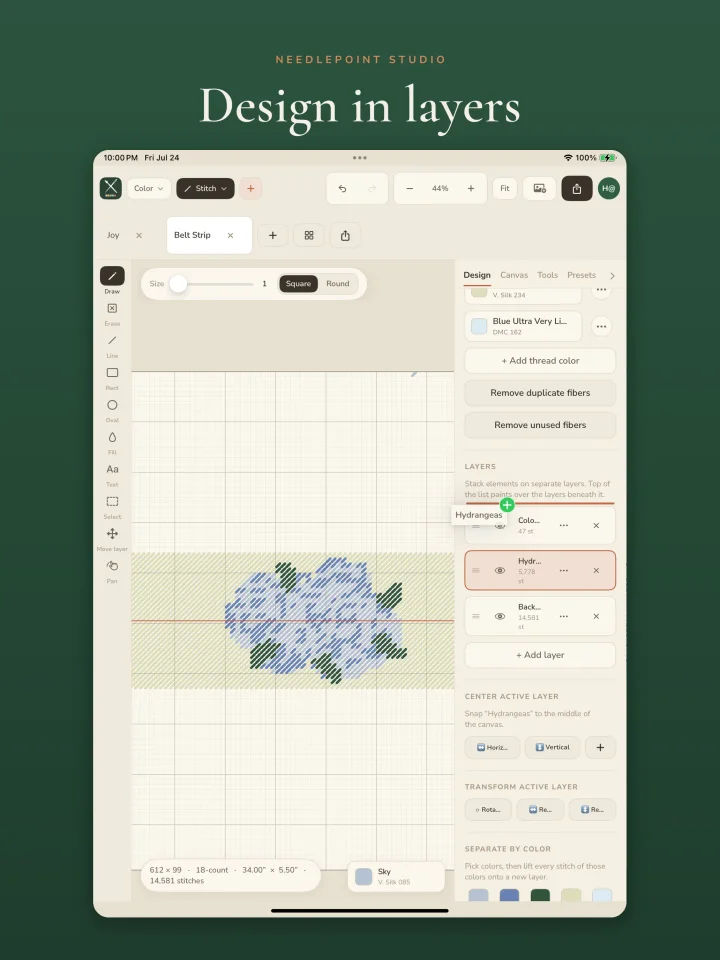
- Work in layers: put every element on its own layer and move, restack, and rearrange it freely, without redrawing.
- Repeat a motif across a belt, a border, or any canvas in a single click.
- Add lettering in any font - straight or curved onto an arch - for names, monograms, and titles.
- Prep a canvas for production in seconds: blank grid, your signature, and your palette, all a click away.
- Save templates for the sizes and setups you come back to again and again.
SEE IT BEFORE IT'S STITCHED
- Preview any design three ways: the block chart, rendered tent stitches, or a realistic painted-canvas mockup - so you and your customer can see exactly how the finished piece will look.
REAL THREADS, TRUE COLORS
- Match real thread colors from DMC, Silk & Ivory, Planet Earth, Appleton Wool and more.
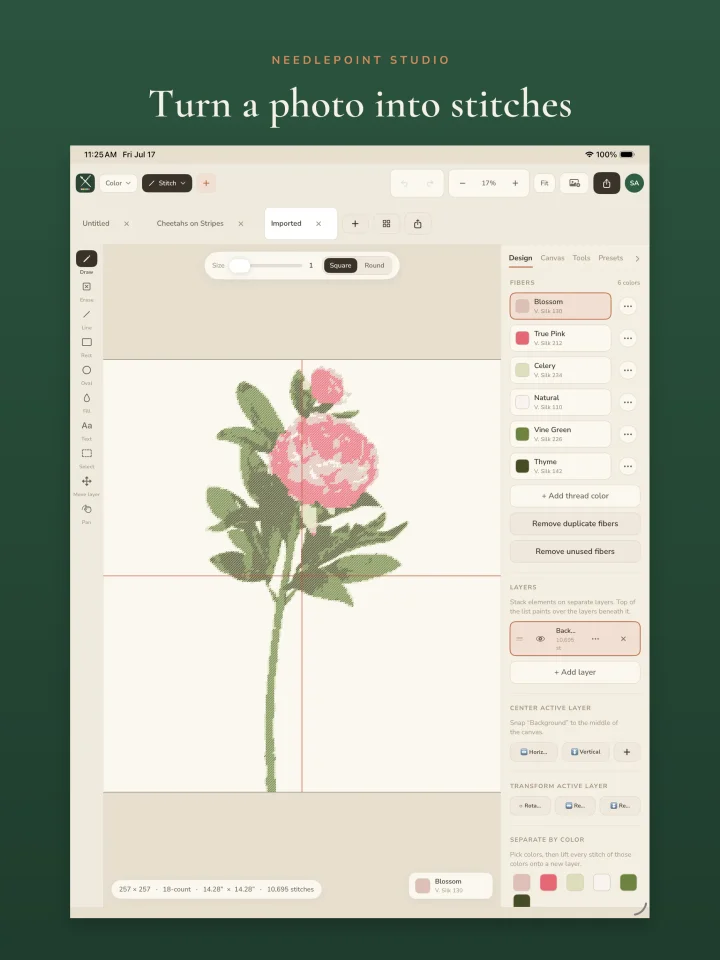
- Import a photo and turn it into a chart automatically.
STITCH RIGHT FROM YOUR SCREEN
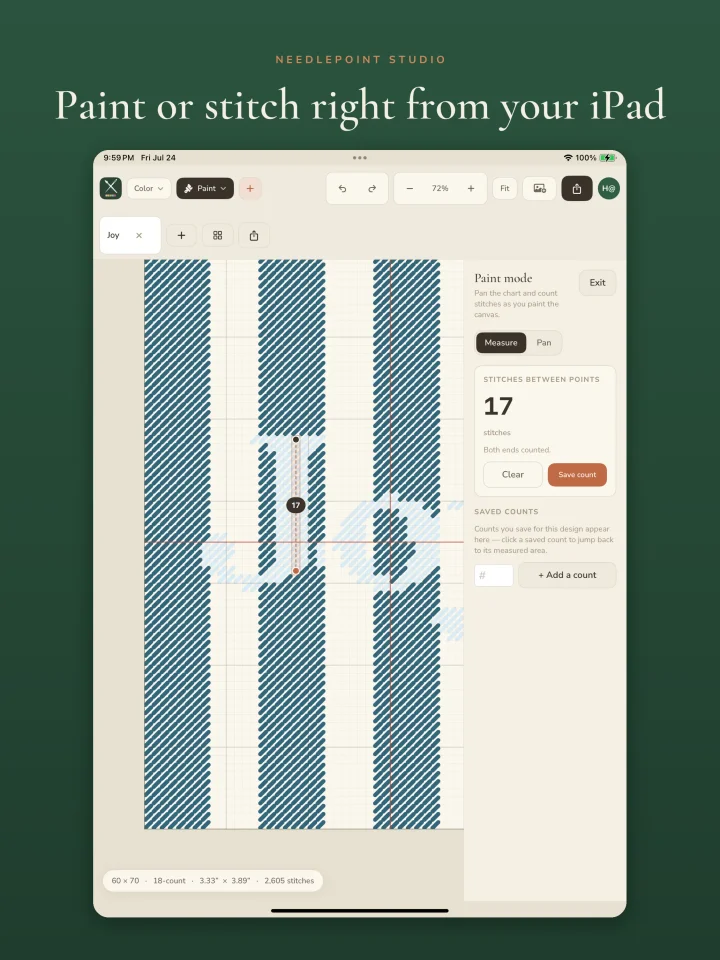
- Paint mode shows live stitch counts as you work, so you can stitch or paint straight from your iPad.
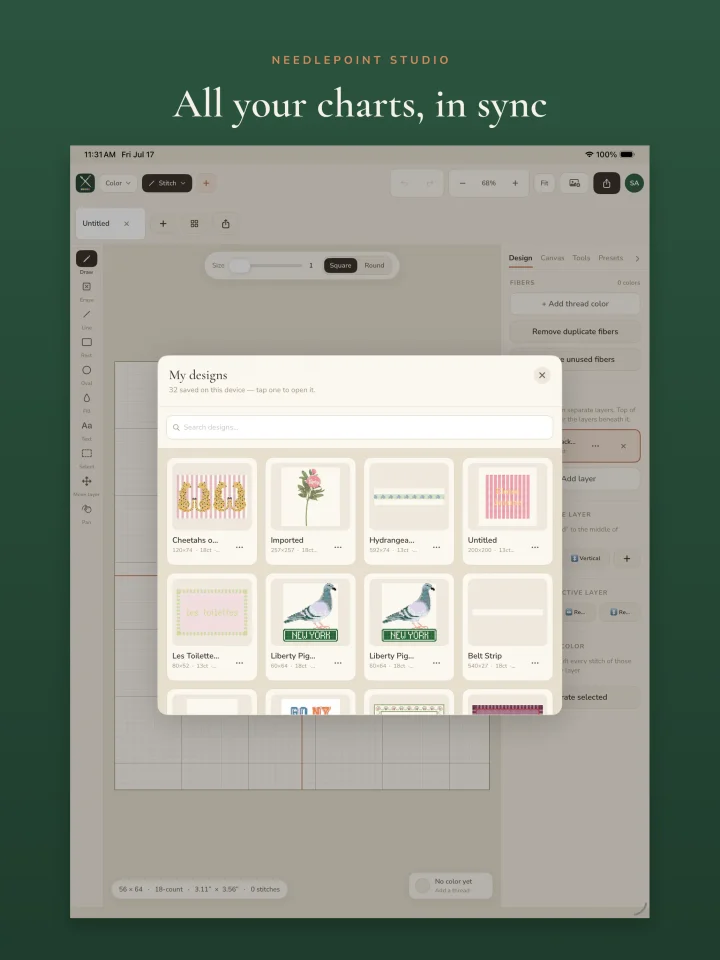
- Design on your Mac and pick it up on your iPad: your work syncs seamlessly between them.
EXPORT & SHARE
- Print at true finished size - lay the canvas mesh right over the printout and paint your sample by hand.
- Bigger than one page? Print across tiles you tape together into a full-size template, or send one large sheet to a wide-format printer.
- Export clean, print-ready PDFs and charts - color, symbols, or both - ready for production or the customer.
- Export Open Cross Stitch (.oxs) files: send your charts straight to painting services, or any software that reads OXS.
- Export a finished-size image of your design - flat color, painted canvas, or tent stitches - ready to print or share.
Your designs stay yours: each chart is saved as a file in a folder you choose (iCloud Drive or Dropbox), so your work travels with you and syncs across devices.
A serious tool, made with the care of people who actually stitch.
Needlepoint Studio is a subscription. Choose Monthly ($12.99/month) or Annual ($129.99/year), each starting with a 7-day free trial. Payment is charged to your Apple ID at confirmation of purchase. Your subscription renews automatically unless canceled at least 24 hours before the end of the current period. Manage or cancel anytime in your Apple ID settings.
Terms of Use (EULA): https://grantpointdesigns.com/pages/terms-of-use-needlepoint-studio
Privacy Policy: https://grantpointdesigns.com/pages/needlepoint-studio-privacy-policy
Questions? help@grantpointdesigns.com
What’s new
Version 1.2.6 · Nov 10, 2026
Turn any idea into a needlepoint or cross-stitch chart. Needlepoint Studio is a professional charting studio for Mac and iPad - paint on the grid, match real thread colors, chart from a photo, and export print-ready patterns, all in sync across your devices.
Made by needlepoint designers, for needlepoint designers - and now for cross-stitch too.
BRING YOUR EXISTING WORK
- Open MacStitch and WinStitch (.chart) files, so the pieces you've already made come with you.
- Open Open Cross Stitch (.oxs) files too, so work from other charting software comes with you as well.
- Open Stitchly (.stitchly) files, so your Stitchly designs come with you too.
DESIGN WITHOUT LIMITS
- Work in layers: put every element on its own layer and move, restack, and rearrange it freely, without redrawing.
- Repeat a motif across a belt, a border, or any canvas in a single click.
- Add lettering in any font - straight or curved onto an arch - for names, monograms, and titles.
- Prep a canvas for production in seconds: blank grid, your signature, and your palette, all a click away.
- Save templates for the sizes and setups you come back to again and again.
NEEDLEPOINT OR CROSS-STITCH
- Chart either craft: render your design as tent stitches for needlepoint or as cross-stitches (X) for counted cross-stitch.
- Set your preferred view as the default, so every new canvas opens the way you work.
SEE IT BEFORE IT'S STITCHED
- Preview any design four ways: the block chart, rendered tent stitches, cross-stitches, or a realistic painted-canvas mockup - so you and your customer can see exactly how the finished piece will look.
REAL THREADS, TRUE COLORS
- Match real thread colors from DMC, Silk & Ivory, Planet Earth, Appleton Wool, Pepper Pot, Milan, Bella Lusso, DMC Tapestry Wool and more.
- Chart with variegated and overdyed lines - DMC Color Variations, DMC Mouline Special Variegated, Vineyard Silk Tone-on-Tone, Planet Earth 6-Ply Variegated - and watch the color shift across the run of stitches, just like the real thread, on screen and in your exports.
- Add shimmer with DMC Mouline Etoile metallic threads - turn the sparkle on, or keep it flat.
- Import a photo and turn it into a chart automatically.
STITCH RIGHT FROM YOUR SCREEN
- Paint mode shows live stitch counts as you work, so you can stitch or paint straight from your iPad.
- Design on your Mac and pick it up on your iPad: your work syncs seamlessly between them.
EXPORT & SHARE
- Print at true finished size - lay the canvas mesh right over the printout and paint your sample by hand.
- Bigger than one page? Print across tiles you tape together into a full-size template, or send one large sheet to a wide-format printer.
- Export clean, print-ready PDFs and charts - color, symbols, or both - ready for production or the customer.
- Export Open Cross Stitch (.oxs) files: send your charts straight to painting services, or any software that reads OXS.
- Export a finished-size image of your design - flat color, painted canvas, or tent stitches - ready to print or share.
Your designs stay yours: each chart is saved as a file in a folder you choose (iCloud Drive or Dropbox), so your work travels with you and syncs across devices. Keep separate folders for different collections - switching folders keeps them apart.
A serious tool, made with the care of people who actually stitch.
Needlepoint Studio is a subscription. Choose Monthly ($12.99/month) or Annual ($129.99/year), each starting with a 7-day free trial. Payment is charged to your Apple ID at confirmation of purchase. Your subscription renews automatically unless canceled at least 24 hours before the end of the current period. Manage or cancel anytime in your Apple ID settings.
Terms of Use (EULA): https://grantpointdesigns.com/pages/terms-of-use-needlepoint-studio
Privacy Policy: https://grantpointdesigns.com/pages/needlepoint-studio-privacy-policy
Questions? help@grantpointdesigns.com
App privacy
What Landing NYC Designs, LLC declares on the App Store about how this app handles data.
-
Data linked to you
May be collected and linked to your identity.
- Purchases
- Contact info
- User content
- Identifiers
Privacy practices may vary, for example with the features you use or your age.
Information
- Seller
- Landing NYC Designs, LLC
- Category
- Graphics & Design
- Version
- 1.2.6
- Updated
- Nov 10, 2026
- Released
- Jul 24, 2026
- Size
- 16.0 MB
- Requires
- iOS 17.0 or later
- Age rating
- 4+
- Price
- Free
- In-app purchases
- Yes
- Languages
- English
- Copyright
- © 2026 Landing NYC Designs, LLC
You might also like
-
 Stitch BelleNeedlepoint canvas design app
-
 StitchALot StudioNeedlepoint Designer
-
 StitchHub: Cross StitchPattern Maker & Chart Tracker
-
 Brother ArtspiraGraphics & Design
-
 Silhouette GoGraphics & Design
-
 ProcreateSketch. Paint. Create.
-
 Cricut Design SpaceGraphics & Design
-
 Morpholio Trace - Sketch CADDesign & Architecture Drawing
-
 Affinity Designer 2 for iPadVector graphics & illustration
-
 Linearity Curve Graphic DesignVectornator AI, Vector Art