
oktake
Timecode Marking & Sync
Designed for iPhone, iPad, Mac
Free · In-app purchases
- Age rating4+
- CategoryPhoto & Video
- DeveloperBeijing Luminous Island Cultural Media Co., Ltd
- LanguagesEnglish+ 1 more
- Size8.2 MB
Links to the official App Store page
Download.org hosts no file of oktake. The button opens its official App Store page, published by Beijing Luminous Island Cultural Media Co., Ltd. Listing last checked on Nov 18, 2026.
Screenshots



About
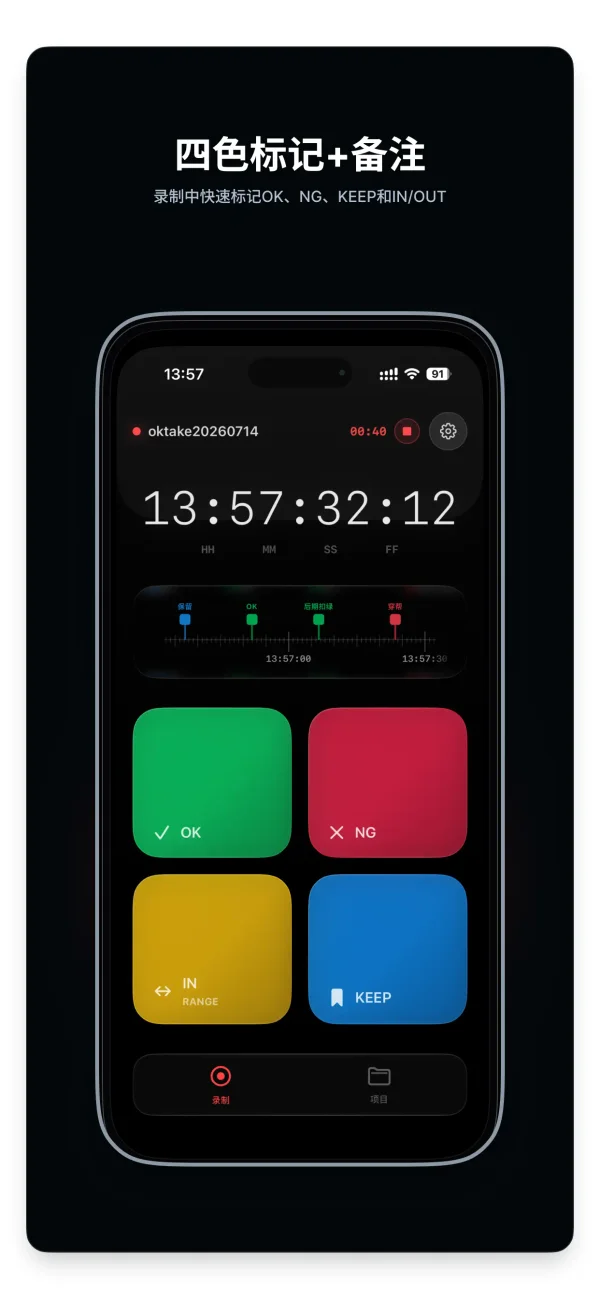
oktake is a timecode marker for film crews and post-production teams. Use iPhone, iPad, or Apple Watch to record OK, NG, KEEP, and range markers on set, then match those notes to camera media on Mac and move into editing faster.
【Fast On-Set Marking】
• Large controls designed for quick operation on set
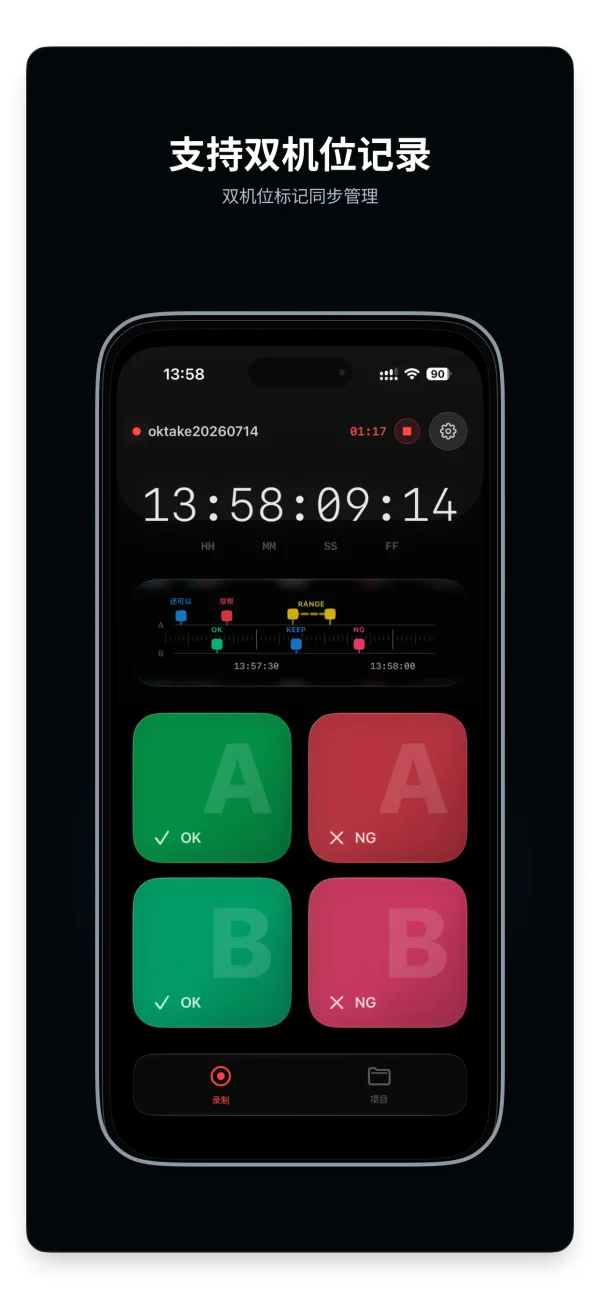
• Single-camera and dual-camera sessions
• Point markers and range markers
• Notes with precise marker timecodes
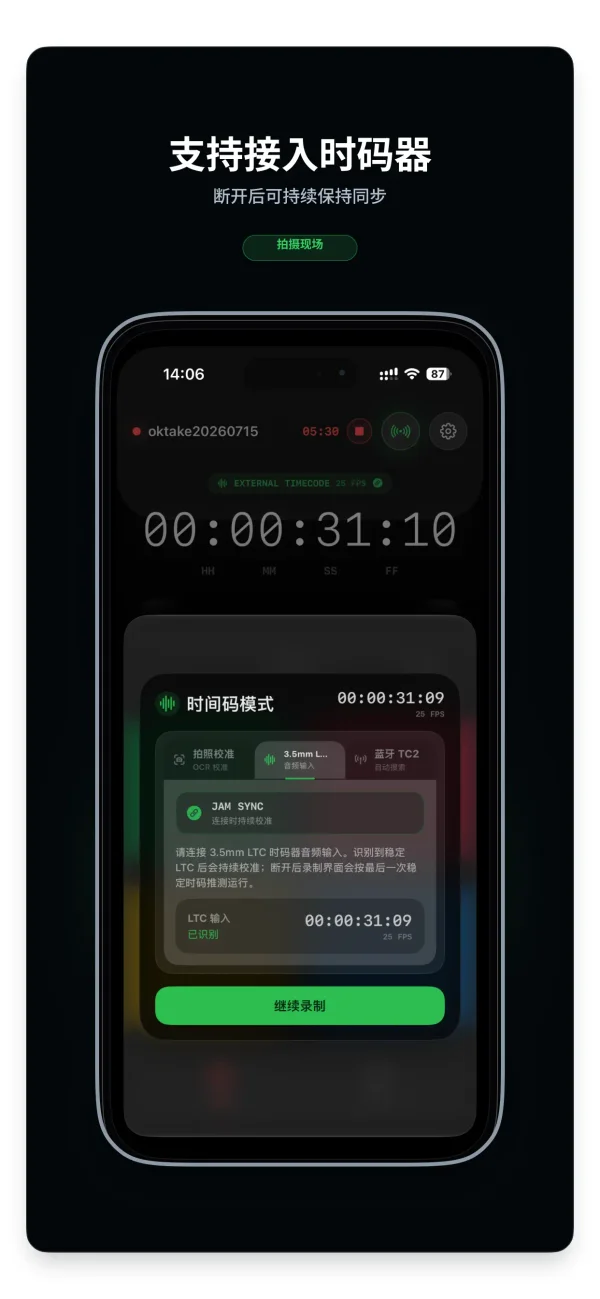
【Flexible Timecode Calibration】
• Photograph and recognize a camera timecode display
• Apply a manual timecode offset
• Read LTC from a 3.5 mm audio input
• Scan and select compatible BLE external timecode devices; sync only with the selected device
【Connected Apple Workflow】
• View status and add markers from Apple Watch
• See the active recording state in Live Activities
• Keep projects and marker data on the device
• Export .take files 5 times for free
【Free Mac Post Workflow】
• Match .take markers to video media by timecode
• Export Final Cut Pro XML / FCPXML
• Use the DaVinci Resolve import workflow
• Process media locally without uploading it
oktake requires no account, contains no advertising, and does not track or collect personal data. Recording, all four marker types, range marking, dual-camera sessions, Apple Watch, Live Activities, and every timecode calibration method are free. Every user gets 5 free .take exports; an export is counted only after sharing completes, and canceling the share does not use one. The annual Pro subscription unlocks unlimited .take exports only. The macOS App Store and DMG versions are free.
Terms of Use (Apple Standard EULA): https://www.apple.com/legal/internet-services/itunes/dev/stdeula/
What’s new
Version 1.0.5 · Nov 15, 2026
Improved Bluetooth timecode device recognition and display for a more reliable synchronization experience.
App privacy
What Beijing Luminous Island Cultural Media Co., Ltd declares on the App Store about how this app handles data.
-
Data not collected
The developer does not collect any data from this app.
Privacy practices may vary, for example with the features you use or your age.
Information
- Seller
- Beijing Luminous Island Cultural Media Co., Ltd
- Category
- Photo & Video
- Version
- 1.0.5
- Updated
- Nov 15, 2026
- Released
- Aug 2, 2026
- Size
- 8.2 MB
- Requires
- iOS 16.0 or later
- Age rating
- 4+
- Price
- Free
- In-app purchases
- Yes
- Languages
- English, Simplified Chinese
- Copyright
- © 2026 Beijing Luminous Island Cultural Media Co., Ltd.
You might also like
-
 MetaStillsStill Collection with Metadata
-
 Celvion ScoutPlan light, weather & shots
-
 SaveMarker: Timecode MarkerMark your video while filming
-
 EasyShowPhoto & Video
-
 ScriptySyncTake Logging Made Easy
-
 新茄子快门Photo & Video
-
 Gloaming — Film CameraFilm color. Stills. Cinema.
-
 ShutterFinder: Flicker MeterScan light, get shutter speed
-
 Film LightPhoto & Video
-
 Scouter Cine ViewfinderShot Planning & AI Lighting