
Pantry for Nextcloud
Home lists, photos & notes
Designed for iPhone, iPad, Mac, iPod touch
Free
- Age rating4+
- CategoryProductivity
- DeveloperChen Asraf
- LanguagesEnglish
- Size40.3 MB
Links to the official App Store page
Download.org hosts no file of Pantry for Nextcloud. The button opens its official App Store page, published by Chen Asraf. Listing last checked on Nov 24, 2026.
Screenshots
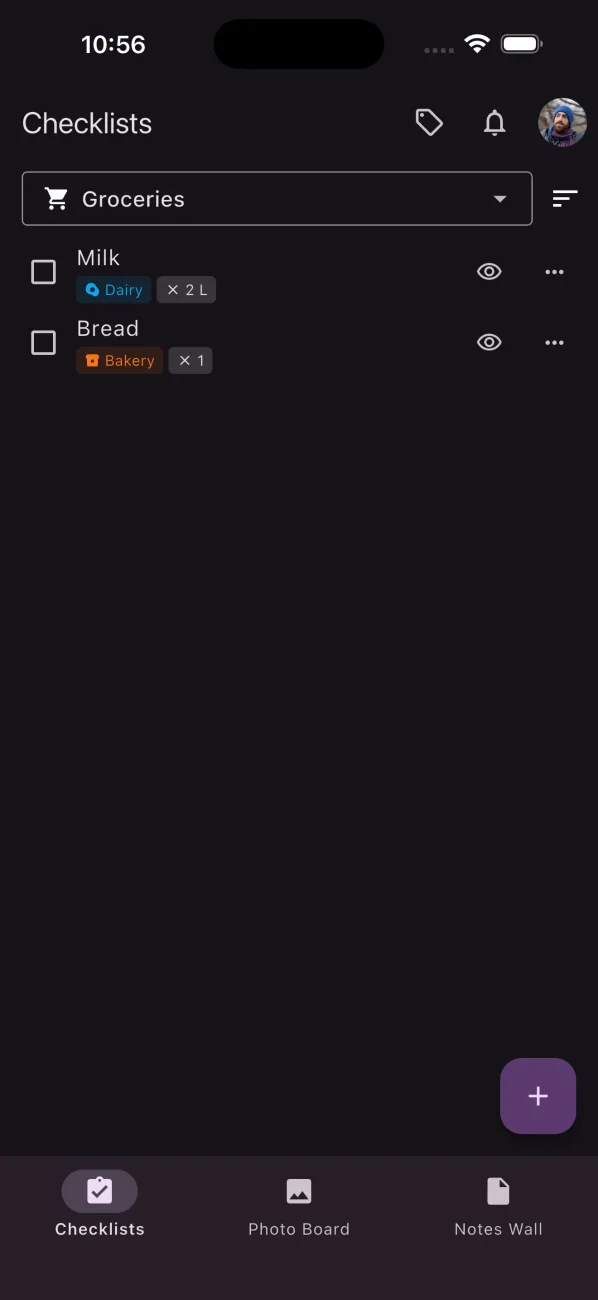
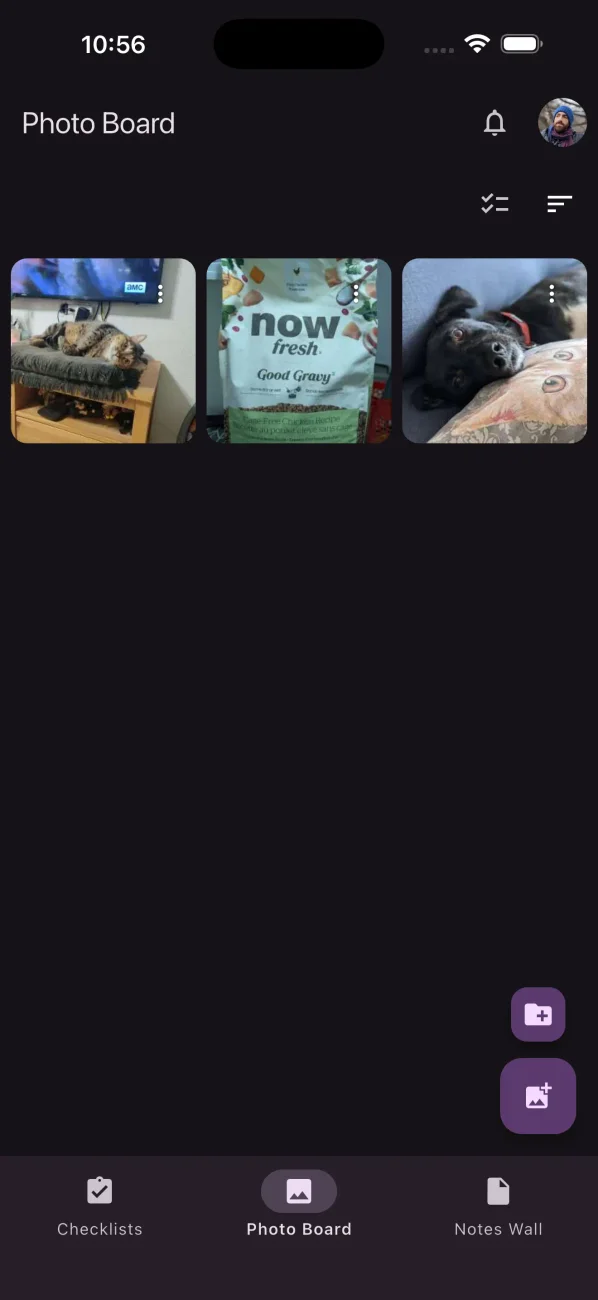
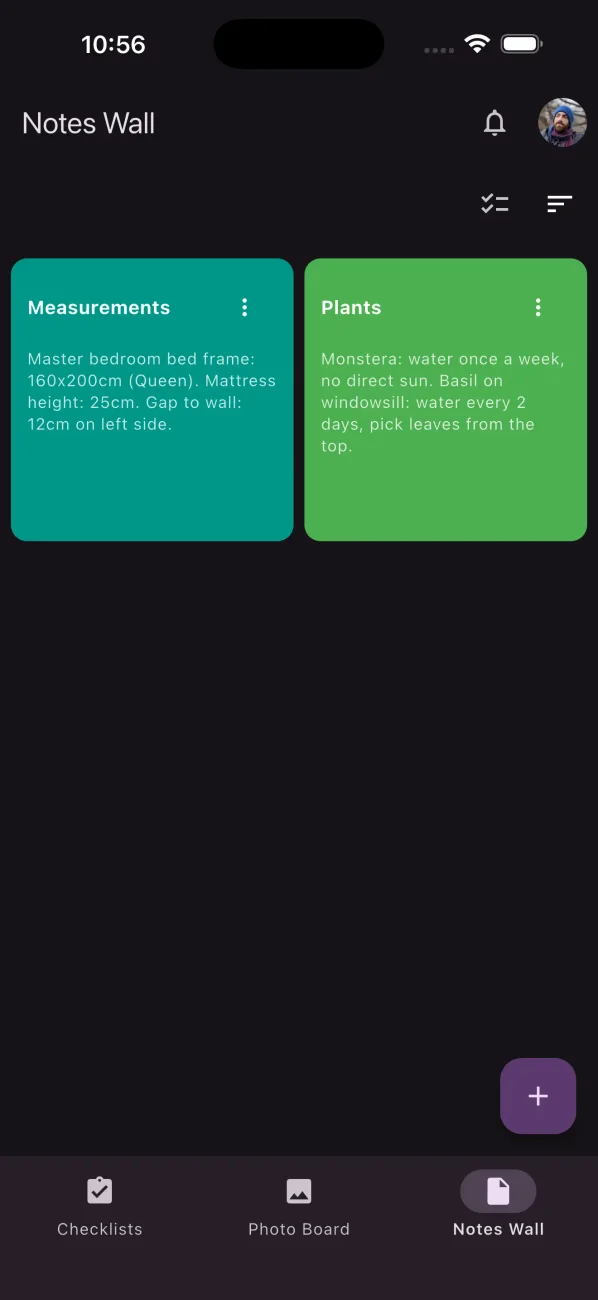
About
Pantry is a companion app for the Nextcloud Pantry server app. It lets you and your household members collaborate on shared checklists, a photo board, and a notes wall — all stored on your own Nextcloud server.
* Checklists
Create shopping lists and to-do lists with categories, quantities, recurring items, and images. Drag to reorder, sort by name or date, and check items off as you go.
* Photo Board
Upload and organize photos into folders. Add captions, drag to reorder, and browse everything in a clean grid view.
* Notes Wall
Keep shared notes with your household. Color-code them, write in markdown, and pin the important stuff where everyone can see it.
* Your data, your server
Pantry connects directly to your Nextcloud instance. No accounts to create, no cloud services in between. Your data never leaves your server.
* Features
- Shared checklists with categories, quantities, and recurrence
- Photo board with folders, captions, and multi-upload
- Color-coded notes wall
- Drag-and-drop reordering everywhere
- Multi-select for bulk actions
- Offline caching for fast loading
- Material Design 3 with dark mode support
- Secure login flow authentication
* Requires a Nextcloud server with the Pantry app installed. Visit the project page for setup instructions.
What’s new
Version 0.40.0 · Nov 23, 2026
Adding items is quicker. Type "2 L milk" and Pantry fills in the amount and suggests a category, based on what your household picked for that item before. Each guess shows as a chip you can click to drop, and anything you type or pick yourself always wins. You can turn it off with "Smart input" in Settings. Category and amount suggestions need the Pantry server app 0.40.0 or newer.
New:
• Keep a note in sync with a Markdown file in your Nextcloud: pick a folder from the note's menu, and edits made to either one show up in the other. You can also turn a text file already in your Nextcloud into a note with Import from Nextcloud. When the file is in someone else's Nextcloud, the note shows whose files it's in.
• Add pictures that are already in your Nextcloud to items and the photo board, no re-uploading needed. Link to the file and it keeps showing even after you rename or move it, or import your own copy.
• Lists add up the prices of the items you still need to buy. Filter or search and the estimate follows along, so you know what a store run will cost before you head out.
• Finished a shopping trip by mistake? Undo it from shopping history: what you checked off goes back on its list, and what the trip added to your inventories is taken back out.
• Templates can add new items from their attached lists on their own. Turn it on in the template's settings; items the template already has are left as they are.
• Items sold at several stores show a single chip with the number of stores instead of crowding the row. Click it to see them all.
Fixes:
• Checking off checklist items in a note works straight away, without opening the note for editing.
• Inventory lists show their names, instead of a number, when you manage categories, labels and custom fields.
• Inventory: rows show at their full height, and setting a category or labels on several items at once offers the ones from their lists.
• Lists: the templates you pick when creating a list are saved, and a new list opens straight away.
App privacy
What Chen Asraf declares on the App Store about how this app handles data.
-
Data not collected
The developer does not collect any data from this app.
Privacy practices may vary, for example with the features you use or your age.
Information
- Seller
- Chen Asraf
- Category
- Productivity
- Version
- 0.40.0
- Updated
- Nov 23, 2026
- Released
- Apr 16, 2026
- Size
- 40.3 MB
- Requires
- iOS 15.0 or later
- Age rating
- 4+
- Price
- Free
- Languages
- English
- Copyright
- © 2026 Chen Asraf
You might also like
-
 Deckloud: Nextcloud DeckSelf-hosted Kanban & tasks
-
 Nextscan - Scans for NextcloudDocument Scanner for Nextcloud
-
 Nextcloud CalendarCalendar for Nextcloud
-
 Nextcloud AttendanceRSVP & CheckIns for Groups
-
 Passwords for NextcloudProductivity
-
 Nextcloud NotesProductivity
-
 WeSpendA Nextcloud Cospend PWA.
-
 NowThis: Tasks for NextcloudPrivate, Smart Productivity
-
 Next DeckVerwalte Boards von Nextcloud
-
 All Cloud Hub: Storage ManagerMulti-Cloud Search & Transfer