
PasteQ - Search Copy Paste
Copy history, snippets & sync
Designed for iPhone, iPad, Mac, iPod touch
Free · In-app purchases
- Age rating4+
- CategoryProductivity
- Developer旭 徐
- LanguagesEnglish+ 2 more
- Size35.9 MB
Links to the official App Store page
Download.org hosts no file of PasteQ - Search Copy Paste. The button opens its official App Store page, published by 旭 徐. Listing last checked on Nov 17, 2026.
Screenshots


About
Reuse copied and collected text in your next draft, post or reply.
Capture, organize, find and reuse content on iPhone and iPad, then continue on Mac with iCloud.
COPY, BACK TAP, REUSE
Copy text or a link, then use your configured Back Tap shortcut on a compatible iPhone. With automatic pinning on (the default), captures appear in Pinned on the PasteQ keyboard. Collect several items and insert or reuse them one by one, without opening the main app.
For writers and creators: keep title ideas, reference links, captions, hashtags and bios ready for drafts and posts.
Requires iOS / iPadOS 16+. In PasteQ Settings > Quick Capture, add the preset shortcut. Bind it to Back Tap on iPhone and add the PasteQ keyboard. On iPad, run the shortcut. Control Center and Action button support vary by device and OS. Each capture is user-triggered; text and links only.
CREATE, EDIT, COPY AND SHARE
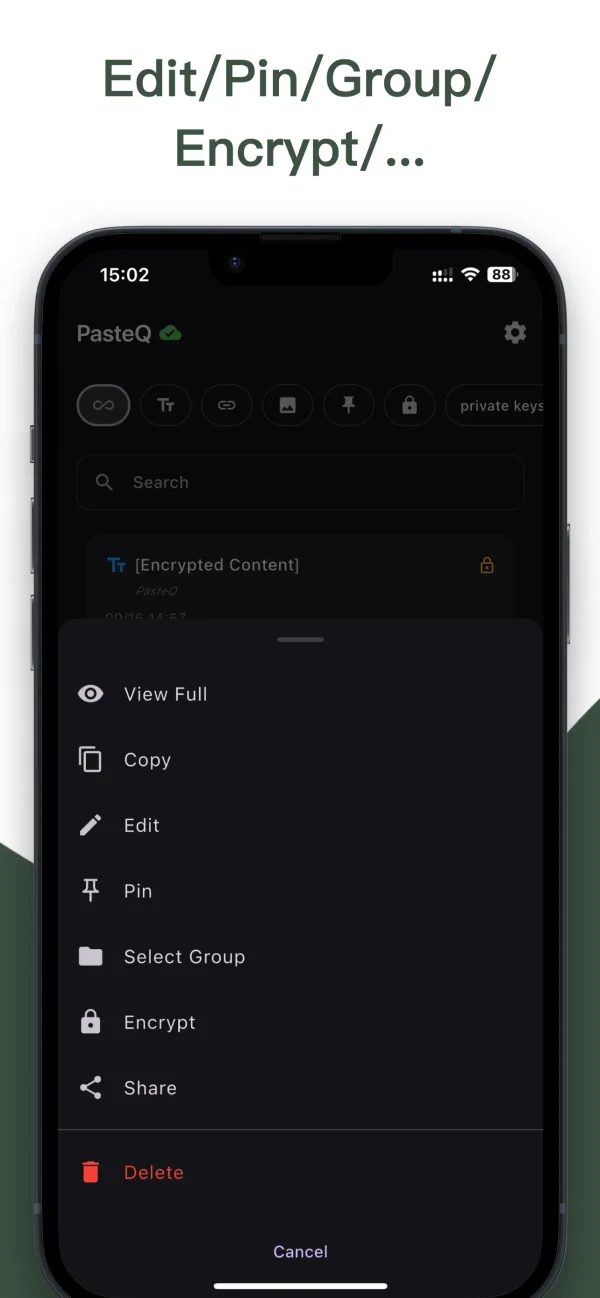
Add replies, templates, addresses, links or other text without a Mac. Edit text and add notes. Tap to copy, double-tap to view full text and select a passage, or share text and links with the system share sheet. Long-press for more actions.
SEARCH AND FILTER
Search saved content or text notes; browse and swipe between text, links, images, Pin and groups. Filter or search Mac records by source app. Mobile captures are labeled Quick Capture, without the original app's name.
PIN AND ORGANIZE GROUPS
Pin favorites, add text notes and put a record in multiple groups. Rename, reorder or delete groups; deleting a group keeps its records. Pinned and grouped records are kept when ordinary history expires.
TEXT ENCRYPTION OPTIONS
Encrypt or decrypt text records and browse the encrypted category. Detected sensitive text can be encrypted automatically.
VIEW, SAVE AND SHARE IMAGES
Zoom in on saved images, save them to Photos or share them. Images on iOS are used through saving and sharing; rich text can be copied as plain text.
SYNC WITH MAC
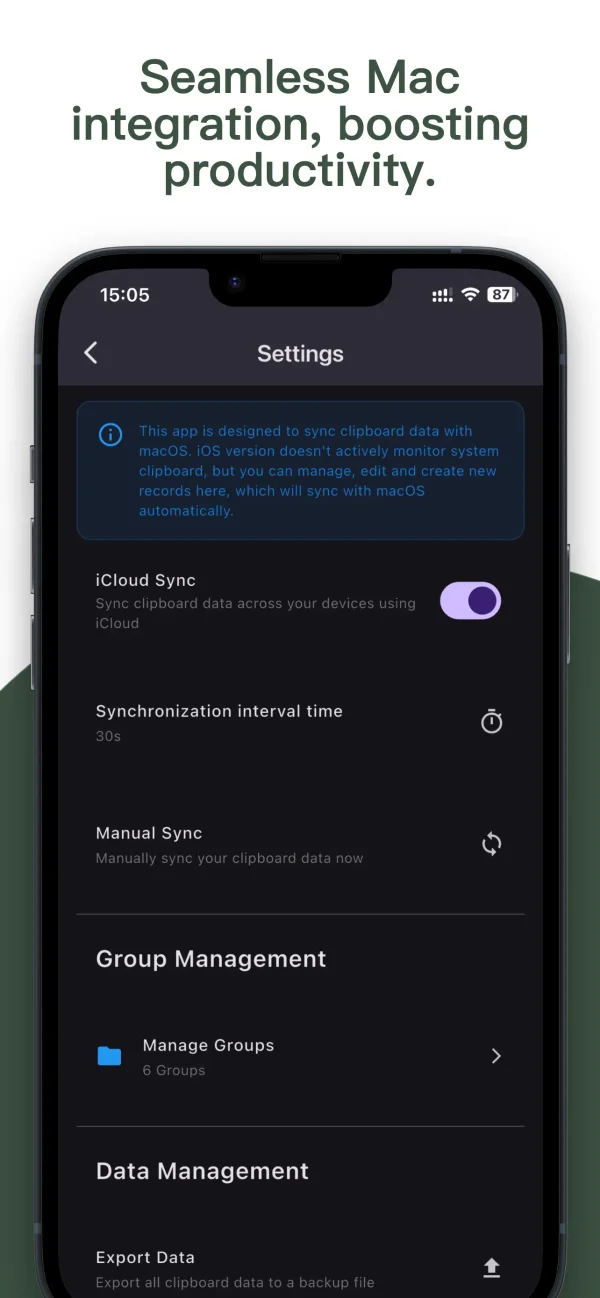
Enable iCloud sync with the same Apple Account. Check status, sync manually and adjust the sync interval. Opening PasteQ imports mobile captures into history for sync to Mac. Captures are pinned by default; turn automatic pinning off in settings if preferred. Open the mobile app to check records synced from Mac before use. iOS does not continuously capture other apps' clipboards in the background.
REUSE TEXT WITH THE KEYBOARD
Add the PasteQ keyboard. In fields supporting third-party keyboards, tap text from Pin or custom groups to insert it, long-press to copy, or swipe between groups. In the main app's keyboard settings, choose which custom groups appear on the keyboard; Pin is always included. No Allow Full Access is required. Images, files and encrypted records are excluded.
IMPORT, EXPORT AND CHOOSE YOUR LANGUAGE
Import or export PasteQ data on your device. Exports exclude original files referenced by file records. Choose English, Simplified Chinese or Traditional Chinese.
Download PasteQ, save a useful snippet and reuse it from your keyboard.
PRIVACY
- 100% local storage: All data stays on your devices and is never uploaded.
- iCloud: Secure sync across devices.
- Sensitive data: Automatically detect and protect private data, such as credit card numbers and passwords.
SUBSCRIPTIONS
- Payment is charged to your Apple Account at purchase confirmation.
- Manage or cancel anytime in your Apple Account settings.
- Cancel auto-renewal at least 24 hours before the current period ends.
- Unless canceled, renewal is charged within 24 hours before expiry; payment extends membership by one period.
- If membership is inactive after payment, tap Restore Purchases.
- Before your first purchase, add WeChat Pay, Alipay or UnionPay to your Apple Account, where available.
- Membership is linked to the Apple Account used for purchase.
Contact: admin@iofree.xyz
Website: https://pasteq.iofree.xyz/en/
Terms of Use: https://pasteq.iofree.xyz/en/guide/terms
Privacy Policy: https://pasteq.iofree.xyz/en/guide/privacy
What’s new
Version 1.2.0 · Nov 13, 2026
What's New:
- Upgraded iCloud Sync for a better synchronization experience.
- Keyboard tab order now follows your custom order in the app.
- Improved group refreshing after synchronization.
- Added offline OCR text recognition and QR code scanning.
- Added batch operations on mobile for easier content management.
- Fixed several issues and improved app stability.
App privacy
What 旭 徐 declares on the App Store about how this app handles data.
-
Data not collected
The developer does not collect any data from this app.
Privacy practices may vary, for example with the features you use or your age.
Information
- Seller
- 旭 徐
- Category
- Productivity
- Version
- 1.2.0
- Updated
- Nov 13, 2026
- Released
- Nov 17, 2022
- Size
- 35.9 MB
- Requires
- iOS 15.6 or later
- Age rating
- 4+
- Price
- Free
- In-app purchases
- Yes
- Languages
- English, Simplified Chinese, Traditional Chinese
- Copyright
- © IOfree
You might also like
-
 ClipSafeClipboard Manager & Organizer
-
 Pastes - Notes meets ClipboardCopy, Note, Personal Database
-
 Pop: Clipboard ManagerCopy History, Cloud Sync, Tags
-
 Clipboard Manager - CopyCacheSmart Scanner & Extractor
-
 Awesome Copy Mobile ClipboardClipboard history sync manager
-
 Copy 'Em + Paste KeyboardCopy. Paste. Organize. Sync.
-
 PasteDock: Clipboard ManagerCopy & Paste Text and Images
-
 Clipboard - EasyPaste keyboardAuto paste keyboard clipboard
-
 Clipboard - Paste KeyboardAuto Copy and Paste Keyboard
-
 Paste – Limitless ClipboardCopy, Search, Manage, Share