PDF Editor - Draw & Annotate
PDF Reader, PDF Filler, Viewer
Designed for iPhone, iPod touch
Free · In-app purchases
- Age rating4+
- CategoryProductivity
- DeveloperKamalkumar Trapasiya
- LanguagesEnglish
- Size34.6 MB
Links to the official App Store page
Download.org hosts no file of PDF Editor - Draw & Annotate. The button opens its official App Store page, published by Kamalkumar Trapasiya. Listing last checked on Nov 12, 2026.
Screenshots

About
Welcome to your all-in-one solution for managing and editing PDF documents on your iOS device! With this app, you can effortlessly annotate, highlight, draw, erase, and organize your PDF files with ease. Whether you're a student, professional, or just someone who loves working with PDFs, this app has everything you need to take your document editing to the next level.
Key Features:
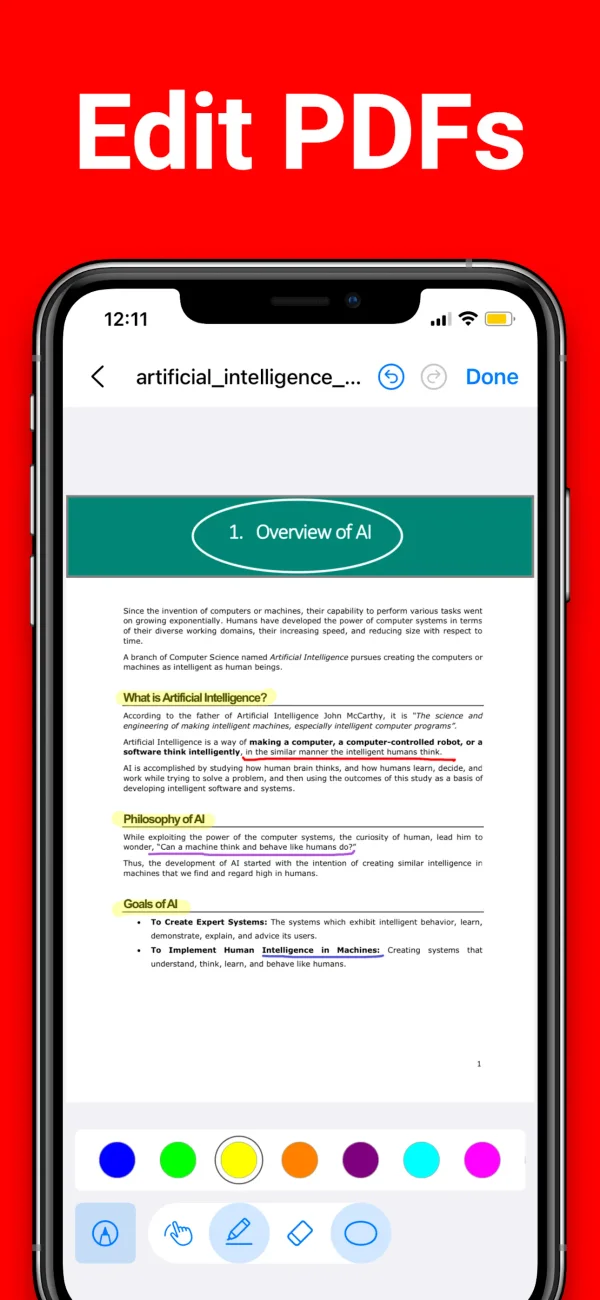
1. Annotation Tools: Mark up your PDFs with a variety of annotation tools including drawing lines, shapes, and freehand sketches.
2. Highlighting: Easily highlight important sections of your documents to emphasize key points or to make studying more efficient.
3. Eraser: Correct mistakes or remove annotations with the intuitive eraser tool.
4. Undo & Redo: Never worry about making mistakes - use the undo and redo buttons to easily correct any errors.
5. File Management: Keep your PDFs organized with a convenient file management system. Access, rename, delete, and rearrange your files effortlessly.
6. Multi-File Support: Open multiple PDF files simultaneously and switch between them seamlessly for efficient multitasking.
7. User-Friendly Interface: This app features an intuitive and user-friendly interface designed to streamline your workflow and maximize productivity.
8. Secure: Protect your sensitive documents with password encryption to ensure your privacy and confidentiality.
PRO Version: Unlock the full potential of our app with premium version. Payment will be charged to your iTunes account at confirmation of purchase. Subscriptions automatically renew unless auto-renew is turned off 24-hours before the end of the current period. Accounts will be charged for renewal within 24 hours of the end of the current period, and a renewal fee will be provided. The unused portion of a free trial period, if offered, will be forfeited when the user purchases a subscription to that product. Please note that a subscription is required for the complete functionality of the app.
Privacy: https://sites.google.com/view/kttechapps-privacy/home
Terms: https://sites.google.com/view/kttechapps-terms/home
Whether you're annotating lecture notes, reviewing business contracts, or simply reading for pleasure, this app is the ultimate PDF editing and viewing app for iOS. Download now and unlock the full potential of your PDF documents!
What’s new
Version 1.0.1 · Jul 17, 2024
Performance enhancements!
App privacy
What Kamalkumar Trapasiya declares on the App Store about how this app handles data.
-
Data not collected
The developer does not collect any data from this app.
Privacy practices may vary, for example with the features you use or your age.
Information
- Seller
- Kamalkumar Trapasiya
- Category
- Productivity
- Version
- 1.0.1
- Updated
- Jul 17, 2024
- Released
- May 13, 2024
- Size
- 34.6 MB
- Requires
- iOS 15.0 or later
- Age rating
- 4+
- Price
- Free
- In-app purchases
- Yes
- Languages
- English
- Copyright
- © 2024 PDF Editor
You might also like
-
 PDF Max - Edit, Sign PDFsScan, OCR, Research & Study
-
 PDF Editor : PDF Reader,SignerEdit Text, Sign PDF,Fill Forms
-
 Drawboard PDF Annotate, MarkupWrite & Type on PDFs and Notes
-
 PDF Export: Editor & ConverterTools, Scan, Compress & Merge
-
 FreeEdit, PDF EditorProductivity
-
 Highlights: PDF Reader & NotesEdit Research Documents/Books
-
 PDF Reader – PDFelementPDF Editor & Viewer, PDF Maker
-
 Free PDF Editor, Converter AppReader Maker Pro: Edit & Sign
-
 PDF Pro - Reader Editor FormsEdit, annotate, view documents
-
 PDF Viewer by NutrientFill Forms, Sign, Edit, Redact