- Age rating4+
- CategoryUtilities
- DeveloperAshen Ishanka Costha
- LanguagesEnglish
- Size5.1 MB
Links to the official App Store page
Download.org hosts no file of PDF Unlocker Pro. The button opens its official App Store page, published by Ashen Ishanka Costha. Listing last checked on Nov 18, 2026.
Screenshots

About
Effortlessly unlock password-protected PDFs and secure your documents with custom passwords. PDF Unlocker Pro is the essential tool for managing PDF security on your iOS device.
Important: For PDFs you own or are authorized to modify only. Always respect copyright and confidentiality agreements.
KEY FEATURES:
PDF Unlocking • Remove passwords from protected PDF files instantly • Support for all standard PDF encryption types • Fast and reliable password removal process • Maintain original document quality and formatting
PDF Password Protection • Add custom password protection to any PDF • Create secure passwords with confirmation • Protect sensitive documents with military-grade encryption • Control access to your important files
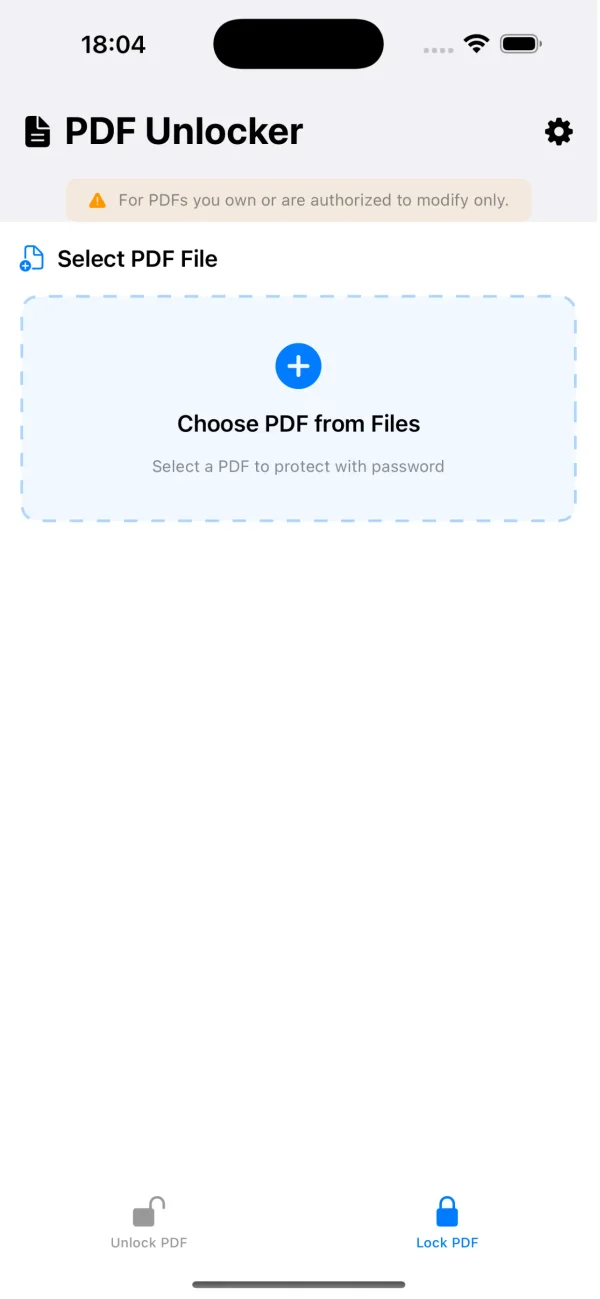
User-Friendly Interface • Clean, intuitive design built for iOS • Easy file selection from Files app • Real-time file information display (size, pages, security status) • Simple two-tab interface: Unlock & Lock
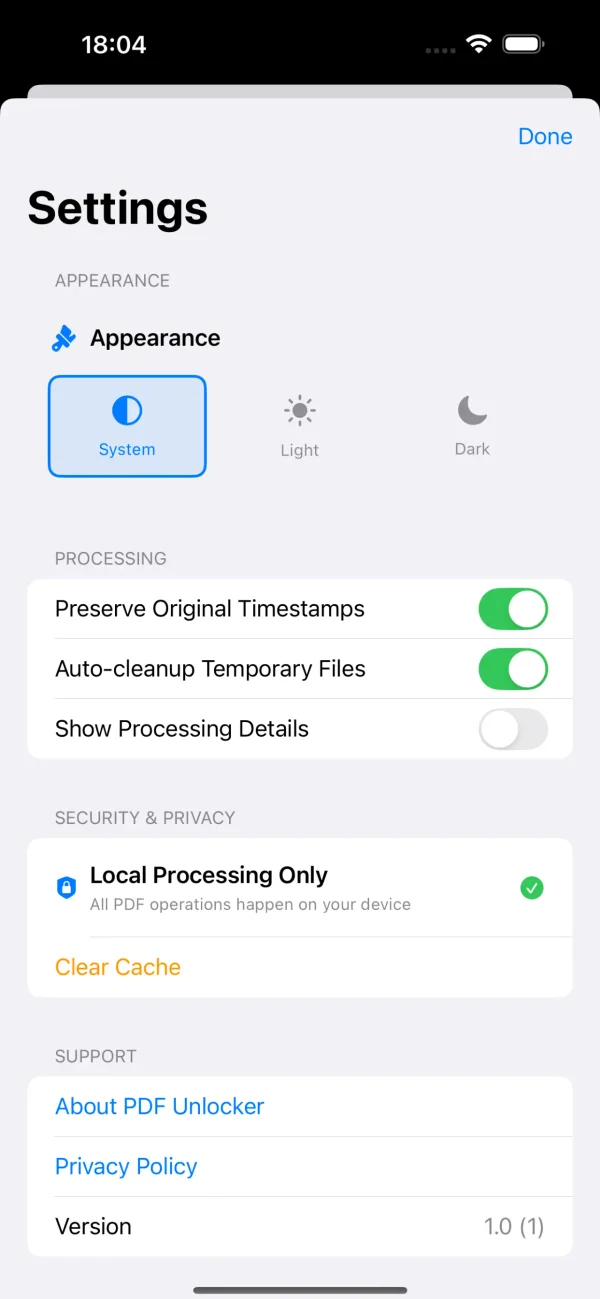
Privacy & Security • All processing happens locally on your device • No files uploaded to external servers • Automatic cleanup of temporary files • Built-in privacy disclaimers and warnings
Flexible Export Options • Save processed PDFs directly to Files app • Share documents via AirDrop, email, or messaging • Custom filename generation for organized storage • Support for all iOS sharing capabilities
Performance • Lightning-fast PDF processing • Handles large documents efficiently • Background processing with progress indicators • Optimized for all iOS devices
Enhanced Experience • Native iOS design language • Support for Dark Mode and Light Mode • Automatic theme switching based on system preferences • Accessibility features for all users
Smart File Management • Detailed file information cards • Page count and file size display • Lock status indicators • Easy file switching between operations
Perfect For: • Business professionals handling confidential documents • Students managing protected academic materials • Anyone needing to unlock legacy password-protected PDFs • Users wanting to secure personal documents • Professionals requiring document access control
Legal & Ethical Use PDF Unlocker Pro is designed for legitimate use with documents you own or are authorized to modify. Always respect copyright and confidentiality agreements.
Requirements: • iOS 16.0 or later • iPhone and iPad compatible • Files app integration • Storage space for document processing
Transform your PDF security workflow with PDF Unlocker Pro - the professional choice for PDF password management on iOS.
App Store Keywords (100 characters max)
PDF,unlock,password,protect,security,document,files,lock,encryption,business
What's New in This Version
Version 1.0 - Initial Release • Complete PDF unlocking and locking functionality • Intuitive tabbed interface for easy navigation
• Local processing for maximum privacy and security • Files app integration for seamless document management • Share and export options for processed documents • Dark Mode and Light Mode support • Optimized performance for all iOS devices
What’s new
Version 1.2 · Sep 26, 2025
PDF content no longer appears horizontally flipped when adding password protection. Locked PDFs now display correctly with proper text and image orientation.
App privacy
What Ashen Ishanka Costha declares on the App Store about how this app handles data.
-
Data not collected
The developer does not collect any data from this app.
Privacy practices may vary, for example with the features you use or your age.
Information
- Seller
- Ashen Ishanka Costha
- Category
- Utilities
- Version
- 1.2
- Updated
- Sep 26, 2025
- Released
- Sep 16, 2025
- Size
- 5.1 MB
- Requires
- iOS 16.0 or later
- Age rating
- 4+
- Price
- Free
- Languages
- English
- Copyright
- © Ashen Ishanka Costha
You might also like
-
 lock pdf | unlock pdf expertadd, remove password from pdf
-
 Omni PDF Unlocker - PasswordRemove PDF password easily
-
 Lock Pdf & Unlock PDF OfflineAdd & Remove Password From PDF
-
 Unlock my PDF: PDF PasswordPassword Remover & Protector
-
 Unlock PDF – Password RemoverRemove PDF passwords offline
-
 Pdf Locker & UnlockerLock, Unlock & Secure PDFs
-
 lock and unlock pdf - pdfsmithAdd, Remove password to PDF
-
 PDF: Lock & UnlockLock & Unlock PDF File
-
 PDF Password: Unlock & LockProtect, save & share files
-
 PDF Password Protector,CreatorPDF locking & Secure sharing