- Age rating4+
- CategoryUtilities
- DeveloperRick Peacock
- LanguagesEnglish
- Size938.0 KB
Links to the official App Store page
Download.org hosts no file of PhaseChecker. The button opens its official App Store page, published by Rick Peacock. Listing last checked on Nov 12, 2026.
Screenshots


About
The PhaseCheck app will run a test signal through your sound system to ensure your speakers are in-phase and wired with the correct polarity. It can be run either manually or automatically.
Manual mode allows you to run the test signal and flip the phase so you can listen yourself to ensure your sound system is setup correctly.
Automatic mode will run a series of test signals through your sound system and use the microphone on the device to analyse the results.
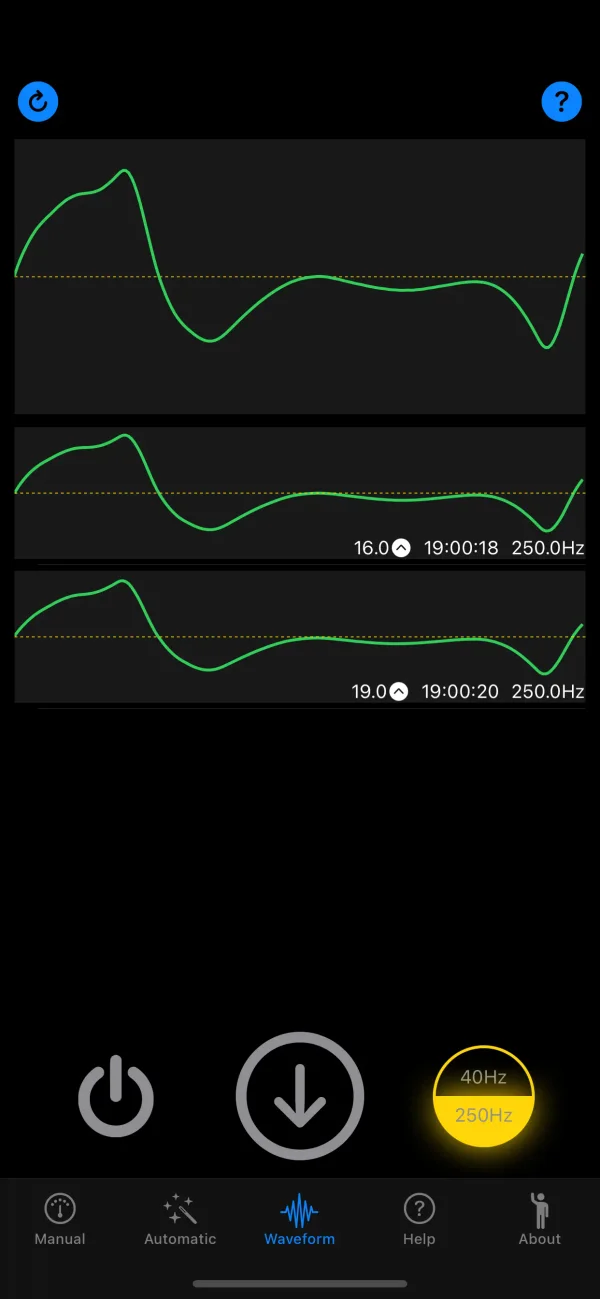
New in version 2.0 is a waveform view mode for advanced use. It allows you to play an asymmetrical waveform (ramp waveform), record the sound from each speaker close up and capture the waveforms to then compare them.
Phase is a difficult concept so full help is available in the app to ensure you get the best results.
You should check the phase of your sound system whenever the wiring has been changed to ensure everything is the correct polarity.
When a sound systems speakers are out of phase the sound quality is affected massively. Bass is reduced significantly and stereo imaging gives the illusion of the sounds pulling outside of the room.
To run the check connect your iOS device to your sound system so it can play audio. If possible place the iOS device evenly between the speakers. Phase cancellation will not occur close to the speakers so ensure the device is not too close. Ensure the volume is at a comfortable listening level and if possible ensure there is no background noise to interfere with the scan.
What’s new
Version 2.1 · Nov 21, 2023
- Improvements for working with bluetooth audio
- Improvements for iOS17
App privacy
What Rick Peacock declares on the App Store about how this app handles data.
-
Data not collected
The developer does not collect any data from this app.
Privacy practices may vary, for example with the features you use or your age.
Information
- Seller
- Rick Peacock
- Category
- Utilities
- Version
- 2.1
- Updated
- Nov 21, 2023
- Released
- Oct 4, 2016
- Size
- 938.0 KB
- Requires
- iOS 14.1 or later
- Age rating
- 4+
- Price
- $0.99
- Languages
- English
- Copyright
- © 2023 Audiodog
You might also like
-
 Tracebook - Speaker ReferenceActionable Field Data
-
 Polarity pulsesSpeaker Polarity Tester
-
 Zulu TimeUTC time app and complication
-
 SignalScope XSpectrum Analyzer, RTA & FFT
-
 HAA CinemaTools with HAA LinkHome Cinema Audio Analysis
-
 Surround Speaker CheckTest Dolby Atmos spatial audio
-
 Speaker Box LiteSubwoofer Box Calculator
-
 Wireless Workbench MobileWireless monitoring & control
-
 Audio Function GeneratorFrequency and Signal Generator
-
 Sound Spectrum AnalysisAudio Frequency Analyzer (RTA)