
- Age rating4+
- CategoryPhoto & Video
- DeveloperRichard Cox
- LanguagesEnglish
- Size3.9 MB
Links to the official App Store page
Download.org hosts no file of PhotoSlate. The button opens its official App Store page, published by Richard Cox. Listing last checked on Nov 12, 2026.
Screenshots
About
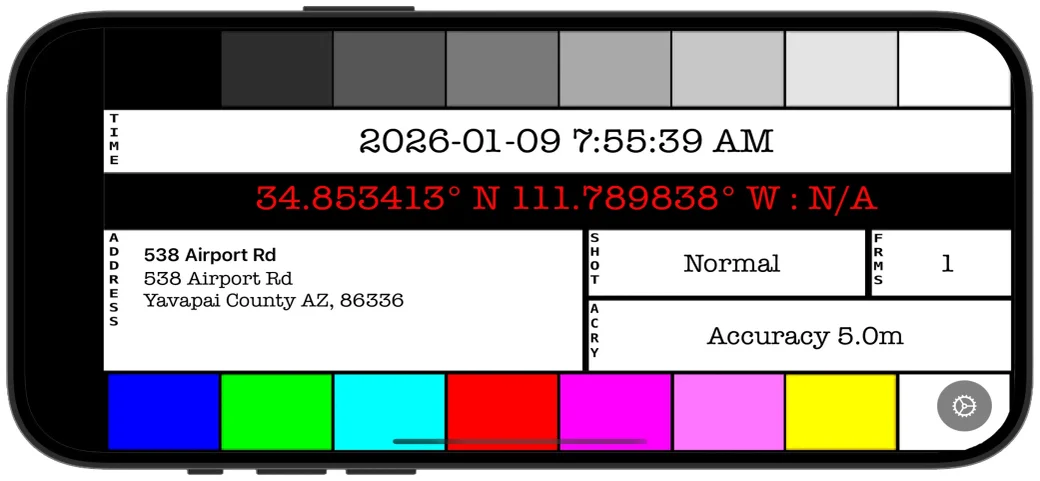
PhotoSlate is a location‑aware metadata slate for photographers who want accurate GPS, time, heading, and address information embedded directly into their shooting workflow. Designed for mirrorless and DSLR cameras without built‑in GPS, PhotoSlate acts as a digital clapperboard you photograph at the start of each session — giving you precise, camera‑agnostic metadata you can reference later in Lightroom, Capture One, or your cataloging system.
Open the app, frame the slate in your camera, and capture a perfectly formatted record of your shooting location. No pairing, no syncing, no cables — just clean, reliable metadata every time.
Key Features
* Real‑time GPS coordinates with multiple format options (DD, DM, DMS)
* True compass heading with cardinal direction
* Automatic reverse geocoding for street address and locality
* Customizable date and time formats for international workflows
* High‑contrast slate design optimized for camera capture and OCR
* SMPTE‑inspired color bars for white balance and exposure reference
* Offline‑first architecture — core features work without a network
* Landscape‑locked interface for consistent framing
* Deep link support so apps like GeoLog can launch PhotoSlate and return with one tap
Perfect For
* Mirrorless and DSLR photographers
* Location scouting
* Travel and landscape photography
* Time‑lapse and multi‑session projects
* Gear testing and documentation
* Astrophotography planning
How It Works
1. Launch PhotoSlate
2. Wait for GPS lock
3. Photograph the slate with your camera
4. Continue shooting — your metadata is now captured
PhotoSlate gives photographers a simple, reliable way to document where and when their images were created, even when their camera can’t.
What’s new
Version 2.1 · Apr 25, 2026
WHAT’S NEW (VERSION 2.1)
Version 2.1 adds deep link support so other apps can launch PhotoSlate and return with one tap. When PhotoSlate is opened using the photoslate URL scheme with optional return and source parameters, a return button appears in the top-left corner. Tapping it sends the user back to the calling app. When launched normally, PhotoSlate behaves exactly as before with no return button.
This update also includes improved reliability for GPS, heading, and reverse geocoding, along with general performance and UI refinements.
---
DEVELOPER NOTES: USING THE PHOTOSLATE DEEP LINK
PhotoSlate supports a simple URL scheme that allows any iOS app to launch it and optionally provide a return path.
Base scheme:
photoslate://
Optional parameters:
return = a callback URL your app wants PhotoSlate to open when the user taps the return button
source = the display name shown on the return button
Example:
let url = URL(string: “photoslate://?return=myapp://&source=My%20App”)!
UIApplication.shared.open(url)
Behavior:
If both return and source are provided, PhotoSlate shows a capsule button in the top-left corner. Tapping it returns the user to your app using the callback URL. If no parameters are provided, PhotoSlate launches normally with no return button.
Registering the scheme in your app:
Add “photoslate” to LSApplicationQueriesSchemes in your Info.plist so your app can check for and open PhotoSlate.
App Store fallback:
If PhotoSlate is not installed, open the App Store page:
https://apps.apple.com/us/app/photoslate/id961512751
App privacy
What Richard Cox declares on the App Store about how this app handles data.
-
Data not collected
The developer does not collect any data from this app.
Privacy practices may vary, for example with the features you use or your age.
Information
- Seller
- Richard Cox
- Category
- Photo & Video
- Version
- 2.1
- Updated
- Apr 25, 2026
- Released
- Mar 4, 2015
- Size
- 3.9 MB
- Requires
- iOS 17.6 or later
- Age rating
- 4+
- Price
- Free
- Languages
- English
- Copyright
- © 2015 Richard Cox, AlwaysPhotographing
You might also like
-
 Evios: Light Meter for FilmSpot Metering & Reciprocity
-
 MonoSnap - B&W Art Cambecome a master of b&w images
-
 Reel Life: Photo CalendarPhoto Diary, Journal & Memory
-
 FilmStyleCam: Retro instantFilmStyleCam: Retro instant
-
 PhotoRiverYour Memories, Perfected
-
 BSelf CameraTrue Beauty Camera & Filters
-
 FlockEyePhoto & Video
-
 ShareGuard: Blur & RedactBlur Screenshots & Metadata
-
 Kompressor - Compress imagesRAW Image Converter
-
 Trippy KaleidoscopeHypnotic Mandala Animations