
QHit
Live Music & Sound Effects
Designed for iPhone, iPad, Mac, iPod touch
Free · In-app purchases
- Age rating4+
- CategoryMusic
- DeveloperZhongshan AppKIS Software Studio (Individually Owned Business)
- LanguagesEnglish+ 9 more
- Size17.8 MB
Links to the official App Store page
Download.org hosts no file of QHit. The button opens its official App Store page, published by Zhongshan AppKIS Software Studio (Individually Owned Business). Listing last checked on Nov 16, 2026.
Screenshots

About
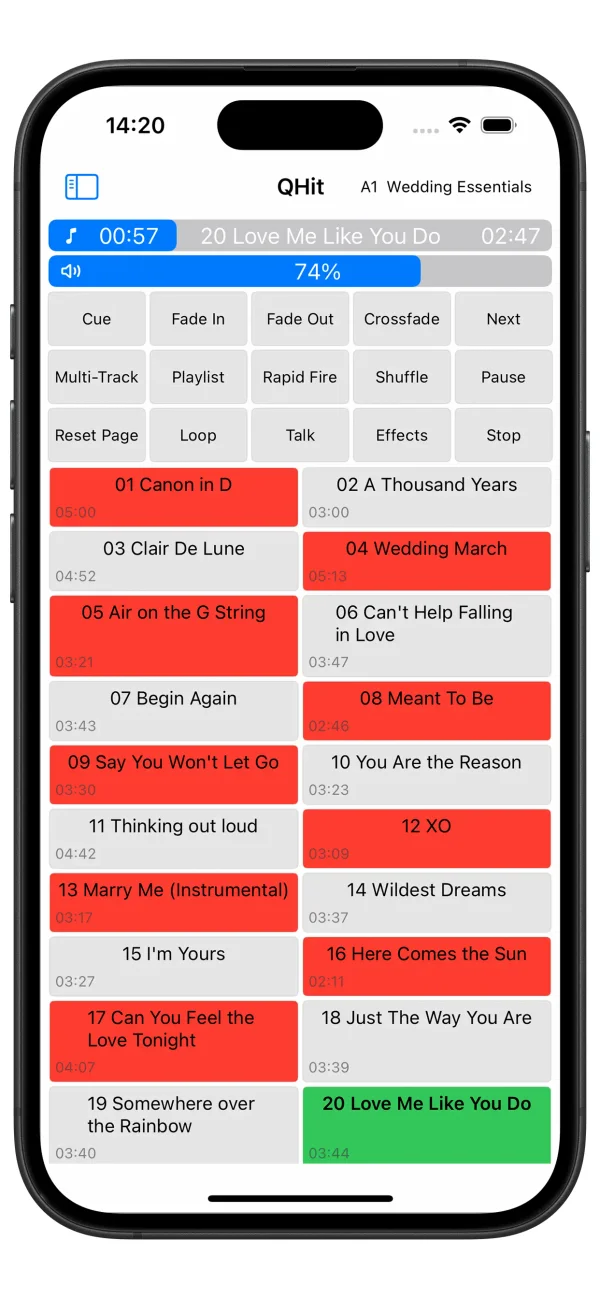
QHit is a stage music control app built for live performances. It provides the essentials you need on stage: remote control (emcee remote clicker), Fade In/Fade Out/Crossfade, Talk Ducking, Multi-Track playback, Loop/Single-Track Loop, A-B Looping, and audio effects.
We recommend storing all music in the system default Music folder (usually shown with a music-note icon). Keeping files there helps avoid permission issues.
Supported Audio Formats: AAC, AC3, AIFF, CAF, FLAC, MP3, MP4, M4A, M4R, WAV.
1. Pages Area (Left)
Import Folder: Automatically creates pages and imports up to 48 audio files from the folder.
• Method 1: Right-click a page → select Import Folder
• Method 2: Drag and drop a folder into the Pages area
2. Music Area (Right)
Import Music:
• Method 1: Right-click a music button → select Import Music
• Method 2: Drag and drop audio files into the Music area
3. Button Colors
• Gray: Default / no custom color
• Green: Playing
• Red: Played
• Purple: File link is invalid
• Black: Place marker (not a music button)
4. Hotkeys
• P: Pause / Resume
• Space: Stop (stops all sounds in Multi-Track mode)
5. Features & Controls
5.1 Playback Modes
• Cue: Opens the Cue page for a temporary performance playlist.
• Multi-Track: Plays up to 5 sounds at the same time. When enabled, Crossfade and Playlist are disabled. Click a playing sound again to stop it; click Stop to stop all sounds. The timer shows the sound that ends first.
• Playlist: Starts sequential playback from any position to the end of the page (left-to-right, top-to-bottom). Played (red), invalid (purple), and place-marker (black) buttons are skipped automatically.
• Rapid Fire: Available only with Playlist. Playback pauses after each sound; press Space to play the next sound. Press Space while a sound is playing to stop it.
• Shuffle: Available only with Playlist. Randomly plays the next sound from the current position without repeating, until the page finishes.
5.2 Fades & Volume
• Fade In: Fades in from silence to the preset level when playback starts.
• Fade Out: Fades out to silence and then stops when you press Stop.
• Crossfade: When switching sounds, the current sound fades out while the new sound fades in (not available in Multi-Track mode).
• Talk: One tap fades the volume down to the “Talk Volume” level; tap again to fade back up.
5.3 Playback Controls
• Pause: Pause/Resume the current sound.
• Stop: Stop the current sound (stops all sounds in Multi-Track mode).
• Next: Plays the next unplayed sound.
• Loop: Repeats the current sound until you press Stop.
• Reset Page: Resets all buttons on the current page back to “Unplayed.”
6. Effects
Supports Equalizer, Tempo, and Reverb settings.
Privacy Policy: https://appkis.com/privacy-policy.aspx
License Agreement: https://appkis.com/terms-of-use.aspx
What’s new
Version 5.2.1 · Oct 28, 2026
Added a “Restart After All Music Has Played” option. When no playable music remains on the current page, Next starts a new playback cycle.
App privacy
What Zhongshan AppKIS Software Studio (Individually Owned Business) declares on the App Store about how this app handles data.
-
Data not collected
The developer does not collect any data from this app.
Privacy practices may vary, for example with the features you use or your age.
Information
- Seller
- Zhongshan AppKIS Software Studio (Individually Owned Business)
- Category
- Music
- Version
- 5.2.1
- Updated
- Oct 28, 2026
- Released
- Mar 9, 2022
- Size
- 17.8 MB
- Requires
- iOS 15.0 or later
- Age rating
- 4+
- Price
- Free
- In-app purchases
- Yes
- Languages
- English, French, German, Japanese, Korean, Portuguese, Russian, Simplified Chinese, Spanish, Traditional Chinese
- Copyright
- Copyright © 2023 Zhongshan AppKIS Software Studio. All rights reserved.
You might also like
-
 SQ Theatre Sound CuesCue the show's music & effects
-
 Sound Board Pro - Audio PadsSoundboard for live show, SFX
-
 Go ButtonProfessional audio playback
-
 Sports Audio DJGame day music & sound board
-
 Easy PerformerMusic
-
 DM StageMixMusic
-
 DM3 StageMixMusic
-
 au editor - audio cutterAudacity,Cool Edit,merge audio
-
 Soundboard Studio: Sound BoardEffects & Cues for Live Shows
-
 Launchpad - Music & Beat MakerPlay, Record & Remix like a DJ