QHit
Live Music & Sound Effects
Được thiết kế cho iPhone, iPad, Mac, iPod touch
Miễn phí · Mua hàng trong ứng dụng
- Độ tuổi4+
- Danh mụcNhạc
- Nhà phát triểnZhongshan AppKIS Software Studio (Individually Owned Business)
- Ngôn ngữTiếng Anh+ 9 ngôn ngữ khác
- Kích thước17,8 MB
Liên kết đến trang App Store chính thức
Download.org không lưu trữ tệp nào của QHit. Nút này mở trang ứng dụng trên App Store, nơi Zhongshan AppKIS Software Studio (Individually Owned Business) phát hành ứng dụng. Trang được kiểm tra lần cuối: 16/11/2026.
Ảnh chụp màn hình

Giới thiệu
Nhà phát triển chưa cung cấp nội dung này bằng ngôn ngữ của bạn.
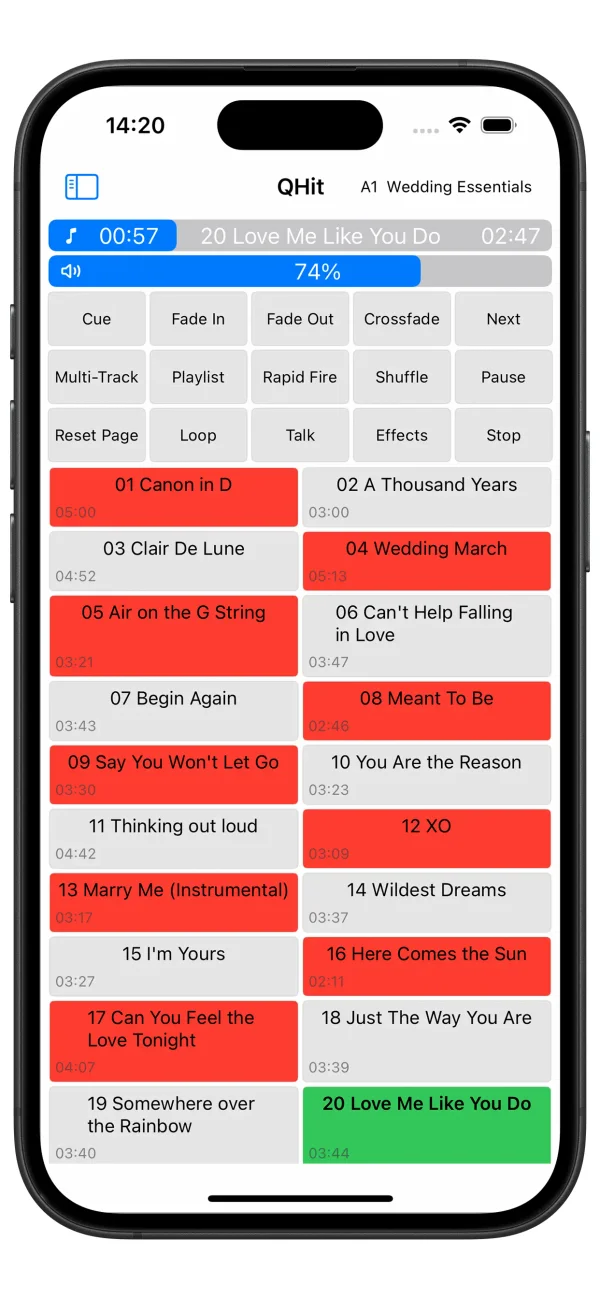
QHit is a stage music control app built for live performances. It provides the essentials you need on stage: remote control (emcee remote clicker), Fade In/Fade Out/Crossfade, Talk Ducking, Multi-Track playback, Loop/Single-Track Loop, A-B Looping, and audio effects.
We recommend storing all music in the system default Music folder (usually shown with a music-note icon). Keeping files there helps avoid permission issues.
Supported Audio Formats: AAC, AC3, AIFF, CAF, FLAC, MP3, MP4, M4A, M4R, WAV.
1. Pages Area (Left)
Import Folder: Automatically creates pages and imports up to 48 audio files from the folder.
• Method 1: Right-click a page → select Import Folder
• Method 2: Drag and drop a folder into the Pages area
2. Music Area (Right)
Import Music:
• Method 1: Right-click a music button → select Import Music
• Method 2: Drag and drop audio files into the Music area
3. Button Colors
• Gray: Default / no custom color
• Green: Playing
• Red: Played
• Purple: File link is invalid
• Black: Place marker (not a music button)
4. Hotkeys
• P: Pause / Resume
• Space: Stop (stops all sounds in Multi-Track mode)
5. Features & Controls
5.1 Playback Modes
• Cue: Opens the Cue page for a temporary performance playlist.
• Multi-Track: Plays up to 5 sounds at the same time. When enabled, Crossfade and Playlist are disabled. Click a playing sound again to stop it; click Stop to stop all sounds. The timer shows the sound that ends first.
• Playlist: Starts sequential playback from any position to the end of the page (left-to-right, top-to-bottom). Played (red), invalid (purple), and place-marker (black) buttons are skipped automatically.
• Rapid Fire: Available only with Playlist. Playback pauses after each sound; press Space to play the next sound. Press Space while a sound is playing to stop it.
• Shuffle: Available only with Playlist. Randomly plays the next sound from the current position without repeating, until the page finishes.
5.2 Fades & Volume
• Fade In: Fades in from silence to the preset level when playback starts.
• Fade Out: Fades out to silence and then stops when you press Stop.
• Crossfade: When switching sounds, the current sound fades out while the new sound fades in (not available in Multi-Track mode).
• Talk: One tap fades the volume down to the “Talk Volume” level; tap again to fade back up.
5.3 Playback Controls
• Pause: Pause/Resume the current sound.
• Stop: Stop the current sound (stops all sounds in Multi-Track mode).
• Next: Plays the next unplayed sound.
• Loop: Repeats the current sound until you press Stop.
• Reset Page: Resets all buttons on the current page back to “Unplayed.”
6. Effects
Supports Equalizer, Tempo, and Reverb settings.
Privacy Policy: https://appkis.com/privacy-policy.aspx
License Agreement: https://appkis.com/terms-of-use.aspx
Có gì mới
Phiên bản 5.2.1 · 28/10/2026
Added a “Restart After All Music Has Played” option. When no playable music remains on the current page, Next starts a new playback cycle.
Quyền riêng tư của ứng dụng
Những gì Zhongshan AppKIS Software Studio (Individually Owned Business) khai báo trên App Store về cách ứng dụng này xử lý dữ liệu.
-
Dữ liệu không được thu thập
Nhà phát triển không thu thập bất kỳ dữ liệu nào từ ứng dụng này.
Phương thức đảm bảo quyền riêng tư có thể khác nhau, chẳng hạn như tuỳ theo các tính năng bạn sử dụng hoặc độ tuổi của bạn.
Thông tin
- Người bán
- Zhongshan AppKIS Software Studio (Individually Owned Business)
- Danh mục
- Nhạc
- Phiên bản
- 5.2.1
- Cập nhật
- 28/10/2026
- Phát hành
- 09/03/2022
- Kích thước
- 17,8 MB
- Yêu cầu
- iOS 15.0 trở lên
- Độ tuổi
- 4+
- Giá
- Miễn phí
- Mua hàng trong ứng dụng
- Có
- Ngôn ngữ
- Tiếng Anh, Tiếng Pháp, Tiếng Đức, Tiếng Nhật, Tiếng Hàn, Tiếng Bồ Đào Nha, Tiếng Nga, Tiếng Trung Giản thể, Tiếng Tây Ban Nha, Tiếng Trung Phồn thể
- Bản quyền
- Copyright © 2023 Zhongshan AppKIS Software Studio. All rights reserved.