QHit
Live Music & Sound Effects
iPhone, iPad, Mac, iPod touch için tasarlandı
Ücretsiz · Uygulama içi satın alma
- Yaş sınırı4+
- KategoriMüzik
- GeliştiriciZhongshan AppKIS Software Studio (Individually Owned Business)
- Dillerİngilizce+ 9 dil daha
- Boyut17,8 MB
Resmi App Store sayfasına bağlanır
Download.org, QHit için hiçbir dosya barındırmaz. Düğme, uygulamanın App Store üzerindeki sayfasını açar; uygulamayı orada Zhongshan AppKIS Software Studio (Individually Owned Business) yayınlar. Sayfanın son kontrolü: 16.11.2026.
Ekran görüntüleri

Hakkında
Geliştirici bu metni dilinizde sunmamış.
QHit is a stage music control app built for live performances. It provides the essentials you need on stage: remote control (emcee remote clicker), Fade In/Fade Out/Crossfade, Talk Ducking, Multi-Track playback, Loop/Single-Track Loop, A-B Looping, and audio effects.
We recommend storing all music in the system default Music folder (usually shown with a music-note icon). Keeping files there helps avoid permission issues.
Supported Audio Formats: AAC, AC3, AIFF, CAF, FLAC, MP3, MP4, M4A, M4R, WAV.
1. Pages Area (Left)
Import Folder: Automatically creates pages and imports up to 48 audio files from the folder.
• Method 1: Right-click a page → select Import Folder
• Method 2: Drag and drop a folder into the Pages area
2. Music Area (Right)
Import Music:
• Method 1: Right-click a music button → select Import Music
• Method 2: Drag and drop audio files into the Music area
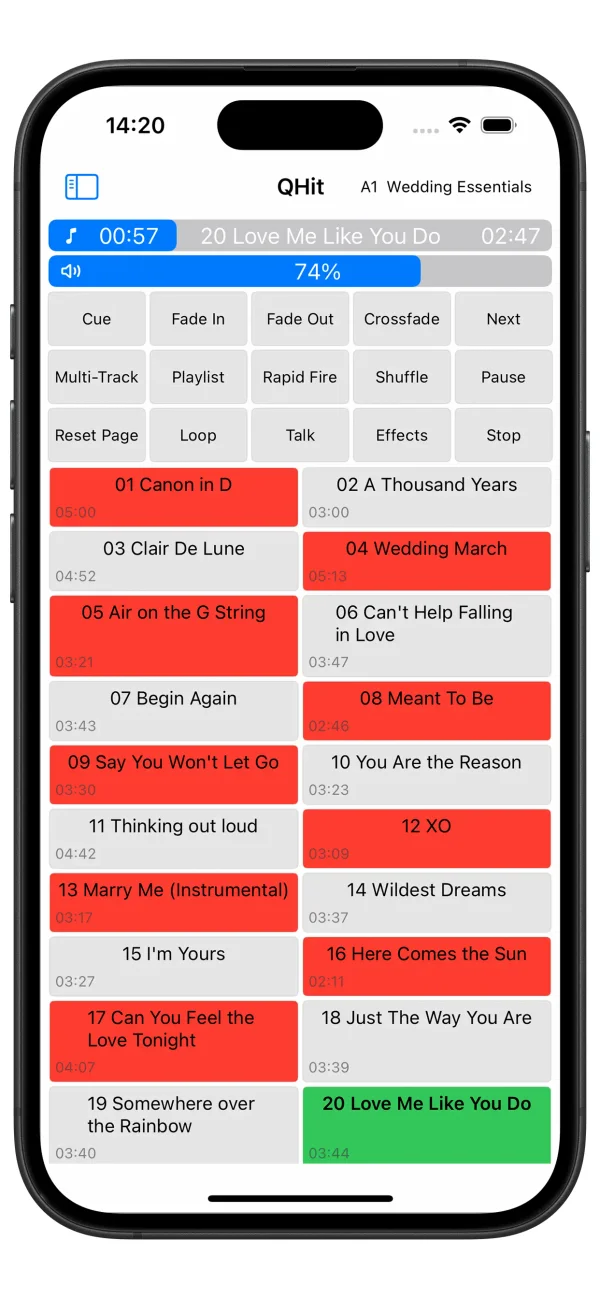
3. Button Colors
• Gray: Default / no custom color
• Green: Playing
• Red: Played
• Purple: File link is invalid
• Black: Place marker (not a music button)
4. Hotkeys
• P: Pause / Resume
• Space: Stop (stops all sounds in Multi-Track mode)
5. Features & Controls
5.1 Playback Modes
• Cue: Opens the Cue page for a temporary performance playlist.
• Multi-Track: Plays up to 5 sounds at the same time. When enabled, Crossfade and Playlist are disabled. Click a playing sound again to stop it; click Stop to stop all sounds. The timer shows the sound that ends first.
• Playlist: Starts sequential playback from any position to the end of the page (left-to-right, top-to-bottom). Played (red), invalid (purple), and place-marker (black) buttons are skipped automatically.
• Rapid Fire: Available only with Playlist. Playback pauses after each sound; press Space to play the next sound. Press Space while a sound is playing to stop it.
• Shuffle: Available only with Playlist. Randomly plays the next sound from the current position without repeating, until the page finishes.
5.2 Fades & Volume
• Fade In: Fades in from silence to the preset level when playback starts.
• Fade Out: Fades out to silence and then stops when you press Stop.
• Crossfade: When switching sounds, the current sound fades out while the new sound fades in (not available in Multi-Track mode).
• Talk: One tap fades the volume down to the “Talk Volume” level; tap again to fade back up.
5.3 Playback Controls
• Pause: Pause/Resume the current sound.
• Stop: Stop the current sound (stops all sounds in Multi-Track mode).
• Next: Plays the next unplayed sound.
• Loop: Repeats the current sound until you press Stop.
• Reset Page: Resets all buttons on the current page back to “Unplayed.”
6. Effects
Supports Equalizer, Tempo, and Reverb settings.
Privacy Policy: https://appkis.com/privacy-policy.aspx
License Agreement: https://appkis.com/terms-of-use.aspx
Yenilikler
Sürüm 5.2.1 · 28.10.2026
Added a “Restart After All Music Has Played” option. When no playable music remains on the current page, Next starts a new playback cycle.
Uygulama gizliliği
Bu uygulamanın verileri nasıl işlediği hakkında Zhongshan AppKIS Software Studio (Individually Owned Business) tarafından App Store üzerinde yapılan beyan.
-
Veri toplanmıyor
Geliştirici bu uygulamadan hiçbir veri toplamıyor.
Gizlilik uygulamaları, örneğin kullandığınız özelliklere veya yaşınıza göre değişiklik gösterebilir.
Bilgiler
- Satıcı
- Zhongshan AppKIS Software Studio (Individually Owned Business)
- Kategori
- Müzik
- Sürüm
- 5.2.1
- Güncellendi
- 28.10.2026
- Yayın tarihi
- 09.03.2022
- Boyut
- 17,8 MB
- Gereksinim
- iOS 15.0 veya sonrası
- Yaş sınırı
- 4+
- Fiyat
- Ücretsiz
- Uygulama içi satın alma
- Evet
- Diller
- İngilizce, Fransızca, Almanca, Japonca, Korece, Portekizce, Rusça, Basitleştirilmiş Çince, İspanyolca, Geleneksel Çince
- Telif hakkı
- Copyright © 2023 Zhongshan AppKIS Software Studio. All rights reserved.