
QPdf - PDF Reader & Editor
Edit, sign & scan PDFs offline
Designed for iPhone, iPad, iPod touch
- Age rating4+
- CategoryProductivity
- DeveloperGaurav Neupane
- LanguagesEnglish
- Size91.5 MB
Links to the official App Store page
Download.org hosts no file of QPdf - PDF Reader & Editor. The button opens its official App Store page, published by Gaurav Neupane. Listing last checked on Nov 12, 2026.
Screenshots
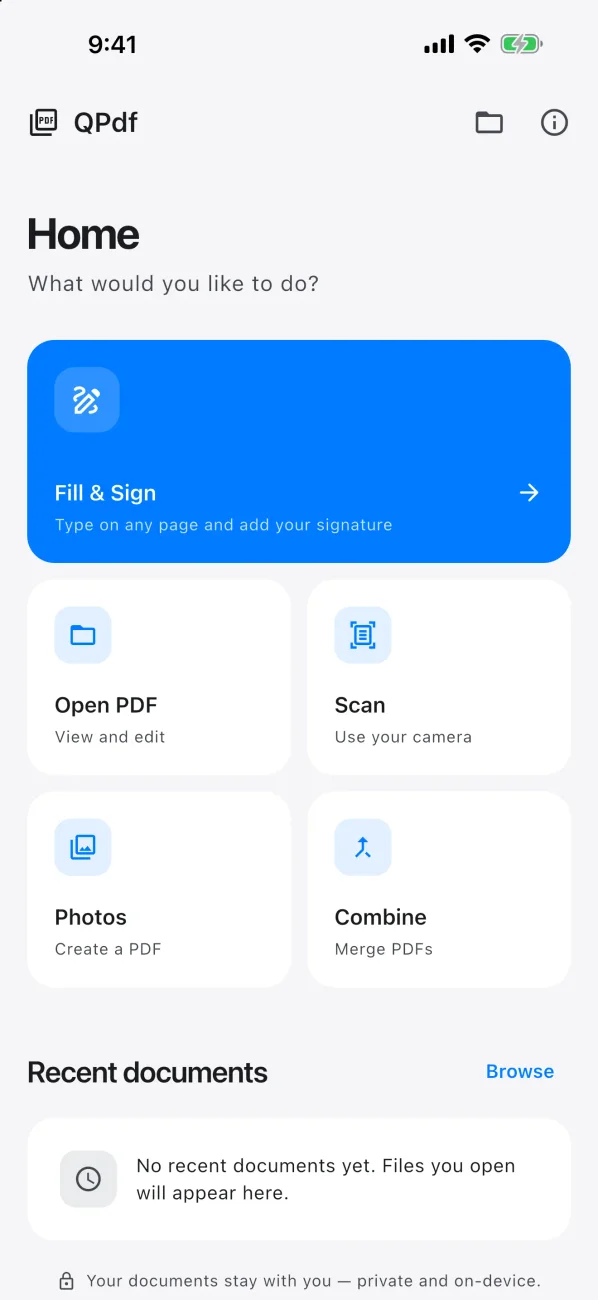
About
QPdf is a local-first PDF workspace for phone, tablet and desktop. Your
documents stay on your device.
READ AND SEARCH
• Fast page rendering with text selection and in-document search
• Open PDFs straight from Files, email or any app that shares them
ANNOTATE AND MARK UP
• Highlight, underline, strike through and draw freehand
• Add sticky notes, shapes, arrows and images to any page
FILL AND SIGN
• Type text anywhere on a page — it works the same on scanned and flattened
forms as on digital ones
• Draw a signature, or apply a cryptographic digital signature
ORGANISE PAGES
• Reorder, rotate, delete, extract and merge pages
• Combine several PDFs into one
• Add page numbers
CREATE AND CONVERT
• Build a PDF from photos
• Scan paper with the camera
• Add a searchable text layer with on-device OCR — pages are never uploaded
PROTECT
• Secure redaction produces an image-only copy and strips searchable text,
interactive content, metadata and existing signatures
• PDF/UA and PDF/A accessibility and archiving audits
PRIVATE BY DESIGN
No account. No advertising SDK. No analytics SDK. QPdf does not upload the PDFs
you open. The only network request is an optional one-time OCR model download,
verified against a published checksum.
Free, with no subscription and no watermark.
App privacy
What Gaurav Neupane declares on the App Store about how this app handles data.
-
Data not collected
The developer does not collect any data from this app.
Privacy practices may vary, for example with the features you use or your age.
Information
- Seller
- Gaurav Neupane
- Category
- Productivity
- Version
- 1.0
- Updated
- Sep 3, 2026
- Released
- Sep 3, 2026
- Size
- 91.5 MB
- Requires
- iOS 15.0 or later
- Age rating
- 4+
- Languages
- English
- Copyright
- © 2026 Gaurav Neupane
You might also like
-
 Bayran Office: PDF EditorWord, Excel, sign & scan
-
 PDFWorldEditor: PDF EditorSign, edit, merge & scan PDFs
-
 42 PDF Editor: Sign & AnnotateFill, sign, edit & scan PDFs
-
 Pure PDF Editor OfflinePrivate PDF Editor & Filler
-
 Glazr DOCX File Editor ProEdit DOCX Offline • Export PDF
-
 DartPDF: Edit PDF DocumentsSign, Annotate, Fill & Redact
-
 PDFfiled: PDF Editor-ScannerFill & Sign PDF. No Watermark
-
 tebDictate: Dictate to PC/MacMedical & everyday dictation
-
 Smart Tasks AI SchedulerAI Calendar & Task Planner
-
 Unlock PDF - Password RemoverOpen Encrypted & Secured Files