
QuickImage - Photo Layers
Layer Photo Editor
Designed for iPhone, iPad, Mac, iPod touch
Free · In-app purchases
- Age rating4+
- CategoryGraphics & Design
- DeveloperKAZUHIRO KAKIMOTO
- LanguagesEnglish
- Size104.1 MB
Links to the official App Store page
Download.org hosts no file of QuickImage - Photo Layers. The button opens its official App Store page, published by KAZUHIRO KAKIMOTO. Listing last checked on Nov 14, 2026.
Screenshots
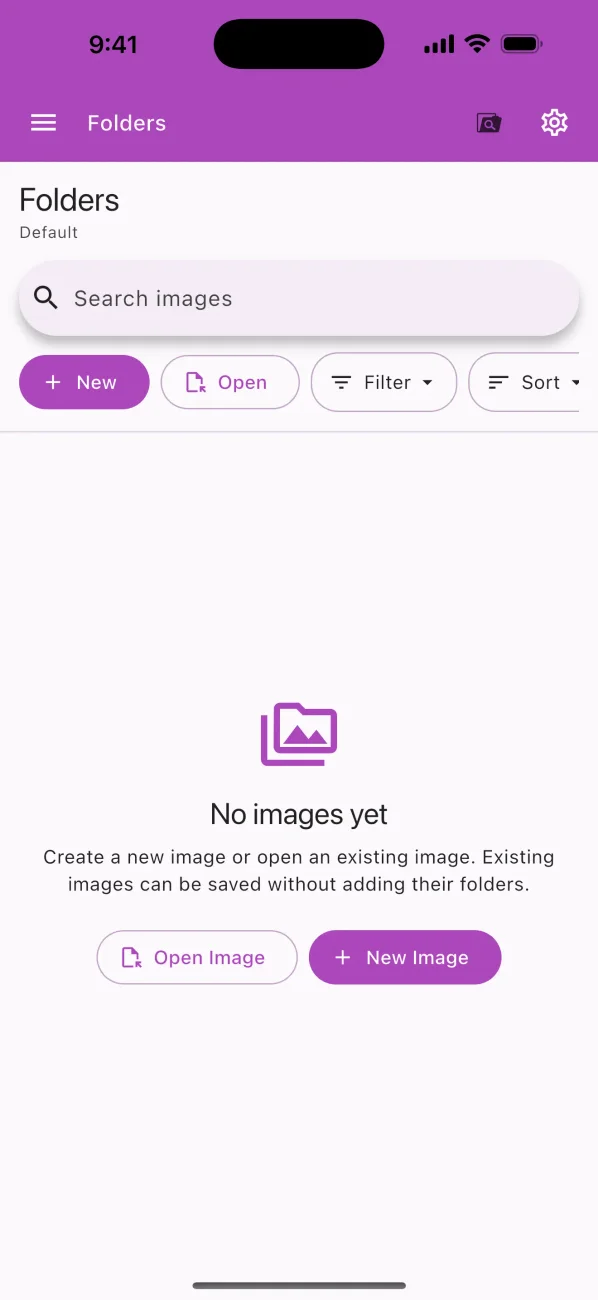
About
QuickImage is a layered image editor for iPhone, iPad, and Mac. It combines approachable photo editing, painting, compositing, annotation, professional file compatibility, and local AI while keeping Original media separate from editable Drafts and Exports.
LAYERED EDITING:
- Build .qimg projects with raster layers, groups, masks, clipping, blend modes, opacity, locks, and verified thumbnails
- Paint with brush, eraser, fill, gradient, clone, pressure mapping, stabilizer, and palm-rejection controls
- Add editable text and shapes, crop or resize the canvas, and transform selections and layers
- Undo and redo real document changes with autosave, recovery, and explicit dirty-state decisions
SELECTIONS AND FILTERS:
- Use rectangle, ellipse, free lasso, polygon, color wand, feather, grow, shrink, invert, and alpha selection
- Preview and apply levels, curves, color balance, hue and saturation, blur, sharpen, noise reduction, pixelate, vignette, and edge filters
- Keep long operations understandable with phase, progress, Cancel, Retry, and safe rollback
FILE WORKFLOWS:
- Import PNG, JPEG, WebP, TIFF, HEIF, PSD/PSB, OpenRaster, and MDP
- Preserve supported PSD layers and report unsupported pass-through content before editing or export
- Export PNG, JPEG, WebP, TIFF, PDF, and layered PSD, then track Original, Draft, and Export lineage
- Use Files, Photos, Camera, Clipboard, scoped folders, and share actions when supported by the device
PRIVATE ON-DEVICE AI:
- Remove backgrounds, select subjects, and remove selected objects through a review-before-apply workflow
- Run supported Vision, ML Kit, or verified ONNX models locally; image pixels are not uploaded for inference
- Apply results as a mask, selection, new layer, or explicit current-layer change with Undo support
AI AGENT WORKSPACE:
- Connect compatible AI agents through an authenticated MCP server on this device or an explicitly enabled local network
- Use verified image uploads, replace one Raster while preserving a reusable layered template, or apply up to 64 reviewed operations as one Undoable transaction
- Add advanced text, editable SVG and Bézier artwork, review persistent audit history, and approve each external publish request in the app
- QuickImage does not require an external image-generator URL and does not store a cloud image-generation API key
ACCESSIBLE AND RESPONSIVE:
- Use desktop menus and shortcuts, touch-first mobile layouts, bottom-docked mobile panels, stylus pressure, and palm rejection
- Navigate clear empty, unavailable, progress, error, permission, read-only, and recovery states
- Work in light or dark appearance with large-text and keyboard-friendly controls
QUICKIMAGE PRO:
- Removes mobile ads after the 7-day trial
- Hides desktop reminders
- Supports continued QuickImage development
- All editing, PSD, filter, and AI features remain available without a Pro purchase
Terms of Use: https://kakitiro.com/quickapps/quickimage/terms/
App privacy
What KAZUHIRO KAKIMOTO declares on the App Store about how this app handles data.
-
Data linked to you
May be collected and linked to your identity.
- Location
- Identifiers
- Usage data
-
Data not linked to you
May be collected but is not linked to your identity.
- Diagnostics
Privacy practices may vary, for example with the features you use or your age.
Information
- Seller
- KAZUHIRO KAKIMOTO
- Category
- Graphics & Design
- Version
- 0.1.4
- Updated
- Sep 2, 2026
- Released
- Aug 20, 2026
- Size
- 104.1 MB
- Requires
- iOS 14.0 or later
- Age rating
- 4+
- Price
- Free
- In-app purchases
- Yes
- Languages
- English
- Copyright
- © kakitiro.com
You might also like
-
 LayerPocketOffline PSD Layer Editor
-
 Painto Bitmap EditorSimple classic bitmap editor
-
 NPS Image EditorA multi-layer image editor
-
 Photo Editor ViewerLayers, Filters & Touch Edit
-
 KukuLayerCutouts, Layers & Collages
-
 FontSwipe - Font InstallerDiscover & Install Free Fonts
-
 Local 3D - Image to 3D ModelImage to 3D Model Maker
-
 LOGO TIME: 3D LOGO ANIMATORTurn logo into 3D animation
-
 editPaintImage Editor
-
 PSD Viewer: Open & View FilesPhotoshop & PSB File Inspector