- Age rating4+
- CategoryProductivity
- DeveloperJack Finnis
- LanguagesEnglish
- Size1.6 MB
Links to the official App Store page
Download.org hosts no file of Screen Time Tracker. The button opens its official App Store page, published by Jack Finnis. Listing last checked on Nov 20, 2026.
Screenshots


About
Your new screen time companion to stop using unproductive apps and block distracting websites. Completely free with no ads or in-app purchases.
KEY FEATURES
Some apps are productive! Filter them out to help you decrease your unproductive screen time.
Apple’s default app blocker is too easy to override! Choose apps and websites to block completely.
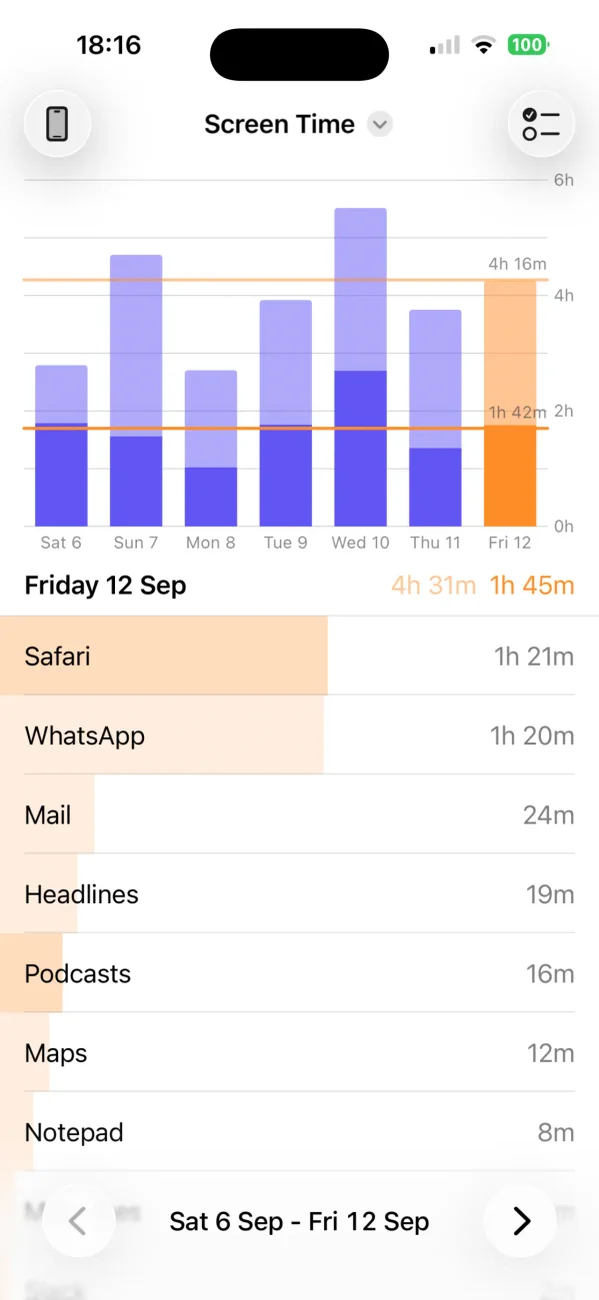
Visualise your screen time on beautiful, interactive charts.
Review your screen time usage progress over last four weeks.
See exactly which apps consume your time.
All your screen time data is kept completely private and only visible to you - not even the developer.
PERFECT FOR
STUDENTS - Allow productive study apps and block entertainment and social media
PROFESSIONALS - track your work vs personal device usage
ANYONE who wants to decrease the amount of time they spend on their device.
What’s new
Version 2.1 · Oct 21, 2025
Bug fixes and improvements.
App privacy
What Jack Finnis declares on the App Store about how this app handles data.
-
Data not collected
The developer does not collect any data from this app.
Privacy practices may vary, for example with the features you use or your age.
Information
- Seller
- Jack Finnis
- Category
- Productivity
- Version
- 2.1
- Updated
- Oct 21, 2025
- Released
- Dec 17, 2024
- Size
- 1.6 MB
- Requires
- iOS 26.0 or later
- Age rating
- 4+
- Price
- Free
- Languages
- English
- Copyright
- © 2025 Jack Finnis
You might also like
-
 Screen Time Control - Stay OffFocus,App Blocker,Timer
-
 Screen Time Control: InscreenApp Blocker, Stay Focused, CBT
-
 finit: Screen Time & LifeEvery day, kept for good
-
 Barrier: Screen Time For FocusBlock apps, limit distractions
-
 Screen Time - Break CheckHabit Timers, No App Blocking
-
 FlowIn - Screen Time ControlApp Blocker & Focus Timer
-
 Opal PRO, Social Media BlockerScreen Time Control, Focus
-
 Tonic: Earn Screen TimeEarn apps, control your scroll
-
 Screen Time Control - App LockFocus, App Blocker, Limit Apps
-
 Project Planner: MilestonesTask Manager & Goal Tracker