
Sibelius
Music Notation and Scoring App
Designed for iPhone, iPad, iPod touch
Free · In-app purchases
- Age rating4+
- CategoryMusic
- DeveloperAvid®
- LanguagesEnglish+ 8 more
- Size1.4 GB
Links to the official App Store page
Download.org hosts no file of Sibelius. The button opens its official App Store page, published by Avid®. Listing last checked on Nov 20, 2026.
Screenshots


About
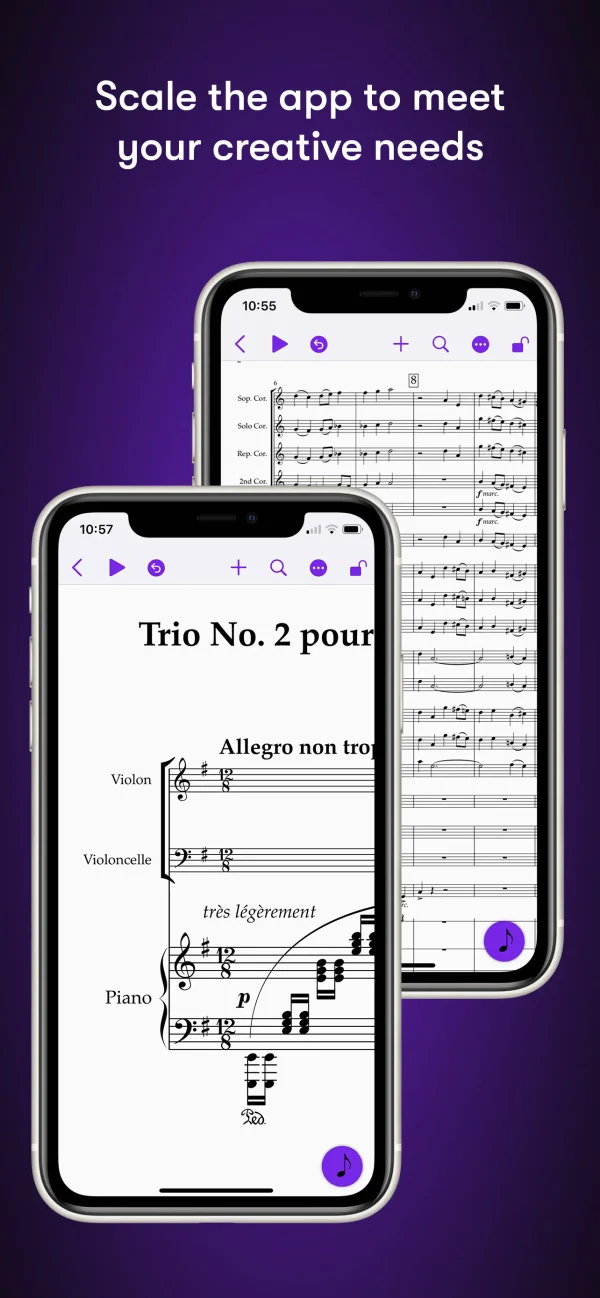
Sibelius brings professional music notation to iPad and iPhone, putting the workflows used by countless composers, orchestrators, and arrangers at your fingertips. Seamlessly move between iPad, iPhone and desktop, and from studio to coffeeshop to scoring stage, and write anywhere inspiration strikes.
# Work on scores anywhere
Sibelius for mobile puts the #1 selling music notation program at your fingertips—literally. Work with the same tools and features used by countless composers and production houses every day on your iPad and iPhone. Whether writing down ideas, creating full-blown compositions, or reviewing scores, you have the freedom to create wherever you’re comfortable.
#Take your portfolio to go
Forget having to bring and break out your laptop when meeting with clients and collaborators. Instead, you can conveniently take the world’s most powerful notation toolset and your entire music portfolio with you wherever you go—ideal for those unexpected opportunities. And for tandemly working through last-minute revisions.
# Hear your music in stunning detail
Sibelius includes a high-quality sample library filled with a variety of musical instrumentation, so you can hear what your music will sound like when performed by real musicians. The Espressivo advanced notation interpretation even lets you adjust rhythm and swing to create a more humanistic feel.
# Speed your workflow
Sibelius for mobile is designed to take full advantage of Apple Pencil and iPad touch capabilities. Its elegant, streamlined interface provides the most intuitive and efficient workflows possible while supporting the same keyboard shortcuts you know and love from working on the desktop version, so you’ll feel right at home.
# Get innovative note entry
Experience the pen and paper workflow reimagined. Enter notes with the onscreen Keypad or a keyboard, and Sibelius takes care of all note layout. Touch a note and drag up or down to change its value, or drag left or right to add a flat or sharp. With an Apple Pencil, tap a note and tilt up or down to add a flat or sharp, or tilt left or right to choose the note value.
# Have everything you need
In addition to the Keypad, Sibelius for mobile features a Create menu that’s optimized for iOS, making it easy to add clefs, key signatures, time signatures, barlines, symbols, text styles, and more to your score from searchable galleries. You can also quickly search through all Sibelius commands using the Command Search, putting the entire app at your fingertips.
# Move tiers to meet needs
Sibelius is designed to grow with you to support your creative aspirations and project needs. From the introductory (and free) Sibelius First to the industry-standard Sibelius Ultimate, you can add more notation capabilities and instrument parts to take on more creative opportunities by simply upgrading your subscription tier.
# Have everything on one creative platform
Seamlessly move from desktop to tablet and back without ever having to import or export files. That’s because whether on mobile or desktop, you’re always in Sibelius. With files saved to iCloud, Dropbox, Google Drive, or other iOS-supported cloud service, you have easy anywhere access to all your ideas and scores.
# Enable a hybrid workflow
While Sibelius for mobile is fully featured, providing many of the same tools as its desktop counterpart, there are some notation and layout features only available in the desktop version, making it an integral part of a complete workflow (compare versions). Plus, the mobile version comes free with the desktop version, enabling you to work where and how you want.
What’s new
Version 2026.11 · Nov 19, 2026
What's new in Sibelius 2026.11
# Intelligent articulations on tied notes
# More cross-staff two-note tremolo improvements
# Bug fixes for pickup bars, text items, score subsets, and more!
App privacy
What Avid® declares on the App Store about how this app handles data.
-
Data not linked to you
May be collected but is not linked to your identity.
- Usage data
- Diagnostics
Privacy practices may vary, for example with the features you use or your age.
Information
- Seller
- Avid Technology Inc
- Category
- Music
- Version
- 2026.11
- Updated
- Nov 19, 2026
- Released
- Jul 29, 2021
- Size
- 1.4 GB
- Requires
- iOS 13.4 or later
- Age rating
- 4+
- Price
- Free
- In-app purchases
- Yes
- Languages
- English, French, German, Italian, Japanese, Portuguese, Russian, Simplified Chinese, Spanish
- Copyright
- © 2026 Avid Technology, Inc.
You might also like
-
 Dorico - Compose MusicMusic Notation & Composer App
-
 Notation Pad-Sheet Music ScoreComposer, Score Creator&Writer
-
 Notion: Music Notation & TabCompose anywhere
-
 Flat: Sheet Music Maker & TabsCompose, Notate & Play Scores
-
 Piascore – Sheet Music ReaderMusic
-
 Maestro - Music ComposerWrite Music Quick and Easy
-
 Score Creator: Sheet MusicAccompaniment & PDF/Photo Scan
-
 Newzik: Sheet Music ReaderYour scores anytime, anywhere
-
 forScoreTurbocharge your sheet music
-
 Composer Pro-Sheet Music MakerCompose Music Score & Writer