Simple Pomodoro Timer + Watch
Watch sync & study log
Designed for iPhone
Free · In-app purchases
- Age rating4+
- CategoryProductivity
- DeveloperTakahiro Ito
- LanguagesEnglish+ 7 more
- Size9.7 MB
Links to the official App Store page
Download.org hosts no file of Simple Pomodoro Timer + Watch. The button opens its official App Store page, published by Takahiro Ito. Listing last checked on Nov 24, 2026.
Screenshots



About
A simple Pomodoro timer that helps you focus: 25 minutes of work, 5 minutes of break, repeat.
■ Truly works with Apple Watch
- iPhone and Apple Watch stay in sync in real time — control the timer from either device
- Works standalone on Apple Watch, no iPhone needed
- Feel a haptic alarm on your wrist exactly when the phase ends, even with the screen off
- Complications show the remaining time right on your watch face
■ Reliable in the background
- Notifications fire at the exact end time — even when the app is closed or the screen is locked
- Live Activity on the Lock Screen and Dynamic Island shows the countdown at a glance
- Start and pause from Home Screen / Lock Screen widgets (StandBy supported)
■ Track your focus
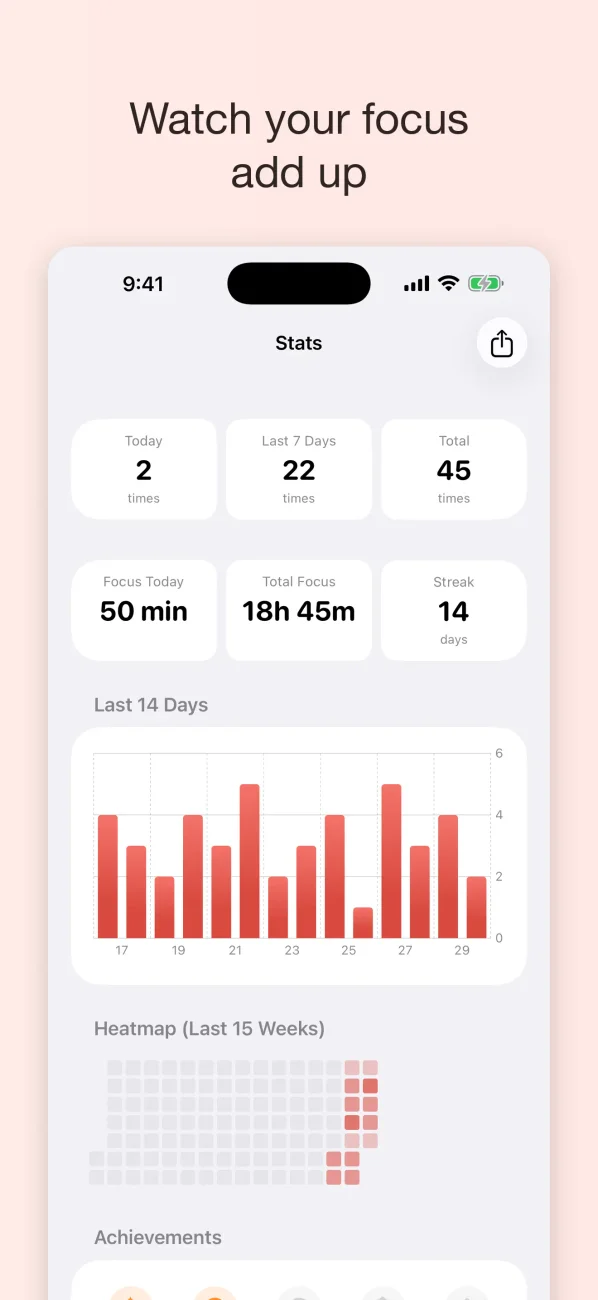
- Completed pomodoros are logged automatically, with an optional task label (tag)
- See today / weekly / all-time counts, total focus time, and your streak
- Per-tag breakdown shows where your time actually went
- Set a daily goal and watch the progress dots fill up
■ Make it yours
- Customize work and break lengths (down to seconds)
- Long break every 4 pomodoros — the classic Pomodoro cycle
- Choose alert sounds, haptic strength, and ambient sounds
■ No strings attached
- No account, no sign-up. Open the app and start
- Just a small banner ad at the bottom — it never interrupts your focus (one-time purchase to remove)
What’s new
Version 2.2 · Oct 21, 2026
• Fixed an issue where pausing on Apple Watch could leave the timer running on iPhone, adding pomodoros you never did to your stats
• New option to choose whether the next period starts automatically. Turn off "Auto-start next phase" in Settings to stop at the end of each work or break period and wait until you tap Start
App privacy
What Takahiro Ito declares on the App Store about how this app handles data.
-
Data not linked to you
May be collected but is not linked to your identity.
- Location
- Identifiers
- Usage data
- Diagnostics
Privacy practices may vary, for example with the features you use or your age.
Information
- Seller
- Takahiro Ito
- Category
- Productivity
- Version
- 2.2
- Updated
- Oct 21, 2026
- Released
- Jul 14, 2026
- Size
- 9.7 MB
- Requires
- iOS 17.0 or later
- Age rating
- 4+
- Price
- Free
- In-app purchases
- Yes
- Languages
- English, Arabic, Japanese, Korean, Portuguese, Simplified Chinese, Spanish, Traditional Chinese
- Copyright
- © Takahiro Ito
You might also like
-
 Pomo: Pomodoro Focus TimerDeep Work, Study & Calm
-
 PomodoroTimerWatch: FocusPomodoro Timer on Your Wrist
-
 Focus & Break TimerProductivity
-
 Pomodoro ポモドーロ タイマー/勉強・作業・集中Productivity
-
 ポモドーロタイマー~最もシンプルなアプリ~Productivity
-
 POMO | 勉強・仕事に集中するためのポモドーロタイマーProductivity
-
 Pomo Simple TimerFocus with the Pomodoro method
-
 FocusSpace: Study Pomo TimerPomodoro timer for study, work
-
 Simple Pomodoro Timer - DoroNo ads, Super simple timer
-
 WatchPomo - Focus TimerWatch-First Pomodoro Timer