
- Age rating4+
- CategoryEntertainment
- DeveloperBrad Howes
- LanguagesEnglish
- Size187.0 MB
Links to the official App Store page
Download.org hosts no file of SoundFonts. The button opens its official App Store page, published by Brad Howes. Listing last checked on Nov 14, 2026.
Screenshots






About
This is a straightforward yet powerful app that acts as a polyphonic audio synthesizer with a virtually unlimited collection of sounds. Under the hood, It uses an AVAudioUnitSampler to generate the audio output when you touch one or more keys. The sounds that are available come from soundfont (SF2) files, such as those available online for free (and of variable quality).
The app also exists as an AUv3 plug-in (included) so you can use it in your favorite music generation application such as GarageBand, Logic, or AUM. It also includes two AUv3 effects units – reverb and delay - which you can use separately as well..
The app supports MIDI input -- just connect a MIDI keyboard/controller to your iOS device and you should be good to go! There is also support for MIDI over Bluetooth. You can also control some app settings using MIDI controls, including the active favorite preset and the audio effects.
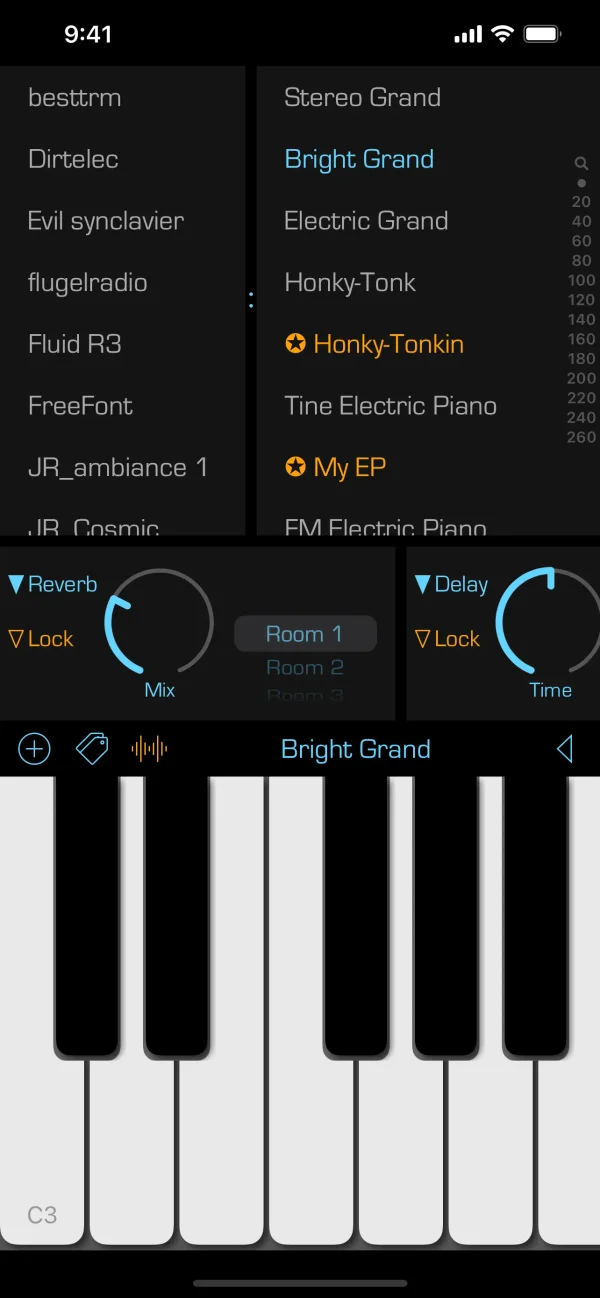
To use, simply select a SoundFont name in the left list, then a patch name on the right and start playing. Some additional hints to get going:
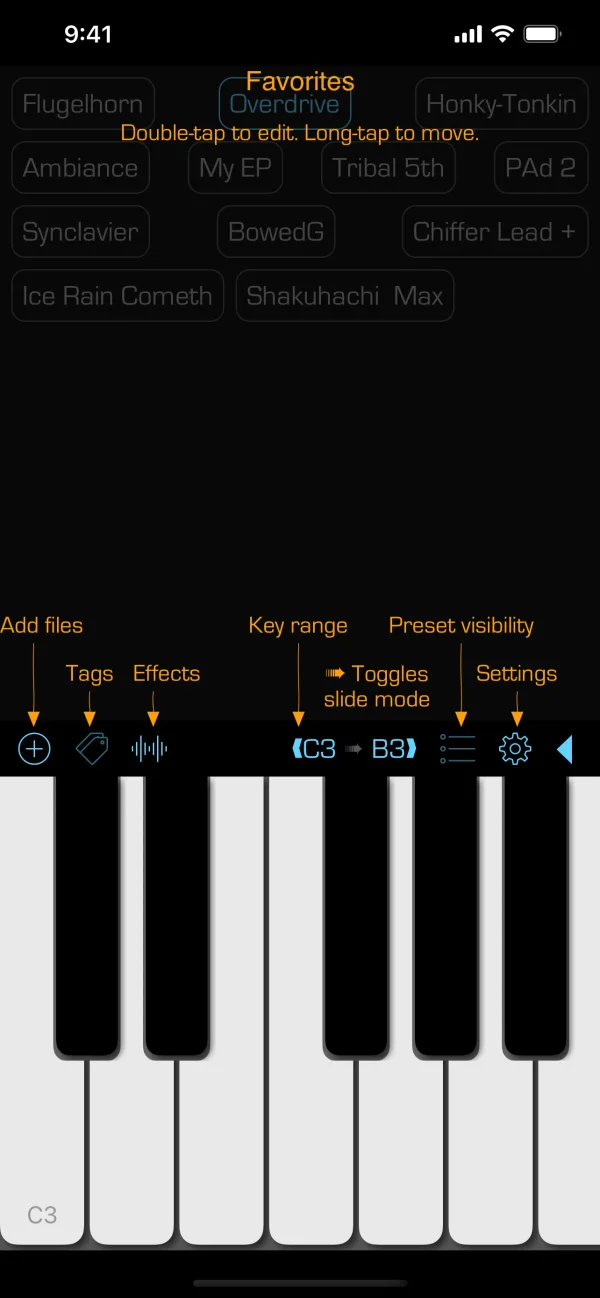
• Add a SoundFont (SF2) file that you have downloaded onto your iCloud Drive. Press the "+" button and then locate the file to add. You can always change the display name of the SoundFont by swiping right. And you can remove a SoundFont that you no longer want by swiping left on its name.
• Bring up reverb and delay effects by touching the wavy "signal" button.
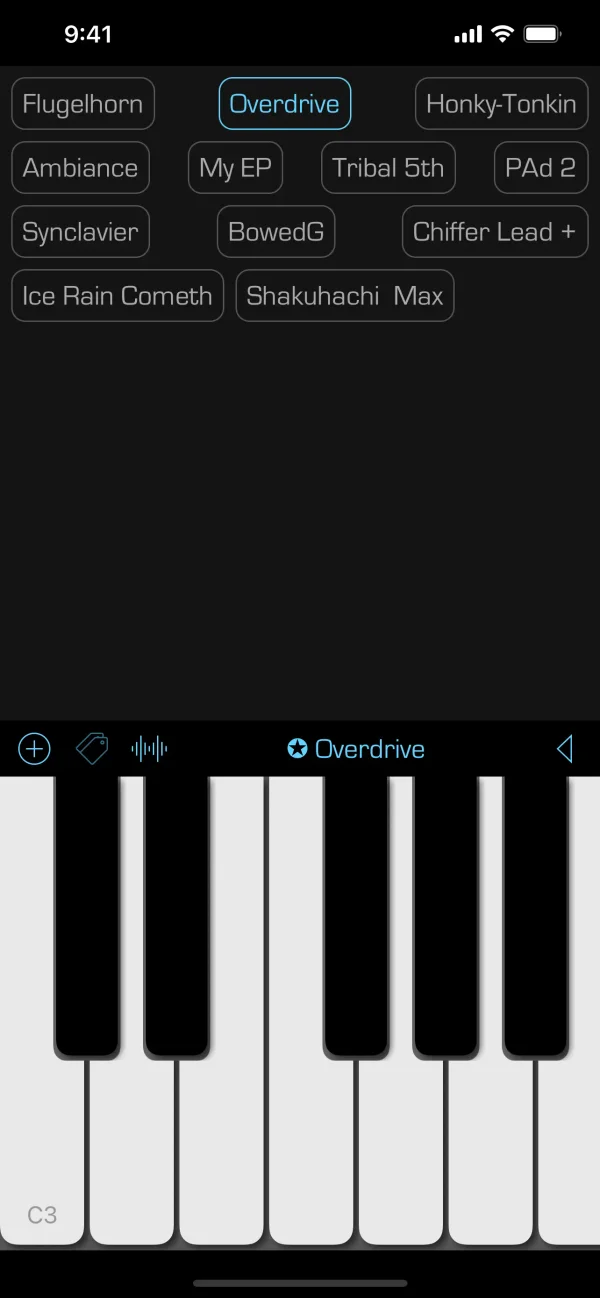
• Swipe right on a patch name to make it a favorite. Favorited patches have a star next to their name. You can edit the name of the favorite by again swiping right and selecting the edit action. You can remove a favorite by swiping left and selecting the remove action.
• Touch the labels at either end of the black bar to change the range of the keyboard. You can go as low as "C0" and as high as "C9". You can also change the range by swiping left/right on the black bar. Note that this ability does not exist in the AUv3 extension -- use the native application keyboard controls to achieve the same results. You can also toggle the keyboard sliding feature by touching the small arrow between the note labels.
• Switch between the soundfont patches listing and the favorites view by double-tapping on the patch name in the black bar above the keyboard. You can also swipe left/right with two fingers in the patches and favorites views to switch to the other view.
• In the view of favorites, you can edit a favorite button by double-tapping on it. You can rearrange the favorite buttons with a tap-and-hold gesture.
Finally, you can check out the source code! Go to the Support URL to find out more.
What’s new
Version 2.32.5 · Jun 16, 2026
• Fix crash in AUv3 component
App privacy
What Brad Howes declares on the App Store about how this app handles data.
-
Data not collected
The developer does not collect any data from this app.
Privacy practices may vary, for example with the features you use or your age.
Information
- Seller
- Brad Howes
- Category
- Entertainment
- Version
- 2.32.5
- Updated
- Jun 16, 2026
- Released
- Feb 19, 2019
- Size
- 187.0 MB
- Requires
- iOS 14.0 or later
- Age rating
- 4+
- Price
- $7.99
- Languages
- English
- Copyright
- © 2025 Brad Howes
You might also like
-
 UTM SE: Retro PC emulatorRun classic software and games
-
 TierMaker.comThe official TierMaker app.
-
 FANDOM News & StoriesEntertainment
-
 RTM-EMU : PS2 PS3 PS4 X360 PS1PS2 PS3 PS4 XB360 PS1 Emulator
-
 Provenance AppRetro console game emulator.
-
 VoicemodVoice Changer & Soundboard
-
 Manic EMU - Game EmulatorRetro GBA NDS PSP 3DS N64
-
 Delta - Game EmulatorAn AltStore app
-
 Gamuroid: All Game EmulatorEMU Retro Console Emulator
-
 Stick Nodes - AnimatorCreate stickfigure animations!