
- Age rating4+
- CategoryDeveloper Tools
- Developer256 Arts
- LanguagesEnglish+ 5 more
- Size6.1 MB
Links to the official App Store page
Download.org hosts no file of Sprite Cutter+. The button opens its official App Store page, published by 256 Arts. Listing last checked on Nov 7, 2026.
Screenshots
About
Cut a spritesheet into individual sprites in seconds.
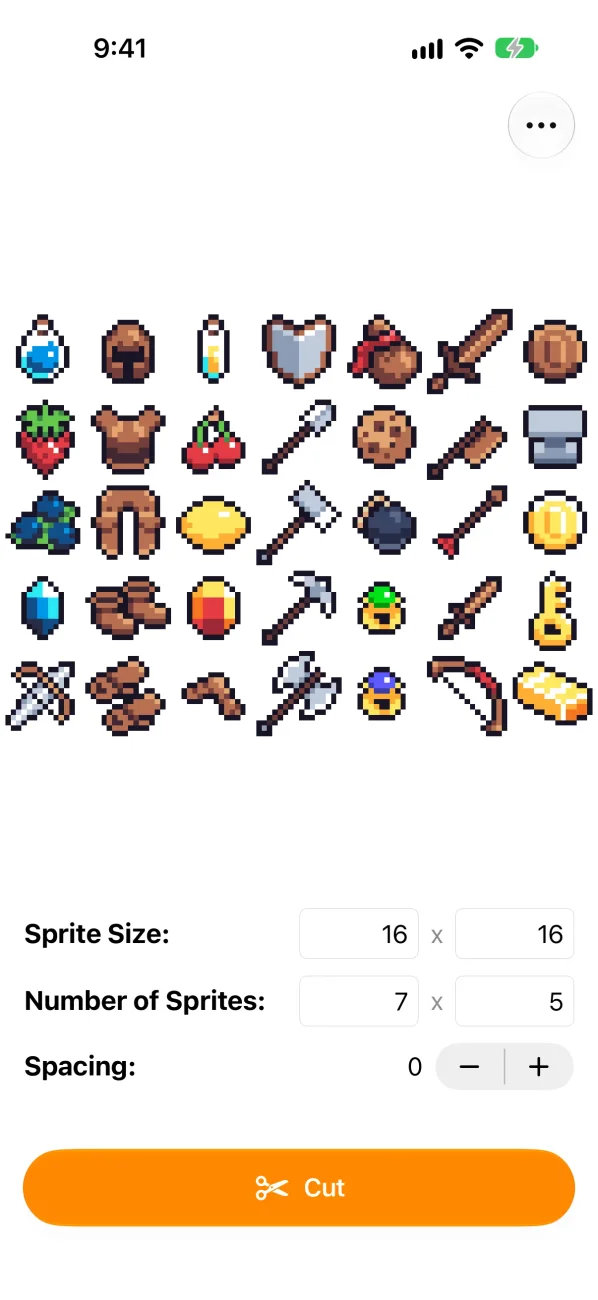
Sprite Cutter does one thing, and does it well. Drop in a spritesheet, tell it how big each sprite is — or how many rows and columns there are — and export every sprite as its own PNG. No image editor, no manual cropping.
Simple, Precise Cutting
• Drag and drop a spritesheet, or import one from Files or another app
• Cut by sprite size or by number of rows and columns; the other updates automatically
• Handles sheets with spacing between sprites
• Exports every sprite as a separate PNG, numbered in order
• Everything happens on your device
Automate It
Add the Cut Spritesheet action to a shortcut and slice sheets without opening the app — even as part of a larger workflow. You can also ask Siri.
Made for game developers, pixel artists, and anyone who works with sprite sheets and texture atlases.
What’s new
Version 1.3.2 · Oct 28, 2026
• New languages: Simplified Chinese, Japanese, German, French, Spanish
• Bug fixes and improvements
App privacy
What 256 Arts declares on the App Store about how this app handles data.
-
Data not collected
The developer does not collect any data from this app.
Privacy practices may vary, for example with the features you use or your age.
Information
- Seller
- 256 Arts Inc.
- Category
- Developer Tools
- Version
- 1.3.2
- Updated
- Oct 28, 2026
- Released
- Apr 13, 2021
- Size
- 6.1 MB
- Requires
- iOS 27.0 or later
- Age rating
- 4+
- Price
- $0.99
- Languages
- English, French, German, Japanese, Simplified Chinese, Spanish
- Copyright
- © 256 Arts Inc.
You might also like
-
 Core Data ManagerThe Mobile Core Data Manager
-
 Fox Issue & Project TrackingPlan, track, and release.
-
 SymbolKitFind the perfect SF Symbol
-
 hyperPad iPad Game MakerVisual Coding. No Subscription
-
 webtoapp.designTurn Your Website into an App
-
 Data ModelerDeveloper Tools
-
 Snippet Dev Tools - CodelimeCode Editor Developer Utility
-
 Territory: Storefront SwitcherSwitch & Redirect Store Region
-
 Xcasca - SSH, SFTP ClientTerminal, SSH, and SFTP Client
-
 Data OSCSend Device Data