
Table Notes Spreadsheet maker
Spreadsheet style notebook
Designed for iPhone, iPad
Free · In-app purchases
- Age rating4+
- CategoryBusiness
- DeveloperWEBDIA INC.
- LanguagesEnglish+ 29 more
- Size18.3 MB
Links to the official App Store page
Download.org hosts no file of Table Notes Spreadsheet maker. The button opens its official App Store page, published by WEBDIA INC. Listing last checked on Nov 24, 2026.
Screenshots


About
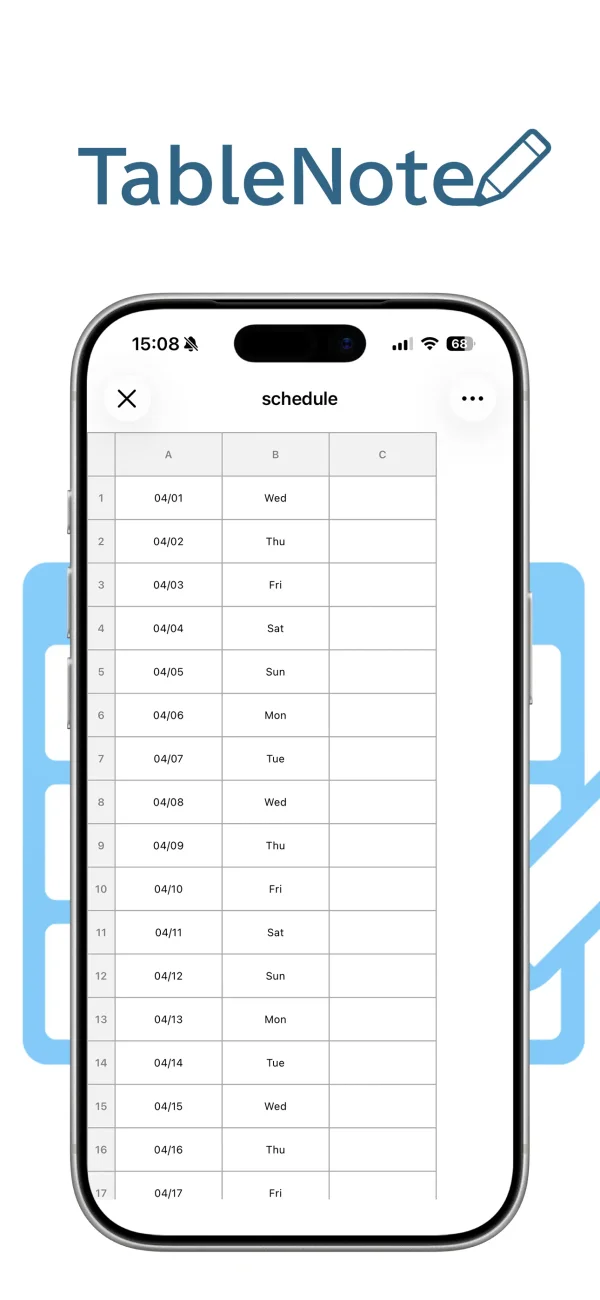
This is a memo application in table format.
You can save your name, phone number, address, etc. in rows.
You can also use it to store recipes.
You can also use it in the following ways
- Create a schedule
- Create recipes
- Create a table
- Create timetables
- Creating shifts
- Setting item names
Tap an item to display the settings screen, where you can set or change the item name.
You can also set the width of the column.
- Setting text and background colors of cells
You can set the text color and background color of each cell.
- Change text size, change text position
The text size can be changed to any size.
The text position can be changed to the left, center, or right.
- Insert images
Images can be inserted into cells.
- Change cell size
The height and width of cells can be adjusted and changed.
- Add Rows, Add Columns
There is no limit to the number of rows and columns that can be added.
- Simple calculations in cells
Four arithmetic operations can be performed in a cell.
Four types of symbols (+-*/) can be used to display the calculation results.
- Import CSV files
You can receive and view CSV files shared from other applications.
- CSV output
Data can be output in CSV format.
Text color, background color, etc. cannot be output to CSV.
- PDF output
Data can be output in PDF format for printing or sharing.
- xlsx output
Output to xlsx is possible.
When outputting a file that contains images, the display may differ.
- iCloud Drive
When using iCloud Drive, you can use common data on multiple devices.
- Trash Box
Even if you delete a file by mistake, you can rest assured that it is in the Trash.
What’s new
Version 4.0.22 · Nov 23, 2026
Fixed an issue where changing the font size in Settings displayed the new value next to “Bounces when scrolling”. The “Font size” setting now shows the new value immediately.
App privacy
What WEBDIA INC. declares on the App Store about how this app handles data.
-
Data used to track you
May be used to track you across apps and websites owned by other companies.
- Location
- Identifiers
- Usage data
- Diagnostics
-
Data linked to you
May be collected and linked to your identity.
- Location
- Identifiers
- Usage data
- Diagnostics
Privacy practices may vary, for example with the features you use or your age.
Information
- Seller
- WEBDIA INC.
- Category
- Business
- Version
- 4.0.22
- Updated
- Nov 23, 2026
- Released
- Jun 3, 2021
- Size
- 18.3 MB
- Requires
- iOS 18.6 or later
- Age rating
- 4+
- Price
- Free
- In-app purchases
- Yes
- Languages
- English, Arabic, Czech, Danish, Dutch, Finnish, French, German, Greek, Hindi, Hungarian, Indonesian + 18 more
- Copyright
- © WEBDIA INC.
You might also like
-
 Utility SpreadsheetNumber Crunching Made Easy
-
 iSpreadsheet™ : Office SheetsSpreadsheet with Excel Formula
-
 Table MemoMemo of spread sheet form
-
 Spreadsheet-xlsx&csv editorSpreadsheets Templates
-
 XLSX Sheets: Edit SpreadsheetCreate, Share XLS Office Files
-
 Table Maker, Spreadsheet NotesSpreadsheet Notes, Gantt Chart
-
 The Spreadsheet App - SheetsExcel Editor, Tables & Scan
-
 SunTable-Spreadsheet view&editTable maker
-
 Spreadsheet - SheetletCharts, Tables & Sheets
-
 Table Notes Spreadsheet ExcelSheets Excel Lio alternative