
Throughput: iPerf3 Speed Test
Network speed tests and charts
Designed for iPhone, iPad, Mac
Free · In-app purchases
- Age rating4+
- CategoryUtilities
- DeveloperYet to be Named Enterprise
- LanguagesEnglish
- Size3.6 MB
Links to the official App Store page
Download.org hosts no file of Throughput: iPerf3 Speed Test. The button opens its official App Store page, published by Yet to be Named Enterprise. Listing last checked on Nov 15, 2026.
Screenshots
About
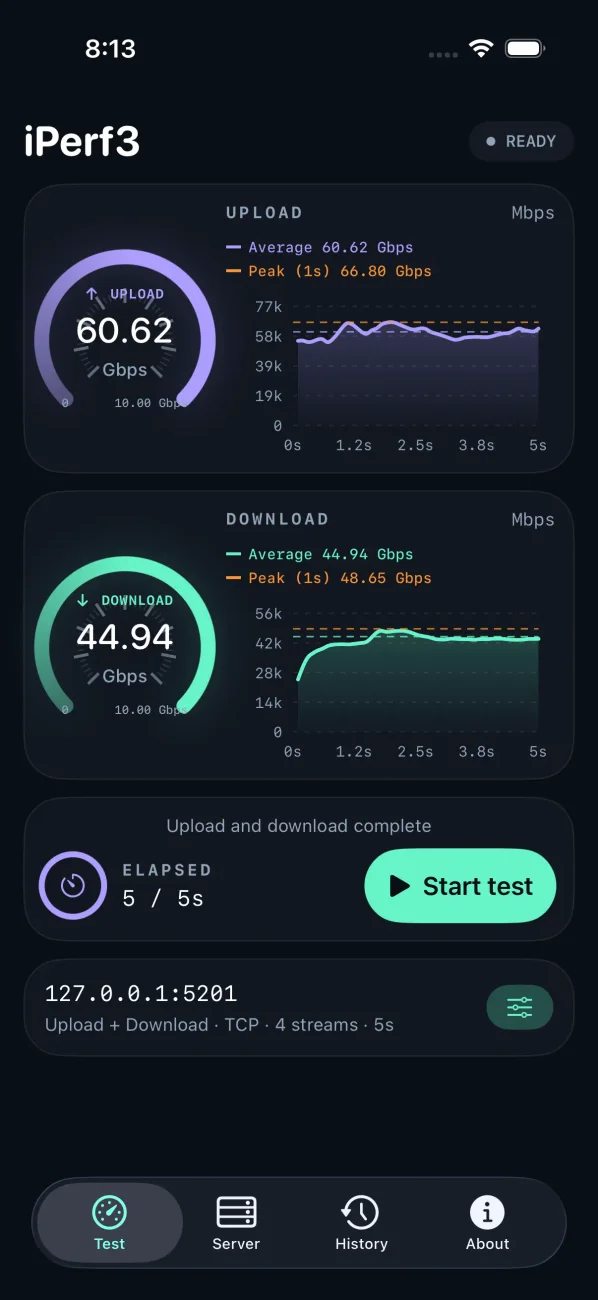
Test network throughput between your device and an iPerf3 server. View upload and download speeds with smooth gauges and live charts, including average speed and a sustained one-second peak.
FREE CLIENT FEATURES
• Upload, download, or both in sequence
• TCP and UDP, configurable duration, parallel streams, port, and UDP bitrate
• Local server discovery with hostnames when available
• Public server browser on iPhone, iPad, Mac, and Apple TV, with cached listings from iperf3serverlist.net and port-range retry options
• Continuous testing with a 10-second pause between runs
• Background client testing on iPhone and iPad while iOS allows execution
• Live Activity with speed, direction, progress, and a chart
• Apple TV remote controls and a layout designed for the TV
• Native Mac app with a live menu bar gauge
SERVER & HISTORY — OPTIONAL ONE-TIME PURCHASE
Unlock server mode and saved history on iPhone, iPad, Mac, and Apple TV, plus saved history on Apple Watch, using the same Apple Account.
• Run an iPerf3 server from the Server tab on iPhone, iPad, Mac, or Apple TV
• See incoming test gauges and charts, and review completed server results during the current app session
• Save completed client tests, inspect charts and results, and reuse test settings
• Export saved results as JSON on iPhone and iPad
GETTING STARTED
Run iperf3 -s on another computer, then enter its hostname or IP address in the app. Compatible local servers can also be discovered automatically, or choose Configure > Public servers to browse internet servers. Public server availability varies. An iPerf3 server is required for native client tests; iperf2 and authenticated servers are not supported. UDP measures delivery at your chosen target bitrate.
Each direction begins with a one-second warm-up before measurements appear. Server mode runs while the Server tab is open. iPhone, iPad, and Apple TV servers require the foreground; the Mac server can keep running while hidden. Background client execution is controlled by iOS and can be stopped by the system. Apple TV client tests require the app to remain in the foreground.
APPLE WATCH
Run HTTP upload and download tests against this app’s enhanced server mode, with charts, queue positions, latency, and optional saved history. Open the iPhone app to share discovered servers or its own running server. Tap a server on Watch to run a 15-second upload and download test with four connections. Both gauges and charts fit on one screen. watchOS may route traffic through the paired iPhone; results may not represent a direct Watch Wi-Fi connection. HTTP measures TCP payload throughput and does not measure UDP loss or UDP jitter. Keep the Watch app open during tests.
No app account, advertising, or analytics. Test traffic goes directly to your selected server. History stays on each device and does not sync; Apple TV may purge cached charts. Purchases are handled by Apple. Powered by the open-source ESnet iPerf3 engine.
What’s new
Version 1.4 · Nov 9, 2026
Bug Fixes
App privacy
What Yet to be Named Enterprise declares on the App Store about how this app handles data.
-
Data not collected
The developer does not collect any data from this app.
Privacy practices may vary, for example with the features you use or your age.
Information
- Seller
- Jacob White
- Category
- Utilities
- Version
- 1.4
- Updated
- Nov 9, 2026
- Released
- Oct 15, 2026
- Size
- 3.6 MB
- Requires
- iOS 17.0 or later
- Age rating
- 4+
- Price
- Free
- In-app purchases
- Yes
- Languages
- English
- Copyright
- © 2026 Jacob White
You might also like
-
 iPerf FalconLAN Testing & SSH Automation
-
 iPerf NetTestUtilities
-
 AngoloSpeedTestMisura la tua connessione!
-
 Pulse Internet Speed TestInternet speed tester
-
 Super Ping for iOSPing, Port Scan & Monitor
-
 SyscopeDevice stats & network tests
-
 QR2Barcode ConverterConvert Barcodes to QR Codes!
-
 VolteecUPS Monitor for NUT Servers
-
 LanPulseUtilities
-
 PocketAdmin – AI IT ToolkitSysadmin & Homelab SSH Tools