
Time Zone Buddy: World Clock
Converter & meeting planner
Designed for iPhone, iPad, Mac
Free · In-app purchases
- Age rating4+
- CategoryUtilities
- DeveloperScott Breen
- LanguagesEnglish
- Size33.0 MB
Links to the official App Store page
Download.org hosts no file of Time Zone Buddy: World Clock. The button opens its official App Store page, published by Scott Breen. Listing last checked on Nov 21, 2026.
Screenshots




About
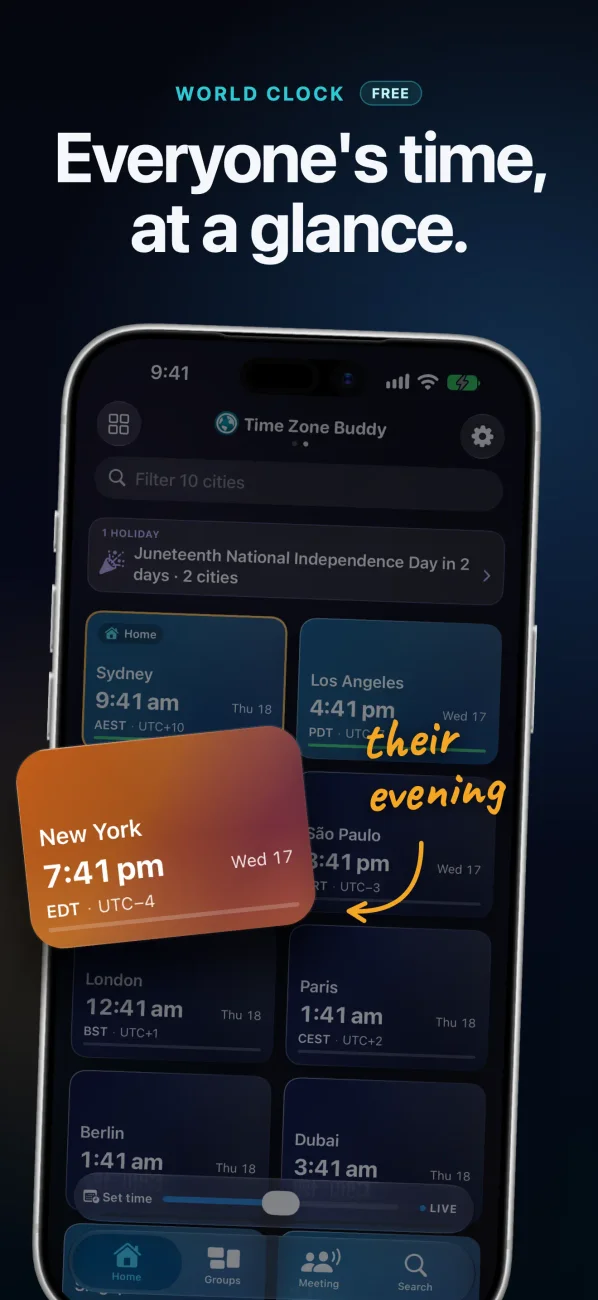
Time Zone Buddy is a beautiful world clock and meeting planner for people who work, travel, or collaborate across time zones.
Calling Tokyo, checking if London is still in the office, or planning a meeting across five time zones — it makes the world easy to read.
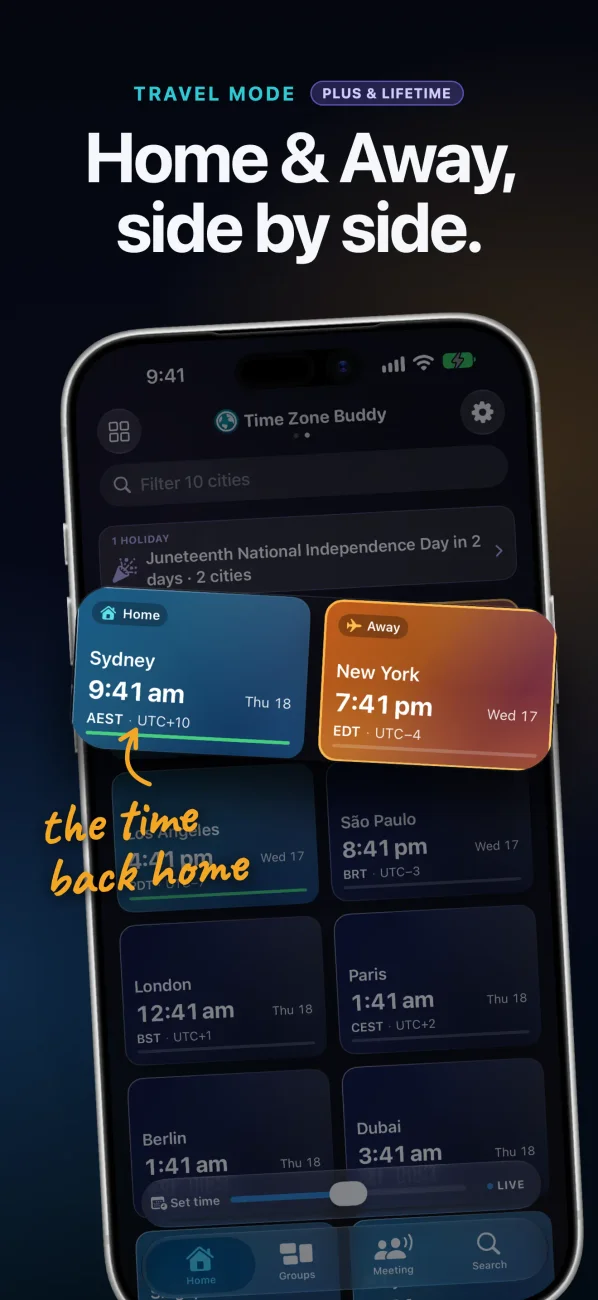
TRAVEL MODE — HOME & AWAY
Pin your Home city so its time, public holidays, and clock changes are always close — free, on every tier. When your device changes time zone, an Away card appears beside Home.
DAYLIGHT AT A GLANCE
Open a city and its sky fills the screen — deep night, golden hour, or mid-afternoon, from that city's own sunrise and sunset. Every card changes with the sun.
SEASONS
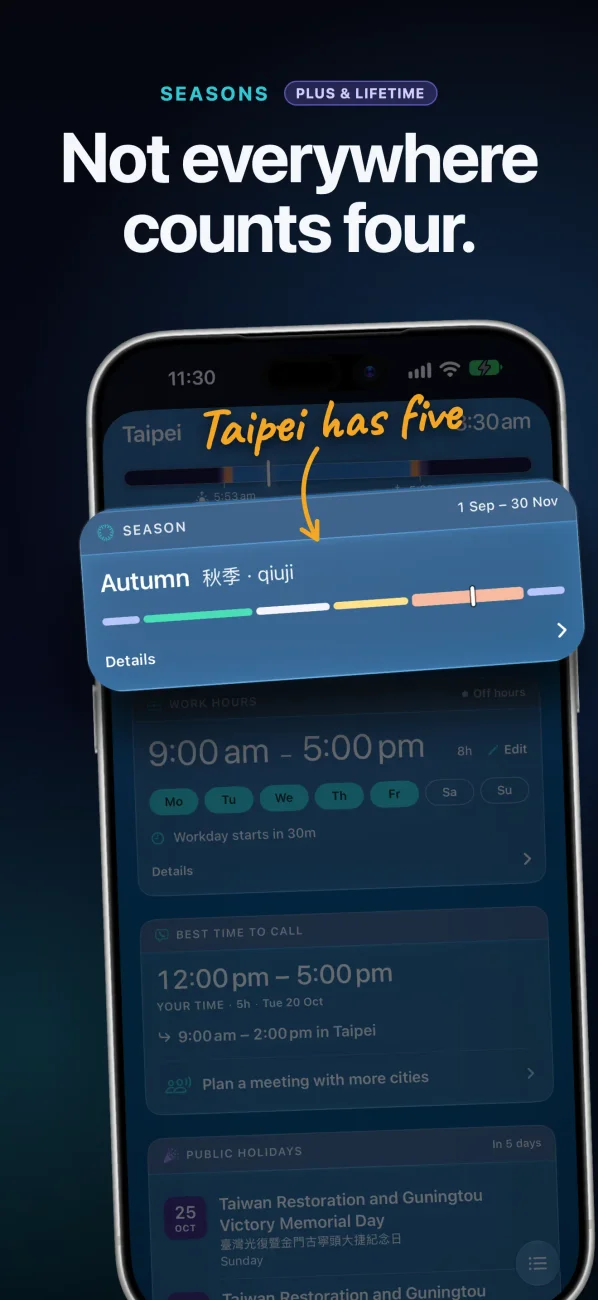
A city's page shows the season there, counted the way people in that country count it, with the local word. Your Home city's is free; the rest are Plus/Lifetime.
HEADS-UP
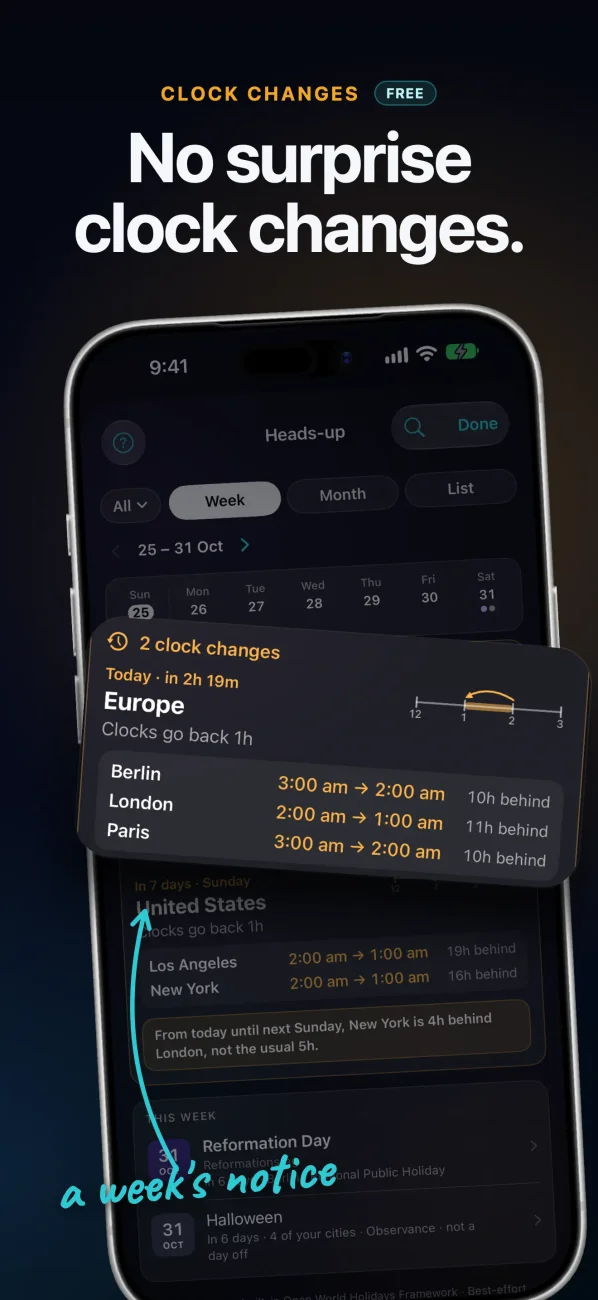
Clock changes, public holidays and market closures in your cities, on a timeline you can tap. Every city's clock changes are free for the next 30 days.
TIME SHIFT & PLANNING
A docked time-shift slider lives at the bottom of every tab. Pick a future date and time, choose which zone you're planning from, and see what time it will be everywhere.
MEETING HUB
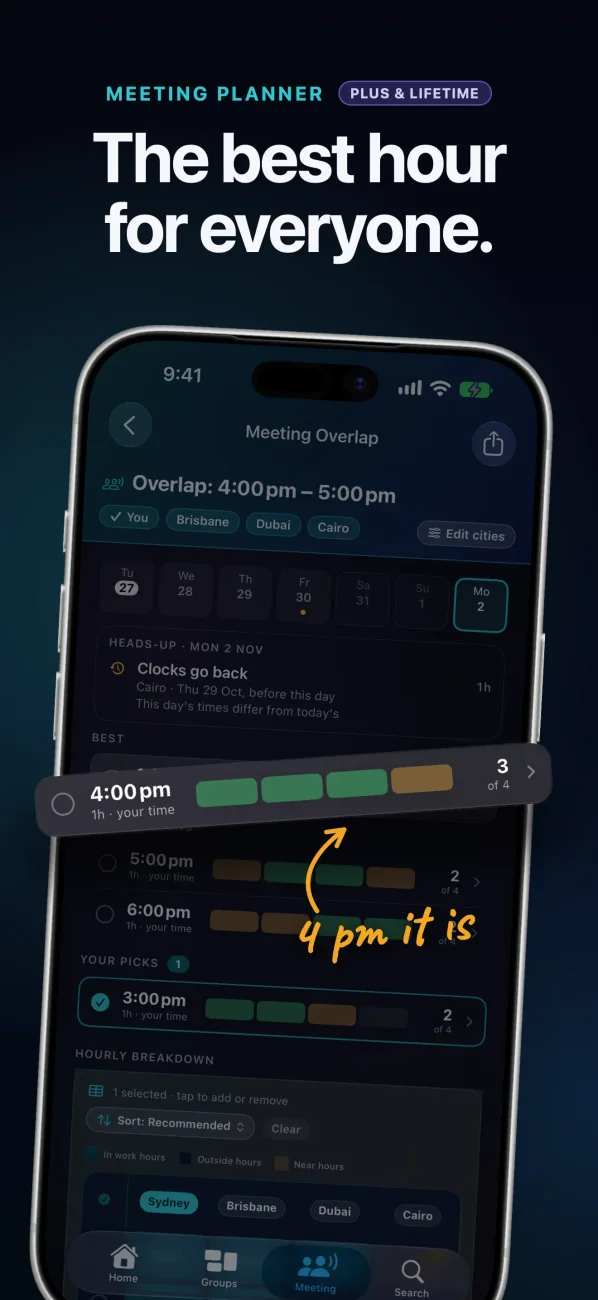
See who's in work hours now, who's coming online soon, and overlap at a glance. Tap "Plan a Meeting" to find a time across every zone, read in your own time.
DETAIL THAT DELIGHTS
Tap any zone for the sky over that city right now, a daylight bar, hour-by-hour comparison, work hours, clock changes, holidays, and a share card. "Best Time to Call" shows the clearest call time between you and that city, free.
APPLE WATCH
Your cities on your wrist, with complications and a Smart Stack card. Round complication free; the rest Plus/Lifetime.
GROUPS & ORGANISATION (PLUS/LIFETIME)
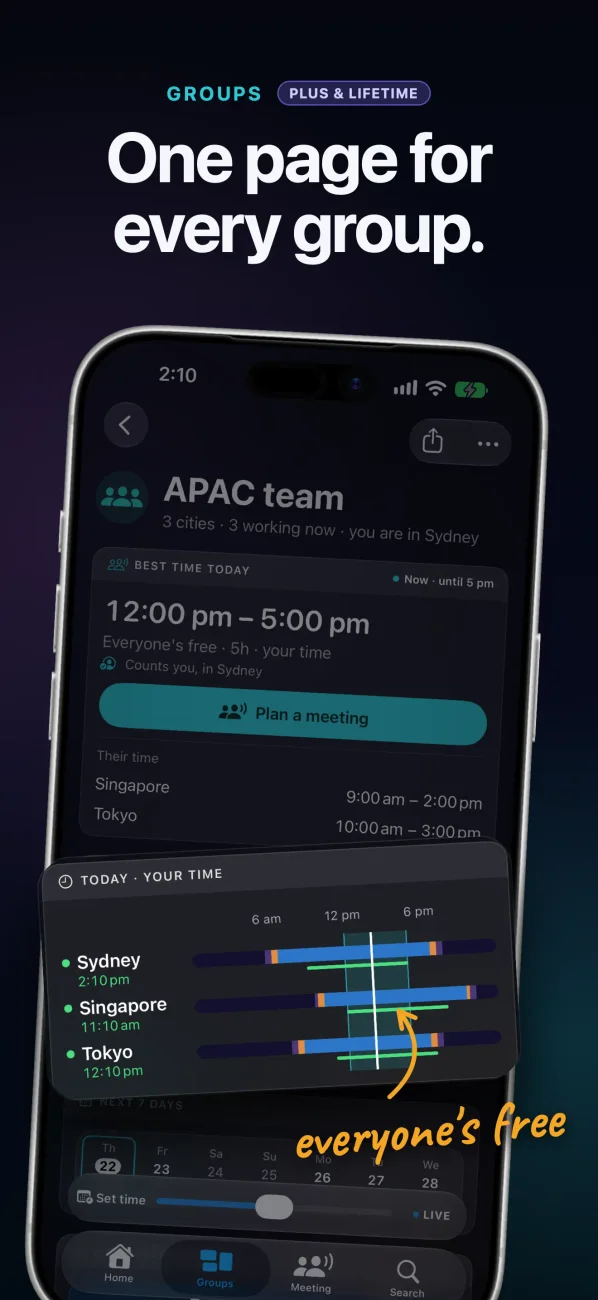
Create named groups for your team, family, or travel contacts. Each group gets one line: when everyone is free, the closest time, or who is off. Share a group's times as an image.
MEETING OVERLAP (PLUS/LIFETIME)
Find the best time to meet across any set of time zones, with you counted in. Options are ranked so the cost is shared rather than landing on one person. Share as an image or plain text.
WIDGETS & STANDBY
• Home & Away (free) — Home at a glance, and Here when you travel
• Multi-City Clock — a "wall of clocks"; 2 cities free, up to 6 with Plus/Lifetime
• Single Zone (free) — any city's live time, daylight-shaded
• Lock Screen clocks — circular free; inline & rectangular Plus/Lifetime
• Meeting Hub (Plus/Lifetime) — who's working now across your zones
• Heads-up (free) — the next two weeks of clock changes and holidays, a day at a time
• StandBy (free) — a dimmable bedside clock while charging
CLOCK CHANGES
Every city's clock changes for the next 30 days, free. Plus/Lifetime adds the whole year, with notifications a week before, the business day before, on the day and after.
PUBLIC HOLIDAYS (PLUS/LIFETIME)
Today's holiday on every zone card, and a full year per city. About 250 countries, with state and regional holidays in 35. Built in, so they work offline.
MARKET HOURS (PLUS/LIFETIME)
When 27 stock exchanges open, close early or shut for a holiday, in your own time. Your Home city's markets are free.
SIRI & SHORTCUTS
"Hey Siri, plan a meeting in Time Zone Buddy"
ACCESSIBILITY
Full VoiceOver support, Dynamic Type, and Reduce Motion.
PRIVACY FIRST
No account required. Your saved cities, groups, and preferences stay on-device unless you enable private iCloud sync (Plus). No ads or tracking.
PRICING
One app on iPhone, iPad, Apple Watch and Mac. Plus and Lifetime unlock it everywhere you're signed in.
• Free — up to 5 zones, daylight-aware cards, time shift planner, Best Time to Call, free widgets
• Lifetime — one-time purchase, all features unlocked forever (except iCloud Sync)
• Plus — subscription with iCloud Sync, Annual-plan Family Sharing, and early access
Terms of Use (EULA): https://www.apple.com/legal/internet-services/itunes/dev/stdeula/
What’s new
Version 1.10 · Nov 17, 2026
Where everyone is: a night map of your cities that follows the sun, so dragging Set time moves the night across it. On iPhone, swipe right on Home (or choose Map in the View menu), and turn your phone sideways for the whole screen. On iPad it sits above your cities. Each group's page has one too.
A clearer Heads-up: the week's clock changes in one card, with each city's times and the week the gap between two cities is not the usual one. Christmas, Easter, New Year, Lunar New Year and Thanksgiving get a card of their own saying who is off and who works as normal (Settings ▸ Display turns the festive look off). Swipe to the next week, or see the month as a calendar. Holidays that start part-way through the day, like Christmas Eve from 6 pm in Queensland, show when they start. A day of several market closures shows your home market and folds the rest. And when nothing is coming up this week, Home shows the next thing ahead.
Clock-change notifications come once a day, naming the cities that change together, instead of one for each city.
iPhone Duo: open it and Home, Groups, Meeting, Search, Heads-up and Settings use both sides of the fold, a list on one side and the page it opens on the other. Partly folded, Home, Groups and Meeting keep clear of the crease. Closed, the app is laid out for the outer screen. Sheets stay on one side of the fold. iPad in landscape uses the same two panes.
A page for each group (Plus and Lifetime): tap a group's name to see everyone's day on your clock, the best time to meet, what is coming up this week and the group's cities, all on one page.
Groups in one row each (Plus and Lifetime): each group is one row with its line and its first cities, and a tap on the cities shows them all. With four or more groups, a field filters them by group name or by a city in them. On the group page and in the line under each group, a day when everyone is off now says so, instead of calling the time free. Add cities on a group now finds cities you don't have yet, in a section of its own, and adds them to your cities and the group in one go. Your groups are listed A–Z.
Clearer Meeting (Plus and Lifetime): when a day off and Different days name the same cities, Meeting says it once. A long Heads-up list shows its first line, and Show 3 more opens the rest.
Cities, not zones: the app, its widgets and Siri now say cities where they said zones.
Clearer Heads-up widgets: the date shows once, a holiday on a weekend says "Falls on a Saturday" and comes after the days that touch working hours, and the small widget is laid out for StandBy.
The feedback sheet is smaller, and Rate on the App Store opens the review page directly.
Fixed:
• In Australia, a city whose state isn't known no longer shows another state's holidays.
• Siri's answer about a holiday today uses the city's own date and region.
• Searching for Delhi, Mumbai, San Francisco and other big cities that share a time zone with another city now finds them during setup and in the Home City picker, offline too.
• Setup keeps all its steps after you add cities, and reads properly at the largest text sizes.
• The "Welcome to ..." screen you see in a new time zone fits at large text sizes.
• Settings says "1 location" and "1 group", not "1 locations".
• Alphabetical order puts São Paulo and other accented names in their place, not after Z, and lists you pick cities from start A–Z.
• Sunrise and sunset shown before a city's sun data arrives, or offline, are about ten minutes closer to the real times, and an open city page picks up the real ones when they arrive.
• In light mode, Home no longer has a white wash over its top row.
App privacy
What Scott Breen declares on the App Store about how this app handles data.
-
Data not linked to you
May be collected but is not linked to your identity.
- Usage data
- Diagnostics
Privacy practices may vary, for example with the features you use or your age.
Information
- Seller
- Scott Breen
- Category
- Utilities
- Version
- 1.10
- Updated
- Nov 17, 2026
- Released
- May 6, 2026
- Size
- 33.0 MB
- Requires
- iOS 26.2 or later
- Age rating
- 4+
- Price
- Free
- In-app purchases
- Yes
- Languages
- English
- Copyright
- © 2026 Scott Breen
You might also like
-
 Time Zone Meeting Planner ProTeam Scheduler & World Clock
-
 FlutterTime Timezone ConverterWorld Clock Time Zone UTC GMT
-
 TimeShift: World Clock & ZonesTimezone planner & converter
-
 Timezone Grid: World ClockWorld Clock & Time Planner
-
 Timezone: World Clock WidgetTime Zone Converter, Map & UTC
-
 Clock Widget CreatorCustom Clock Widgets
-
 TesseraClockUtilities
-
 BYKKO ServService tool for BYKKO locks
-
 VAICOMThe VAICOM Kneeboard
-
 Timeslide: World ClockTime Zone Converter & Widgets