
TouchLink: Trackpad & Keyboard
Wireless trackpad & keyboard
Designed for iPhone
In-app purchases
- Age rating4+
- CategoryUtilities
- DeveloperFRE:X DESIGN INC.
- LanguagesJapanese+ 1 more
- Size871.0 KB
Links to the official App Store page
Download.org hosts no file of TouchLink: Trackpad & Keyboard. The button opens its official App Store page, published by FRE:X DESIGN INC. Listing last checked on Nov 12, 2026.
Screenshots
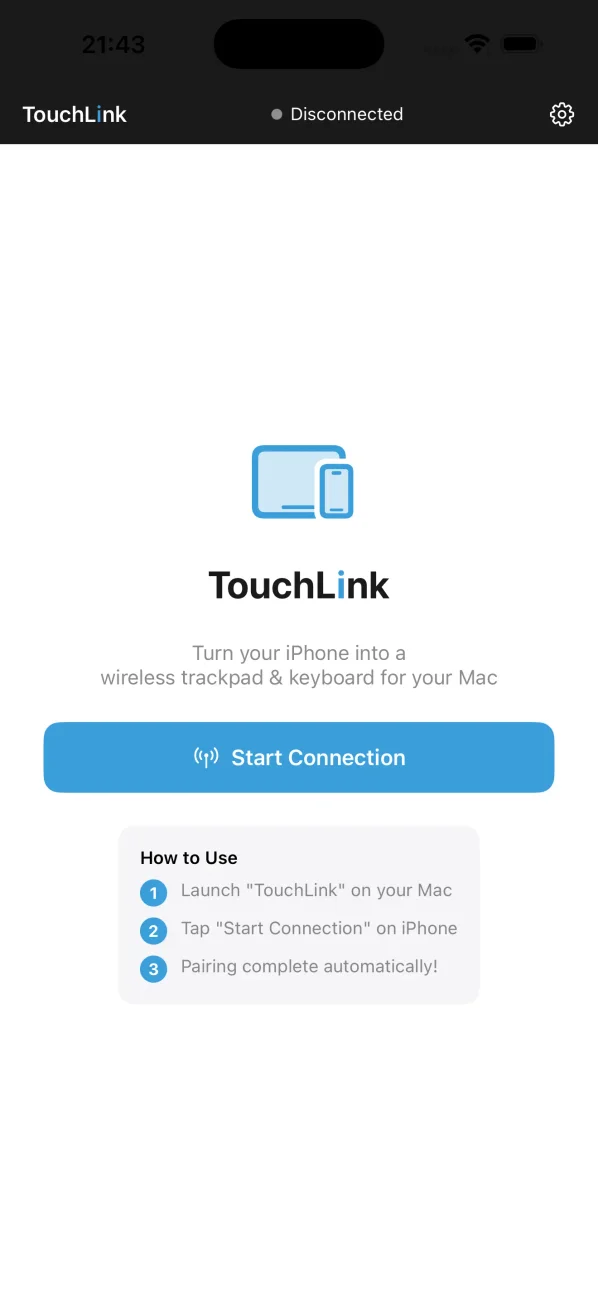

About
Turn your iPhone into a wireless trackpad & keyboard for your Mac.
Whether you're controlling your Mac from across the room, moving the cursor during a presentation, or relaxing on the couch, TouchLink turns the iPhone in your hand into a trackpad for your Mac. No extra hardware needed. Just connect your iPhone and Mac to the same Wi-Fi.
[Features]
- Smooth trackpad
Move the cursor smoothly with one finger. Tap to left-click, two-finger tap to right-click, press and hold to drag.
- Mac-style gestures
Two-finger scroll, pinch to zoom, three-finger swipe for Mission Control and switching Spaces.
- Keyboard input
Type directly from your iPhone to your Mac. Modifier keys (Command / Option / Shift) and shortcuts like Command-C and Command-V. Arrow keys and Backspace supported.
- App Launcher (TouchLink Pro)
Launch and bring your favorite Mac apps to the front with one tap. Running apps are highlighted. Open favorite websites in your Mac browser with a tap. Quick buttons for Spotlight, Screenshot, Mission Control and more.
- Easy connection
Automatic discovery and connection over the same Wi-Fi. No pairing needed.
[Before you start]
- A free Mac companion app is required: https://tl-mac.vercel.app/
- Connect your iPhone and Mac to the same Wi-Fi network.
- The trackpad and keyboard are free. The App Launcher is unlocked with a one-time purchase, TouchLink Pro.
[Requirements]
- iPhone: iOS 16.0 or later
- Mac: macOS 13.0 or later (free Mac app required)
What’s new
Version 1.0.5 · Jun 29, 2026
• Added a volume knob to the Mac launcher screen. Rotate clockwise to increase volume and counterclockwise to decrease it.
• Tap the knob to mute, and tap again to unmute.
• Added tick marks around the knob to make the direction of control easier to understand.
• Improved stability for continuous voice input. Updating the Mac app to the latest version is recommended.
App privacy
What FRE:X DESIGN INC. declares on the App Store about how this app handles data.
-
Data not collected
The developer does not collect any data from this app.
Privacy practices may vary, for example with the features you use or your age.
Information
- Seller
- FRE:X DESIGN INC.
- Category
- Utilities
- Version
- 1.0.5
- Updated
- Jun 29, 2026
- Released
- Jun 14, 2026
- Size
- 871.0 KB
- Requires
- iOS 16.0 or later
- Age rating
- 4+
- In-app purchases
- Yes
- Languages
- Japanese, English
- Copyright
- © 2026 FRE:X DESIGN INC.
You might also like
-
 CommandDeck: Remote for MacRemote for your Mac
-
 FlickMouseUtilities
-
 Trackpad & KeyboardYour phone as a desktop pad
-
 eTrackPad: Wireless TrackpadGestures, keyboard & remote
-
 ReMacYour machine, in your pocket
-
 PadLinker: Trackpad & KeyboardWireless remote mouse
-
 Coast: Macros & TrackpadBuild your own controller
-
 Mak Commander-Input ControllerUtilities
-
 Pairy: Connecting DevicesRemote desktop, from anywhere
-
 Entangle - Remote trackpadUtilities