Transcriber: Subtitles & Notes
On-device transcripts & SRT
Designed for iPhone, iPad, Mac
Free
- Age rating4+
- CategoryProductivity
- DeveloperStephen Robles
- LanguagesEnglish
- Size2.6 MB
Links to the official App Store page
Download.org hosts no file of Transcriber: Subtitles & Notes. The button opens its official App Store page, published by Stephen Robles. Listing last checked on Nov 17, 2026.
Screenshots

About
Transcriber turns a video or audio file into a transcript you can edit, with every word timed, using Apple's on-device speech engine. Nothing leaves your Mac, iPhone or iPad.
Pick a file, and the text appears as it is recognized. A ten-minute video takes well under a minute on Apple silicon. The words are grouped into subtitle cues the way YouTube and broadcast captions expect them, so the SRT you export drops straight into your video.
WHAT IT DOES
• Transcribes MP4, MOV, M4A, MP3, WAV, AIFF and anything else your device can play
• Keeps the moment every word was spoken, so subtitles land exactly on the speech
• Groups text into cues of two lines up to 42 characters, broken at sentence ends, commas and pauses (adjustable)
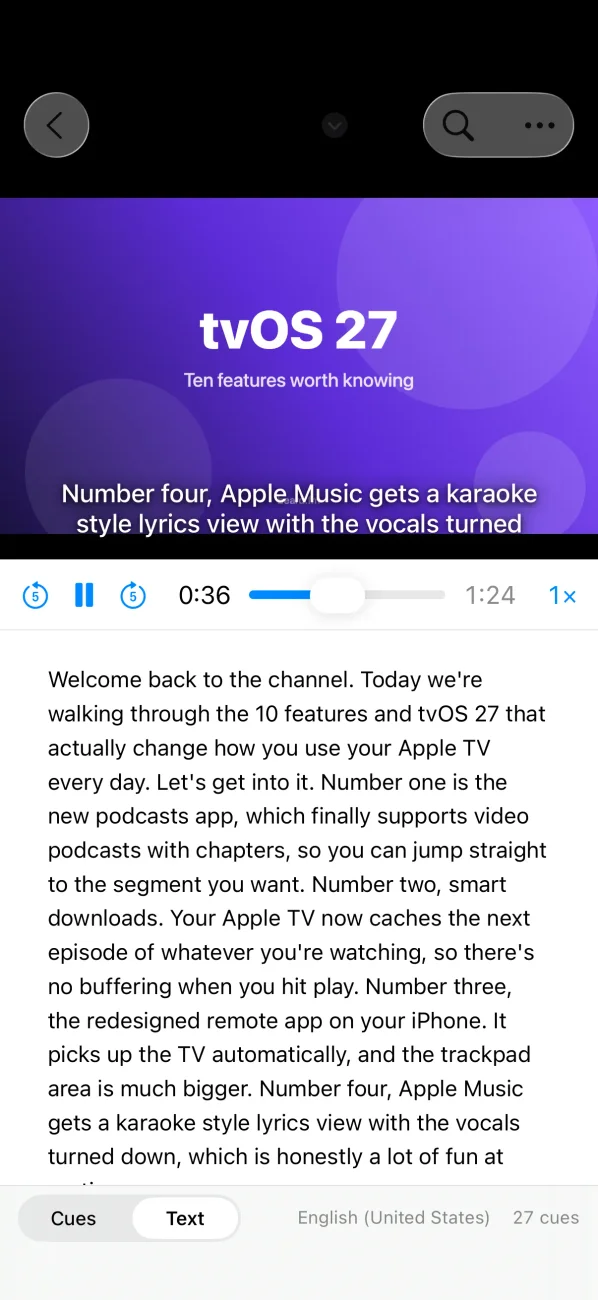
• Plays the file in the window with the current cue shown over the video as a caption, in a classic, boxed or outlined style, exactly as it will look in the SRT
• Edit any cue in place, split a cue at the cursor, merge two, or retime one. Find & Replace fixes a misheard name everywhere at once, and everything is undoable
• A Text view shows the transcript as readable paragraphs, with optional timestamps and Copy All
EXPORT
• SRT and WebVTT subtitles for YouTube and video editors
• Plain text as paragraphs, text with a timestamp on each paragraph for show notes and chapters, or Markdown with bold timestamps
• Save the project to come back to it later
LANGUAGES
• Everything Apple's on-device engines support: English, Spanish, French, German, Italian, Portuguese, Japanese, Korean, Chinese, Hindi and more through Apple's newest model, plus Swedish, Danish, Norwegian, Finnish, Dutch, Russian, Polish, Turkish, Greek, Arabic, Hebrew, Thai, Vietnamese and others through Apple's earlier dictation model
• Pick the language right in the window; the model downloads once, then works offline
ON THE MAC
• Drop files on the window or the Dock icon
• Watched folders: point Transcriber at a folder and every new file that lands in it is transcribed automatically, with the outputs you choose saved next to it
• Open at Login keeps it running quietly in the background
PRIVATE BY DESIGN
• Transcription runs on your device's Neural Engine. There is no account, no analytics and no network feature of any kind
• The first use of a language downloads Apple's speech model for it; after that it works offline
Transcriber requires macOS 26, iOS 26 or iPadOS 26 and a device that supports Apple's on-device speech recognition.
What’s new
Version 1.3.1 · Nov 3, 2026
Made for iPhone Duo. Transcriber fills the outer display, puts the video and cue list side by side on the inner display, and keeps everything clear of the hinge when the phone is partly folded.
App privacy
What Stephen Robles declares on the App Store about how this app handles data.
-
Data not collected
The developer does not collect any data from this app.
Privacy practices may vary, for example with the features you use or your age.
Information
- Seller
- Stephen Robles
- Category
- Productivity
- Version
- 1.3.1
- Updated
- Nov 3, 2026
- Released
- Oct 16, 2026
- Size
- 2.6 MB
- Requires
- iOS 26.0 or later
- Age rating
- 4+
- Price
- Free
- Languages
- English
- Copyright
- © 2026 Stephen Robles
You might also like
-
 Resecta: Redact PDFsRemove text, not just cover it
-
 LookyHere! Lists & RemindersPrivate notes for future you
-
 Clipy - Clipboard SyncHistory & Quick Sharing
-
 Earful: Talk to your botsVoice notes for AI assistants
-
 HikkiNotes that stay yours
-
 Re/memberYour Second Brain
-
 StuffioOrganize Your Belongings
-
 FolikPDFPrivate PDF Reader & Editor
-
 Csv2ImgCsv Converter to PNG / PDF.
-
 Sift — Notes You Can FindMarkdown notes, found fast