- Age rating4+
- CategoryUtilities
- DeveloperRalf Trachte
- LanguagesEnglish
- Size1.6 MB
Links to the official App Store page
Download.org hosts no file of TypeWay. The button opens its official App Store page, published by Ralf Trachte. Listing last checked on Nov 12, 2026.
Screenshots

About
CUSTOMIZED KEYBOARD FOR 10-FINGER TYPING
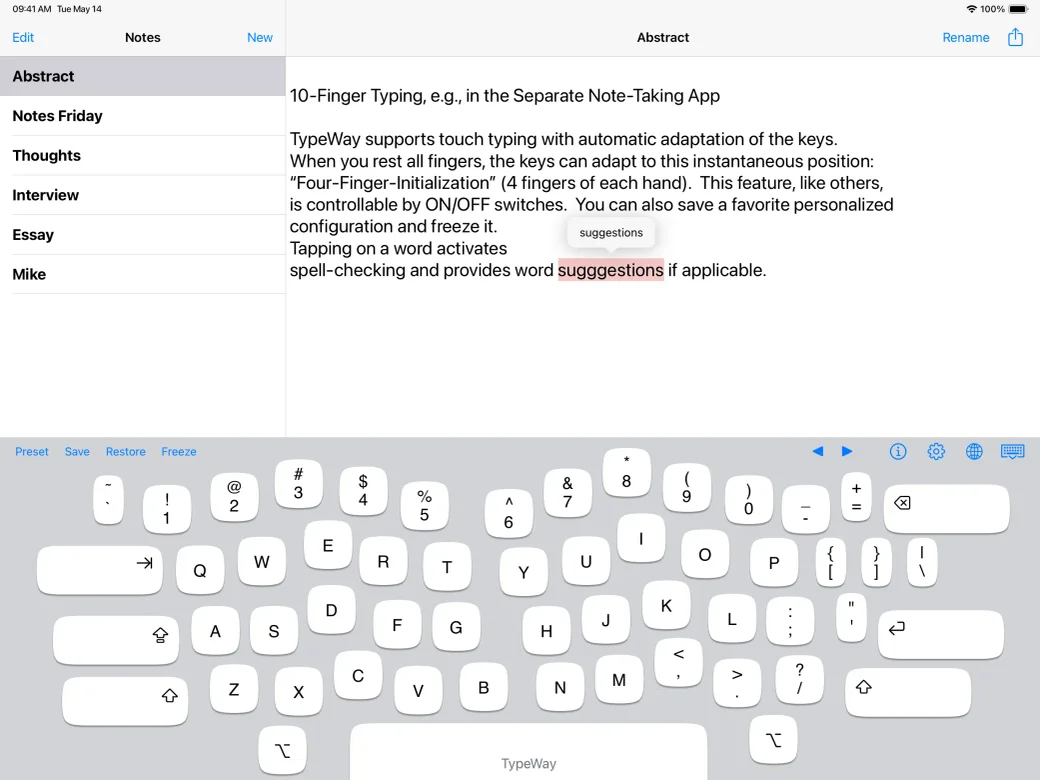
TypeWay supports touch typing with automatic adaptation of the key configuration.
It adapts to individual hands and typing habits (only on iPad, in landscape mode).
You can “Save” and “Restore” a configuration as a favorite.
“Freeze” fixes the actual configuration.
“Save” / “Restore” and “Freeze” your personalized keyboard.
For beginners, we recommend a fixed configuration (“Freeze”)
and the slow adaptation in TypeWay’s “Settings”.
The keyboard layout offers British English, US English,
and German with several international accents.
iOS features are integrated, like cut, copy & paste, etc.
TypeWay provides fast typing, e.g., for protocols,
lesson scripts, interviews, emails, and basic text editing.
TYPEWAY AS A SEPARATE APP
Activate the separate note-taker app by tapping on the TypeWay icon.
“New” opens a new text file. You can “Edit” and “Rename” the text notes.
For text export, the share button offers, e.g., Mail,
Messages, AirDrop, Print, DropBox, Pages, etc.
TYPEWAY AS A UNIVERSAL KEYBOARD
For use in various iPad applications, you can activate TypeWay in iPad’s settings:
> “General” > “Keyboard” > “Keyboards” > “Add New Keyboard” > “TypeWay”
This installation of TypeWay offers the question for “Full Access”.
“Full Access” also can be activated or deactivated in the iPad settings:
> “General” > “Keyboard” > “Keyboards” > “TypeWay” > “Full Access”
( TypeWay does not need “Full Access”, does not need to connect to the internet,
and does not transfer information. It works with and without “Full Access” mode.
All typed data stays local on the iPad. )
Each keyboard shows the Globe Button to switch between available keyboards.
TypeWay and its logo are registered trademarks in several countries.
© 2011-2024 Ralf Trachte, Switzerland, all rights reserved.
Engineering: Pierre Bernard
Support: app@typeway.com
Information: www.typeway.com
What’s new
Version 2.0 · Jul 4, 2024
In a new design, additional wide keyboard layouts offer complete character assignments
for British English, US English, and German. You can activate intelligent formatting,
such as smart quotation marks and capitalization.
App privacy
What Ralf Trachte declares on the App Store about how this app handles data.
-
Data not collected
The developer does not collect any data from this app.
Privacy practices may vary, for example with the features you use or your age.
Information
- Seller
- Ralf Trachte
- Category
- Utilities
- Version
- 2.0
- Updated
- Jul 4, 2024
- Released
- Dec 20, 2011
- Size
- 1.6 MB
- Requires
- iOS 13.0 or later
- Age rating
- 4+
- Price
- $0.99
- Languages
- English
- Copyright
- © 2011-2026 Ralf Trachte
You might also like
-
 ContactHelperYour Assistant for Contacts
-
 TunnaPrivacy at Your Fingertips
-
 Custom Keyboard Fonts FontsifyAuto Paste, Kaomoji, Symbols
-
 AGC - Video PlayerYour personal home theater
-
 Calculator Keyboard - CalkuCalculate from your keyboard
-
 ByePhotos - Free Up StoragePhoto Clean, Delete Duplicates
-
 Fileso: zip rar 7zip ExtractorPreview,video,audio,convert
-
 Dual Space - Parallel SpaceDual app, Multiple Account
-
 Usage Device Monitor & StatusBattery, network, storage
-
 XMirror - Screen MirrorMirror phone to Car Screen