
- Độ tuổi4+
- Danh mụcTiện Ích
- Nhà phát triểnRalf Trachte
- Ngôn ngữTiếng Anh
- Kích thước1,6 MB
Liên kết đến trang App Store chính thức
Download.org không lưu trữ tệp nào của TypeWay. Nút này mở trang ứng dụng trên App Store, nơi Ralf Trachte phát hành ứng dụng. Trang được kiểm tra lần cuối: 12/11/2026.
Ảnh chụp màn hình

Giới thiệu
Nhà phát triển chưa cung cấp nội dung này bằng ngôn ngữ của bạn.
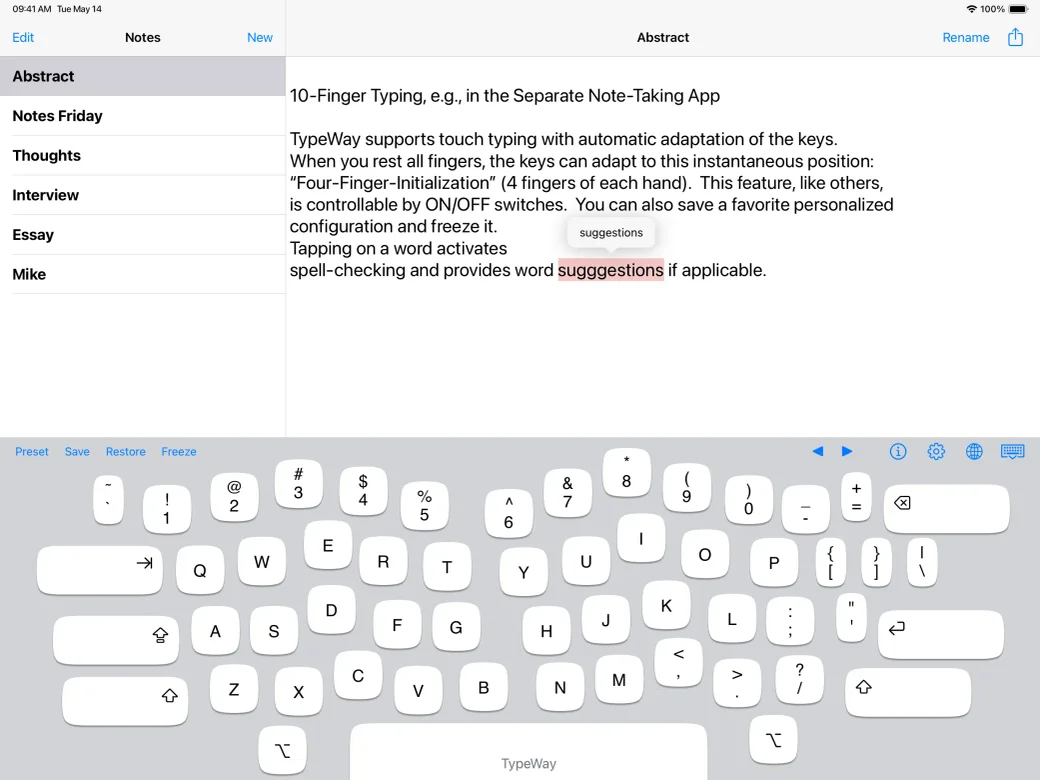
CUSTOMIZED KEYBOARD FOR 10-FINGER TYPING
TypeWay supports touch typing with automatic adaptation of the key configuration.
It adapts to individual hands and typing habits (only on iPad, in landscape mode).
You can “Save” and “Restore” a configuration as a favorite.
“Freeze” fixes the actual configuration.
“Save” / “Restore” and “Freeze” your personalized keyboard.
For beginners, we recommend a fixed configuration (“Freeze”)
and the slow adaptation in TypeWay’s “Settings”.
The keyboard layout offers British English, US English,
and German with several international accents.
iOS features are integrated, like cut, copy & paste, etc.
TypeWay provides fast typing, e.g., for protocols,
lesson scripts, interviews, emails, and basic text editing.
TYPEWAY AS A SEPARATE APP
Activate the separate note-taker app by tapping on the TypeWay icon.
“New” opens a new text file. You can “Edit” and “Rename” the text notes.
For text export, the share button offers, e.g., Mail,
Messages, AirDrop, Print, DropBox, Pages, etc.
TYPEWAY AS A UNIVERSAL KEYBOARD
For use in various iPad applications, you can activate TypeWay in iPad’s settings:
> “General” > “Keyboard” > “Keyboards” > “Add New Keyboard” > “TypeWay”
This installation of TypeWay offers the question for “Full Access”.
“Full Access” also can be activated or deactivated in the iPad settings:
> “General” > “Keyboard” > “Keyboards” > “TypeWay” > “Full Access”
( TypeWay does not need “Full Access”, does not need to connect to the internet,
and does not transfer information. It works with and without “Full Access” mode.
All typed data stays local on the iPad. )
Each keyboard shows the Globe Button to switch between available keyboards.
TypeWay and its logo are registered trademarks in several countries.
© 2011-2024 Ralf Trachte, Switzerland, all rights reserved.
Engineering: Pierre Bernard
Support: app@typeway.com
Information: www.typeway.com
Có gì mới
Phiên bản 2.0 · 04/07/2024
In a new design, additional wide keyboard layouts offer complete character assignments
for British English, US English, and German. You can activate intelligent formatting,
such as smart quotation marks and capitalization.
Quyền riêng tư của ứng dụng
Những gì Ralf Trachte khai báo trên App Store về cách ứng dụng này xử lý dữ liệu.
-
Dữ liệu không được thu thập
Nhà phát triển không thu thập bất kỳ dữ liệu nào từ ứng dụng này.
Phương thức đảm bảo quyền riêng tư có thể khác nhau, chẳng hạn như tuỳ theo các tính năng bạn sử dụng hoặc độ tuổi của bạn.
Thông tin
- Người bán
- Ralf Trachte
- Danh mục
- Tiện Ích
- Phiên bản
- 2.0
- Cập nhật
- 04/07/2024
- Phát hành
- 20/12/2011
- Kích thước
- 1,6 MB
- Yêu cầu
- iOS 13.0 trở lên
- Độ tuổi
- 4+
- Giá
- 29.000đ
- Ngôn ngữ
- Tiếng Anh
- Bản quyền
- © 2011-2026 Ralf Trachte
Có thể bạn cũng thích
-
 ContactHelperTiện Ích
-
 TunnaPrivacy at Your Fingertips
-
 Custom Keyboard Fonts FontsifyTiện Ích
-
 AGC - Video PlayerTiện Ích
-
 Calculator Keyboard - CalkuTiện Ích
-
 Cleaner Kit - ByePhotosGallery clean up made easy
-
 Fileso: zip rar 7zip ExtractorTiện Ích
-
 Dual Space - Parallel SpaceTiện Ích
-
 Usage Device Monitor & StatusLưu trữ, mạng, pin
-
 XMirror - Screen MirrorMirror phone to Car Screen