
- 対象年齢4+
- カテゴリユーティリティ
- 開発元Ralf Trachte
- 言語英語
- サイズ1.6 MB
App Storeの公式ページにリンクしています
Download.orgはTypeWayのファイルを一切ホストしていません。ボタンを押すと、Ralf Trachteが公開しているApp Storeのアプリページが開きます。ページの最終確認:2026/11/12。
スクリーンショット

概要
開発元はこのテキストをお使いの言語で提供していません。
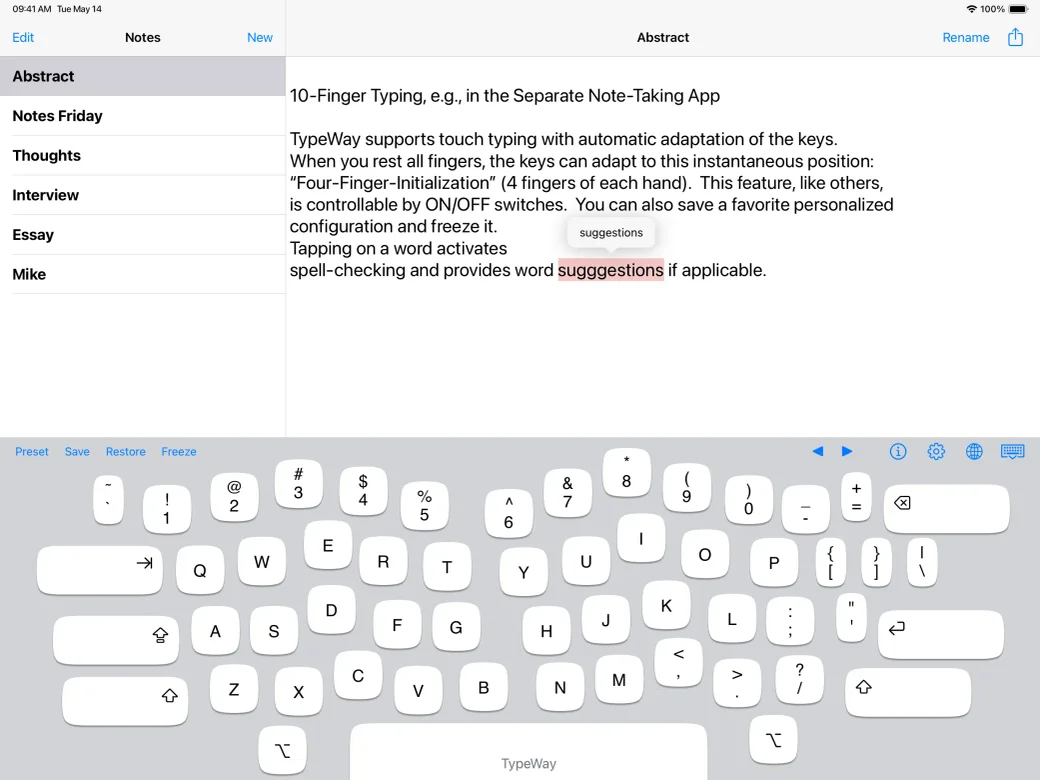
CUSTOMIZED KEYBOARD FOR 10-FINGER TYPING
TypeWay supports touch typing with automatic adaptation of the key configuration.
It adapts to individual hands and typing habits (only on iPad, in landscape mode).
You can “Save” and “Restore” a configuration as a favorite.
“Freeze” fixes the actual configuration.
“Save” / “Restore” and “Freeze” your personalized keyboard.
For beginners, we recommend a fixed configuration (“Freeze”)
and the slow adaptation in TypeWay’s “Settings”.
The keyboard layout offers British English, US English,
and German with several international accents.
iOS features are integrated, like cut, copy & paste, etc.
TypeWay provides fast typing, e.g., for protocols,
lesson scripts, interviews, emails, and basic text editing.
TYPEWAY AS A SEPARATE APP
Activate the separate note-taker app by tapping on the TypeWay icon.
“New” opens a new text file. You can “Edit” and “Rename” the text notes.
For text export, the share button offers, e.g., Mail,
Messages, AirDrop, Print, DropBox, Pages, etc.
TYPEWAY AS A UNIVERSAL KEYBOARD
For use in various iPad applications, you can activate TypeWay in iPad’s settings:
> “General” > “Keyboard” > “Keyboards” > “Add New Keyboard” > “TypeWay”
This installation of TypeWay offers the question for “Full Access”.
“Full Access” also can be activated or deactivated in the iPad settings:
> “General” > “Keyboard” > “Keyboards” > “TypeWay” > “Full Access”
( TypeWay does not need “Full Access”, does not need to connect to the internet,
and does not transfer information. It works with and without “Full Access” mode.
All typed data stays local on the iPad. )
Each keyboard shows the Globe Button to switch between available keyboards.
TypeWay and its logo are registered trademarks in several countries.
© 2011-2024 Ralf Trachte, Switzerland, all rights reserved.
Engineering: Pierre Bernard
Support: app@typeway.com
Information: www.typeway.com
新機能
バージョン 2.0 · 2024/7/4
In a new design, additional wide keyboard layouts offer complete character assignments
for British English, US English, and German. You can activate intelligent formatting,
such as smart quotation marks and capitalization.
アプリのプライバシー
このアプリのデータの取り扱いについて、Ralf TrachteがApp Storeで申告している内容です。
-
データの収集なし
開発元はこのアプリからデータを収集しません。
プライバシーの取り扱いは、ご利用の機能やお客様の年齢などに応じて異なる場合があります。
情報
- 販売元
- Ralf Trachte
- カテゴリ
- ユーティリティ
- バージョン
- 2.0
- 更新日
- 2024/7/4
- リリース
- 2011/12/20
- サイズ
- 1.6 MB
- 必要条件
- iOS 13.0以降
- 対象年齢
- 4+
- 価格
- ¥150
- 言語
- 英語
- 著作権
- © 2011-2026 Ralf Trachte
こちらもおすすめ
-
 ContactHelperユーティリティ
-
 Tunnaユーティリティ
-
 Custom Keyboard Fonts Fontsifyユーティリティ
-
 AGC - Video Playerユーティリティ
-
 Calculator Keyboard - Calkuユーティリティ
-
 ByePhotos: ストレージを整理して解放する手勢整理、写真を削除してストレージを解放
-
 Fileso: ファイル管理&解凍 zip rar 7zipプレビュー・解凍・変換
-
 Dual Space - Parallel Spaceユーティリティ
-
 Usage Device Monitor & Statusネットワーク, バッテリ, ストレージ, 温度
-
 XMirror - Screen MirrorMirror phone to Car Screen