
- 対象年齢4+
- カテゴリユーティリティ
- 開発元Justin Hopkins
- 言語英語
- サイズ25.6 MB
Cue It - Interval Timerは現在App Storeで入手できない可能性があります
前回の確認時、ストアのページにアクセスできませんでした。リンク先は引き続きApp Storeの公式ページです。
スクリーンショット



概要
開発元はこのテキストをお使いの言語で提供していません。
Stay on track with Cue It!
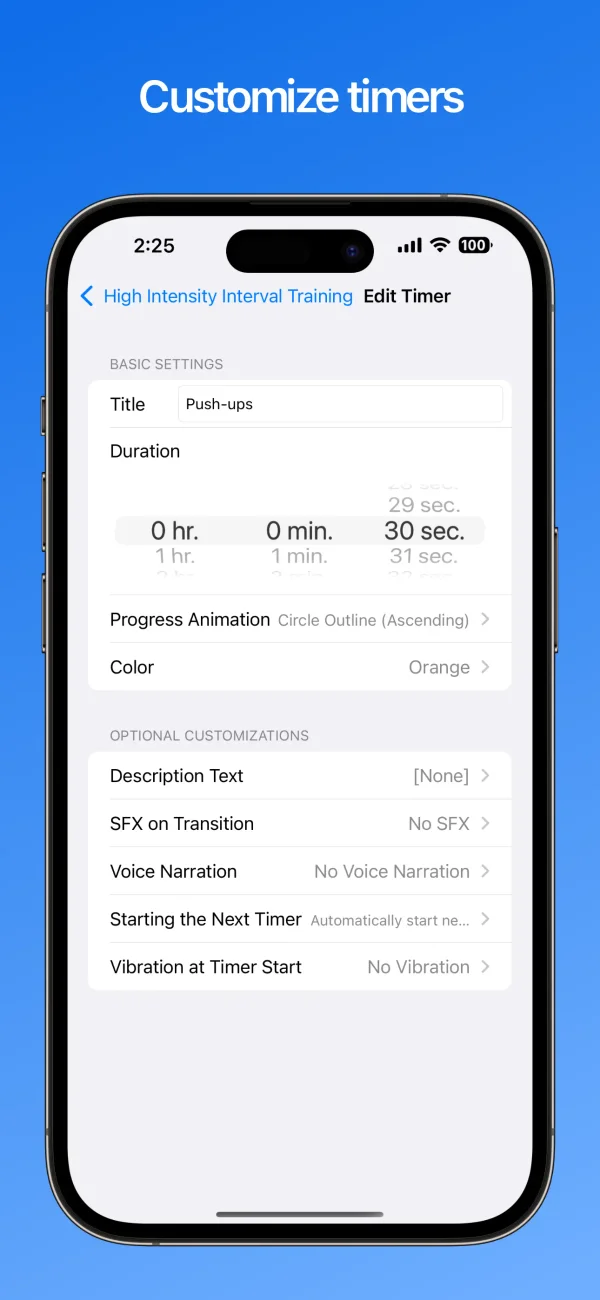
Create lists of timers, called “Cues”, to stay on track for each step in a routine of yours. When one timer on your list ends, the next timer starts.
For when you need to track time on something split into smaller parts, Cue It makes sure you don't miss a beat.
- Stay in shape: Create Cues for your fitness routines, with timers for each exercise and break
- Get productive: Create a Cue with a Pomodoro Timer loop (25 minutes of work, followed by a 5 minute break)
- Find relaxation: Create a Cue for meditation breathing techniques to relax or help with sleep, such as 4-7-8 Breathing
When you start a Cue, two countdown timers will be displayed - one for your current individual timer, and another for how much time is left in total. If you aren't able to keep constant focus on your device, you can also enable features such as Sound Effects, Vibrations, or Text-to-Speech Narration whenever a new timer starts.
Cues can be created for all kinds of purposes, including:
- Fitness/Workout Routines (Interval Timers)
- Productivity (Pomodoro Timers)
- Meditation/Breathing Techniques
- Basic Food Preparation
- Presentation Practice
Need to multitask with Cue In the background? While a Cue is active, you can also toggle the Notification Bell to enable/disable notifications for when a new timer starts, if you are away from Cue It.
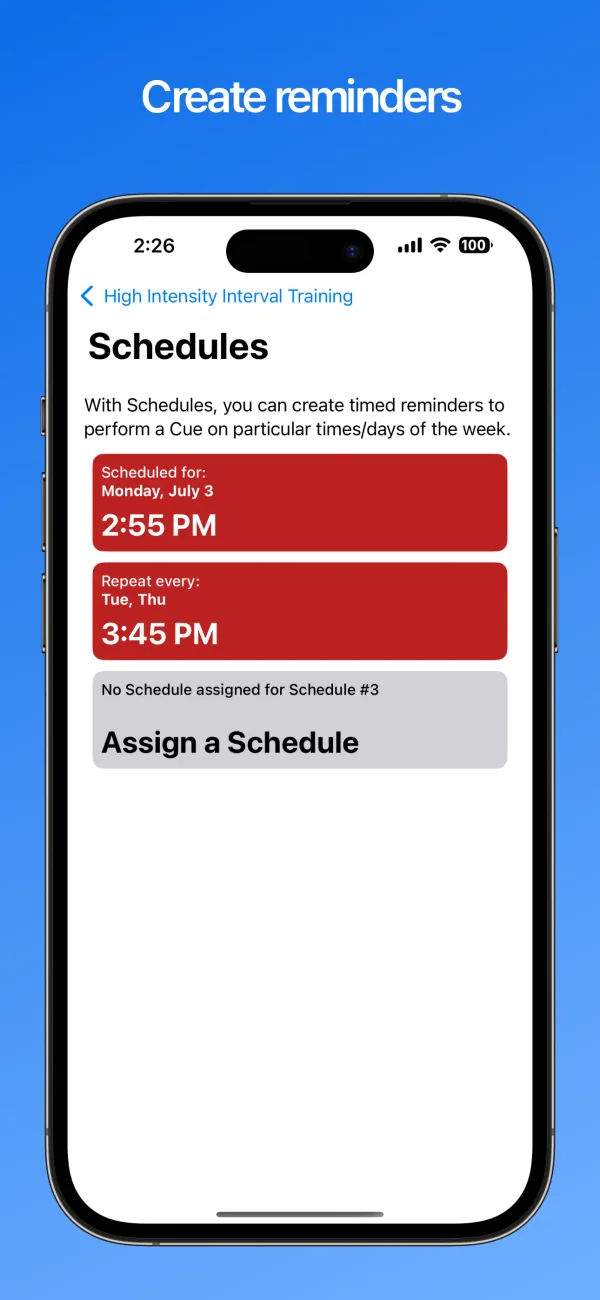
If you want to stick to a schedule, you can also set timed reminders to perform a Cue at a later time - either for a specific time and date, or repeating reminders on specific weekdays at a particular time.
新機能
バージョン 1.7.2 · 2024/3/21
Update 1.7.2 makes minor adjustments to new user onboarding.
Update 1.7 updates when SFX/Notifications play, adds new timer customizations, and fixes minor bugs.
Timer SFX and Notifications now play at the end of a timer by default, similar to traditional timer apps. This can be reverted in Settings if preferred.
* New Timer sound effects added
* Notification Bell now also delivers notifications for the completion of a Cue
* New Timer Customization - “Pre-completion Timer SFX”: Choose intervals of time to play the Timer’s SFX before the timer ends
* New App Setting - “When to play Timer SFX”: Choose when to play timer SFX/notifications (Start/End of Timer), and optionally select Cue Completion SFX (if SFX play at the start of timers)
* Minor bug fixes and tweaks
アプリのプライバシー
このアプリのデータの取り扱いについて、Justin HopkinsがApp Storeで申告している内容です。
-
データの収集なし
開発元はこのアプリからデータを収集しません。
プライバシーの取り扱いは、ご利用の機能やお客様の年齢などに応じて異なる場合があります。
情報
- 販売元
- Justin Hopkins
- カテゴリ
- ユーティリティ
- バージョン
- 1.7.2
- 更新日
- 2024/3/21
- リリース
- 2021/3/24
- サイズ
- 25.6 MB
- 必要条件
- iOS 15.0以降
- 対象年齢
- 4+
- 言語
- 英語
- 著作権
- © 2020-2024 Justin Hopkins
こちらもおすすめ
-
 アンペア4:バッテリー充電テストと診断スマホの寿命確認、電圧やシステムの監視
-
 Scrollit 2X: Visual messengerユーティリティ
-
 Bear - AI Keyboardユーティリティ
-
 もうすぐその時究極のカウントダウンアプリ
-
 Live Transcribe Voice To Text.ユーティリティ
-
 誕生日リマインダー&ウィジェット記念日とカウントダウン通知
-
 Controller Aiming Trainerユーティリティ
-
 Picroll - Tiny Screen Stitcherユーティリティ
-
 Camera Copyユーティリティ
-
 Cleaner Kit: Express Cleanupユーティリティ