
Cue It - Interval Timer
Periodic Interval Timer
Được thiết kế cho iPhone, iPad, iPod touch
- Độ tuổi4+
- Danh mụcTiện Ích
- Nhà phát triểnJustin Hopkins
- Ngôn ngữTiếng Anh
- Kích thước25,6 MB
Cue It - Interval Timer hiện có thể không có trên App Store
Ở lần kiểm tra gần nhất, chúng tôi không truy cập được trang trên cửa hàng. Liên kết vẫn dẫn đến trang App Store chính thức.
Ảnh chụp màn hình



Giới thiệu
Nhà phát triển chưa cung cấp nội dung này bằng ngôn ngữ của bạn.
Stay on track with Cue It!
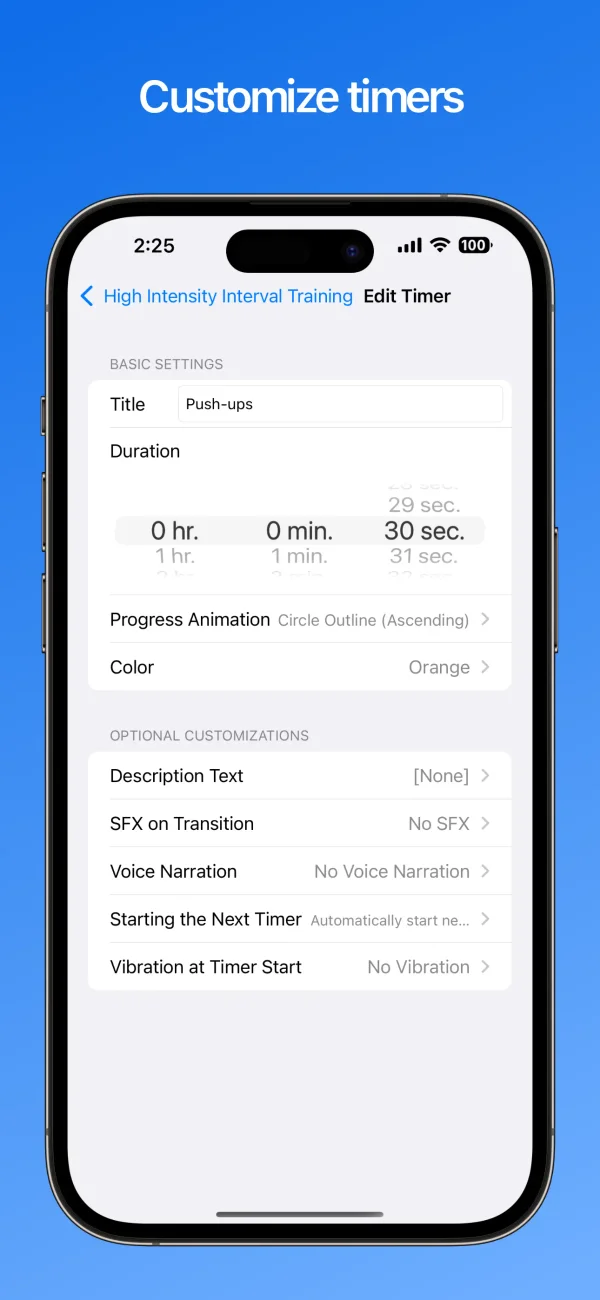
Create lists of timers, called “Cues”, to stay on track for each step in a routine of yours. When one timer on your list ends, the next timer starts.
For when you need to track time on something split into smaller parts, Cue It makes sure you don't miss a beat.
- Stay in shape: Create Cues for your fitness routines, with timers for each exercise and break
- Get productive: Create a Cue with a Pomodoro Timer loop (25 minutes of work, followed by a 5 minute break)
- Find relaxation: Create a Cue for meditation breathing techniques to relax or help with sleep, such as 4-7-8 Breathing
When you start a Cue, two countdown timers will be displayed - one for your current individual timer, and another for how much time is left in total. If you aren't able to keep constant focus on your device, you can also enable features such as Sound Effects, Vibrations, or Text-to-Speech Narration whenever a new timer starts.
Cues can be created for all kinds of purposes, including:
- Fitness/Workout Routines (Interval Timers)
- Productivity (Pomodoro Timers)
- Meditation/Breathing Techniques
- Basic Food Preparation
- Presentation Practice
Need to multitask with Cue In the background? While a Cue is active, you can also toggle the Notification Bell to enable/disable notifications for when a new timer starts, if you are away from Cue It.
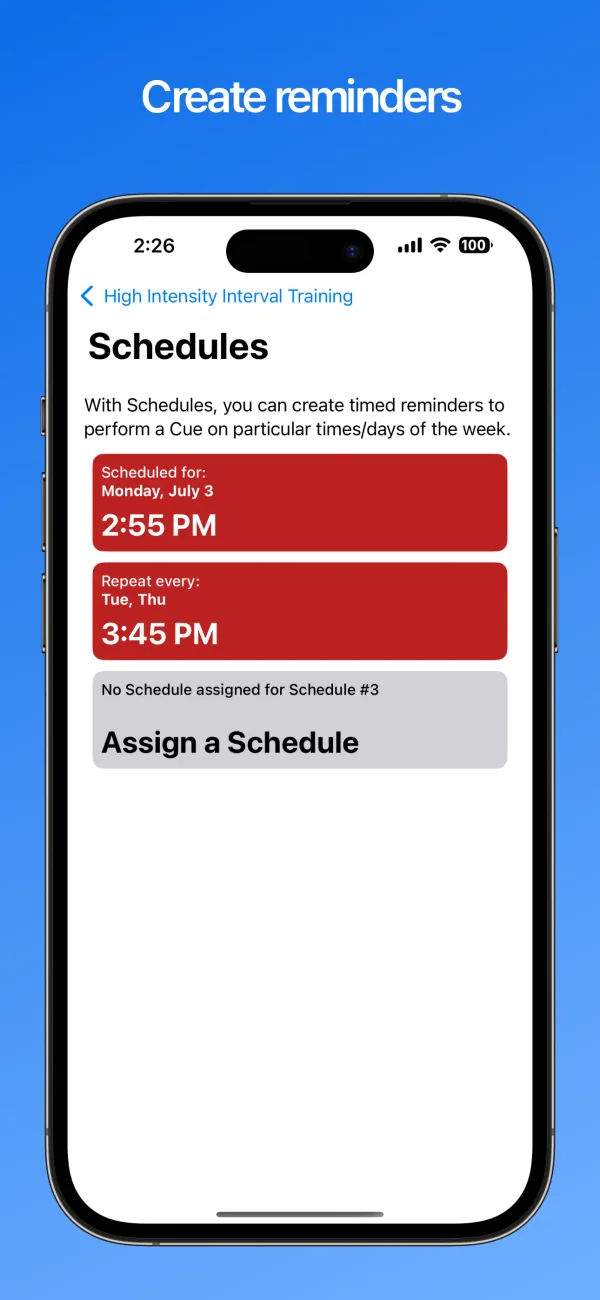
If you want to stick to a schedule, you can also set timed reminders to perform a Cue at a later time - either for a specific time and date, or repeating reminders on specific weekdays at a particular time.
Có gì mới
Phiên bản 1.7.2 · 21/03/2024
Update 1.7.2 makes minor adjustments to new user onboarding.
Update 1.7 updates when SFX/Notifications play, adds new timer customizations, and fixes minor bugs.
Timer SFX and Notifications now play at the end of a timer by default, similar to traditional timer apps. This can be reverted in Settings if preferred.
* New Timer sound effects added
* Notification Bell now also delivers notifications for the completion of a Cue
* New Timer Customization - “Pre-completion Timer SFX”: Choose intervals of time to play the Timer’s SFX before the timer ends
* New App Setting - “When to play Timer SFX”: Choose when to play timer SFX/notifications (Start/End of Timer), and optionally select Cue Completion SFX (if SFX play at the start of timers)
* Minor bug fixes and tweaks
Quyền riêng tư của ứng dụng
Những gì Justin Hopkins khai báo trên App Store về cách ứng dụng này xử lý dữ liệu.
-
Dữ liệu không được thu thập
Nhà phát triển không thu thập bất kỳ dữ liệu nào từ ứng dụng này.
Phương thức đảm bảo quyền riêng tư có thể khác nhau, chẳng hạn như tuỳ theo các tính năng bạn sử dụng hoặc độ tuổi của bạn.
Thông tin
- Người bán
- Justin Hopkins
- Danh mục
- Tiện Ích
- Phiên bản
- 1.7.2
- Cập nhật
- 21/03/2024
- Phát hành
- 24/03/2021
- Kích thước
- 25,6 MB
- Yêu cầu
- iOS 15.0 trở lên
- Độ tuổi
- 4+
- Ngôn ngữ
- Tiếng Anh
- Bản quyền
- © 2020-2024 Justin Hopkins
Có thể bạn cũng thích
-
 Amperes 4: Quản lý pin & sạcTheo dõi sức khỏe đo hiệu suất
-
 Scrollit 2X: Visual messengerTiện Ích
-
 Bear - AI KeyboardTiện Ích
-
 It's Almost TimeTiện Ích
-
 Live Transcribe Voice To Text.Tiện Ích
-
 Birthday Reminder & WidgetTiện Ích
-
 Controller Aiming TrainerTiện Ích
-
 Picroll - Tiny Screen StitcherTiện Ích
-
 Camera CopyTiện Ích
-
 Cleaner Kit: Express CleanupTiện Ích