- 対象年齢4+
- カテゴリユーティリティ
- 開発元PessTechnologies
- 言語英語ほか5言語
- サイズ37.4 MB
App Storeの公式ページにリンクしています
Download.orgはelios APPのファイルを一切ホストしていません。ボタンを押すと、PessTechnologiesが公開しているApp Storeのアプリページが開きます。ページの最終確認:2026/11/16。
スクリーンショット
概要
開発元はこのテキストをお使いの言語で提供していません。
Elios APP is the application that can handle the PESS Elios system via TCP / IP.
In this way we obtain a bi-directional link between the panel and your smartphone without having to send and receive numerous SMS
Once you create a profile, accessing to the control panel, will automatically learn all the programming. You now have the ability to manage the system by entering the same password used to access the keyboard.
There are no limits for the creation of profiles; 2 different layouts make this app customizable
The app can manage 2 languages : Italian and English by setting the language on the device’s menu.
The application can manage:
-Inputs: Status, enabling and disabling.
-Areas: Status, enabling and disabling, locking and unlocking, supervision ON / OFF.
-Alarms H24: status, enabling and disabling.
-Anomalies: Display all anomalies in the Elios system
-Functions: Status, enabling and disabling, locking and unlocking
-Events: Display up to 4000 events.
-Programmes: Status, enabling and disabling
Functionning:
Once installed and opened on the device the profiles screen will be displayed where the different profiles will be saved. To create a profile just click on the + displayed on the top right and choose the type of connection, direct or CLOUD.
Direct connection:
Requires the update of the Elios 1.00 or above.
A window will open to enter the data of the i.Lan board (WAN host and port and LAN host and port). The profile will be created when you click OK.
The APP can manage automatically the LAN and WAN depending on the device connection.
CLOUD connection:
Requires the update of the Elios 1.00 or above.
A window will open to enter the data of the CLOUD (Username, Password, panel ID ). The profile will be created when you click OK.
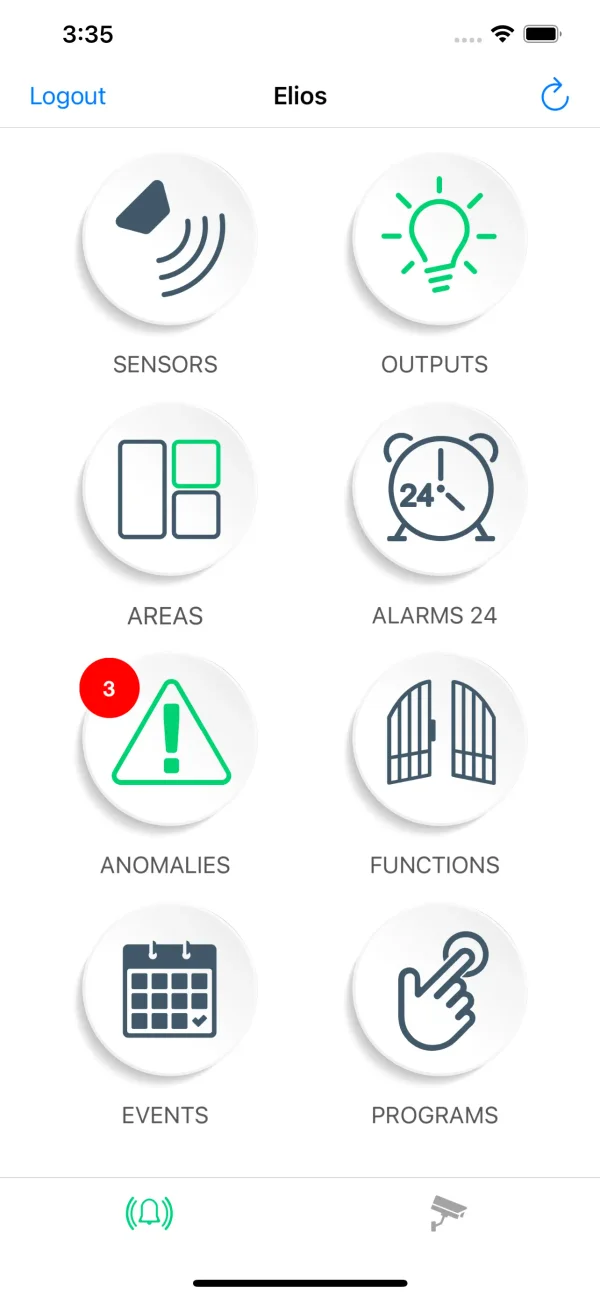
Every profile is a PESS Elios system. Clicking on one of them a password will be requested. Typing the password followed by a click on OK allow you the manage the system after few minutes. The following page will be the "MENU'" where the icons for inputs, outputs, areas, alarm H24, anomalies, functions, events and programmes will be displayed.
新機能
バージョン 2.0.9 · 2026/7/31
Fixed an issue that could prevent videos saved on iSee from being displayed.
Preview of Display Improvements
Horus Bus Support
Minor Bug Fixes
アプリのプライバシー
このアプリのデータの取り扱いについて、PessTechnologiesがApp Storeで申告している内容です。
-
データの収集なし
開発元はこのアプリからデータを収集しません。
プライバシーの取り扱いは、ご利用の機能やお客様の年齢などに応じて異なる場合があります。
情報
- 販売元
- PESS Technologies Srl
- カテゴリ
- ユーティリティ
- バージョン
- 2.0.9
- 更新日
- 2026/7/31
- リリース
- 2016/4/16
- サイズ
- 37.4 MB
- 必要条件
- iOS 12.0以降
- 対象年齢
- 4+
- 価格
- 無料
- 言語
- 英語, フランス語, ドイツ語, ギリシャ語, イタリア語, スペイン語
- 著作権
- © PESS Technologies Srl