- Độ tuổi4+
- Danh mụcTiện Ích
- Nhà phát triểnPessTechnologies
- Ngôn ngữTiếng Anh+ 5 ngôn ngữ khác
- Kích thước37,4 MB
Liên kết đến trang App Store chính thức
Download.org không lưu trữ tệp nào của elios APP. Nút này mở trang ứng dụng trên App Store, nơi PessTechnologies phát hành ứng dụng. Trang được kiểm tra lần cuối: 16/11/2026.
Ảnh chụp màn hình
Giới thiệu
Nhà phát triển chưa cung cấp nội dung này bằng ngôn ngữ của bạn.
Elios APP is the application that can handle the PESS Elios system via TCP / IP.
In this way we obtain a bi-directional link between the panel and your smartphone without having to send and receive numerous SMS
Once you create a profile, accessing to the control panel, will automatically learn all the programming. You now have the ability to manage the system by entering the same password used to access the keyboard.
There are no limits for the creation of profiles; 2 different layouts make this app customizable
The app can manage 2 languages : Italian and English by setting the language on the device’s menu.
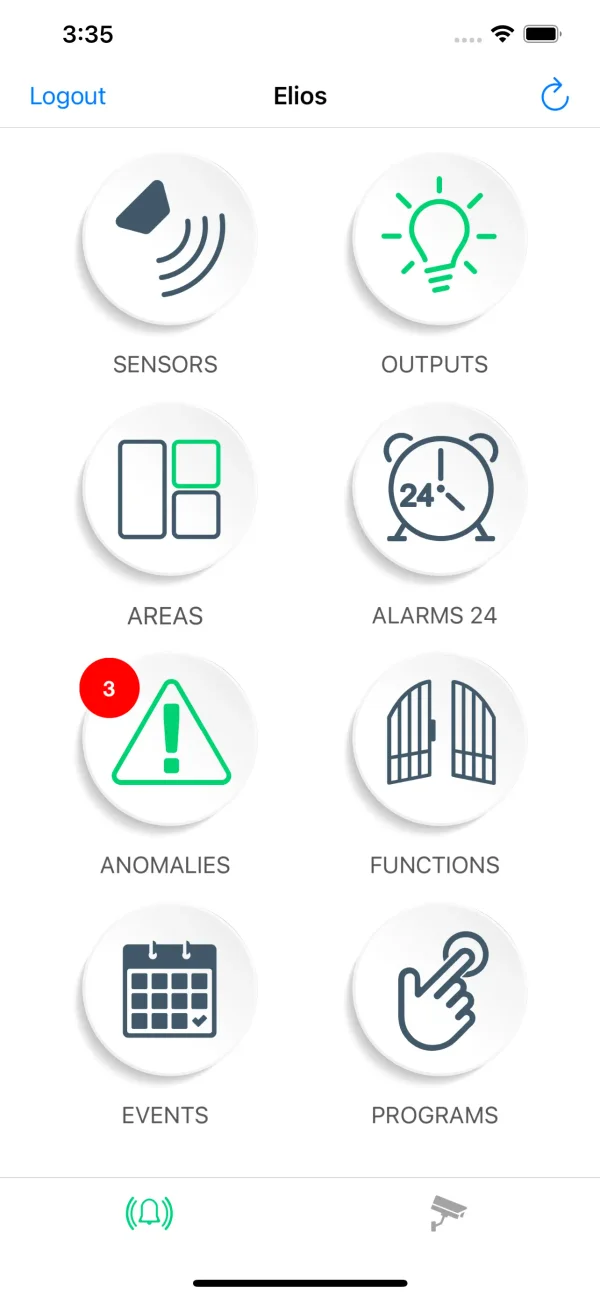
The application can manage:
-Inputs: Status, enabling and disabling.
-Areas: Status, enabling and disabling, locking and unlocking, supervision ON / OFF.
-Alarms H24: status, enabling and disabling.
-Anomalies: Display all anomalies in the Elios system
-Functions: Status, enabling and disabling, locking and unlocking
-Events: Display up to 4000 events.
-Programmes: Status, enabling and disabling
Functionning:
Once installed and opened on the device the profiles screen will be displayed where the different profiles will be saved. To create a profile just click on the + displayed on the top right and choose the type of connection, direct or CLOUD.
Direct connection:
Requires the update of the Elios 1.00 or above.
A window will open to enter the data of the i.Lan board (WAN host and port and LAN host and port). The profile will be created when you click OK.
The APP can manage automatically the LAN and WAN depending on the device connection.
CLOUD connection:
Requires the update of the Elios 1.00 or above.
A window will open to enter the data of the CLOUD (Username, Password, panel ID ). The profile will be created when you click OK.
Every profile is a PESS Elios system. Clicking on one of them a password will be requested. Typing the password followed by a click on OK allow you the manage the system after few minutes. The following page will be the "MENU'" where the icons for inputs, outputs, areas, alarm H24, anomalies, functions, events and programmes will be displayed.
Có gì mới
Phiên bản 2.0.9 · 31/07/2026
Fixed an issue that could prevent videos saved on iSee from being displayed.
Preview of Display Improvements
Horus Bus Support
Minor Bug Fixes
Quyền riêng tư của ứng dụng
Những gì PessTechnologies khai báo trên App Store về cách ứng dụng này xử lý dữ liệu.
-
Dữ liệu không được thu thập
Nhà phát triển không thu thập bất kỳ dữ liệu nào từ ứng dụng này.
Phương thức đảm bảo quyền riêng tư có thể khác nhau, chẳng hạn như tuỳ theo các tính năng bạn sử dụng hoặc độ tuổi của bạn.
Thông tin
- Người bán
- PESS Technologies Srl
- Danh mục
- Tiện Ích
- Phiên bản
- 2.0.9
- Cập nhật
- 31/07/2026
- Phát hành
- 16/04/2016
- Kích thước
- 37,4 MB
- Yêu cầu
- iOS 12.0 trở lên
- Độ tuổi
- 4+
- Giá
- Miễn phí
- Ngôn ngữ
- Tiếng Anh, Tiếng Pháp, Tiếng Đức, Tiếng Hy Lạp, Tiếng Ý, Tiếng Tây Ban Nha
- Bản quyền
- © PESS Technologies Srl