Skip to content

Deeper3.4.1 for macOS

Tweaks Finder, Safari, Login and other Mac settings

Titanium

Free · Proprietary

Download 3.4.1 · 5.9 MB
  • Age rating
    0+
    All ages
  • Category
    Maintenance
  • Developer
    Titanium
  • Languages
    5
    English
  • Size
    5.9
    MB

Mac

Deeper adjusts Mac settings: Finder menus and spacing, Safari history and PDFs, Login items. It is a Mac customization utility made by the same developer as Onyx.

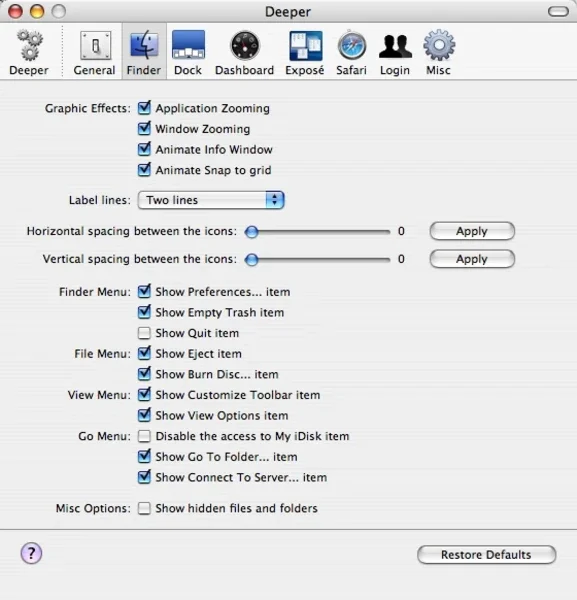
  • Choose which items appear in the Finder menu, set horizontal and vertical spacing, and adjust graphical effects such as zooming.
  • Safari settings cover how many history items are shown and whether PDFs open in the browser automatically. Browser settings are limited to Safari.
  • Login settings let you disable elements such as Restart or Logout and choose which users appear.
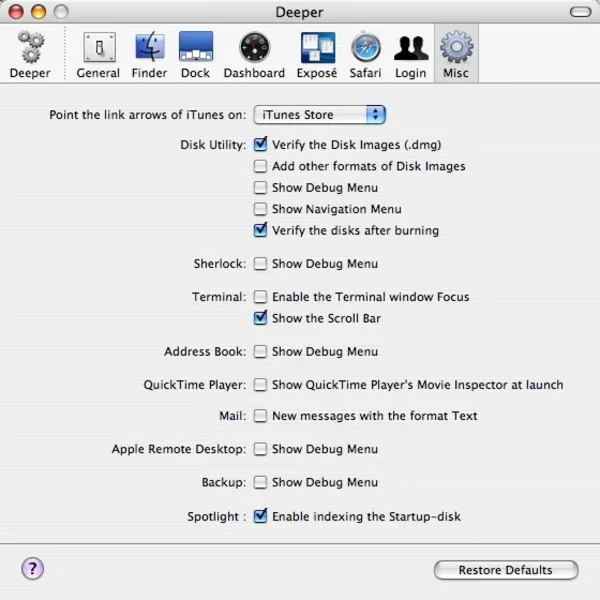
  • Show the Debug Menu for many Mac features, including Spotlight, Address Book and Terminal.

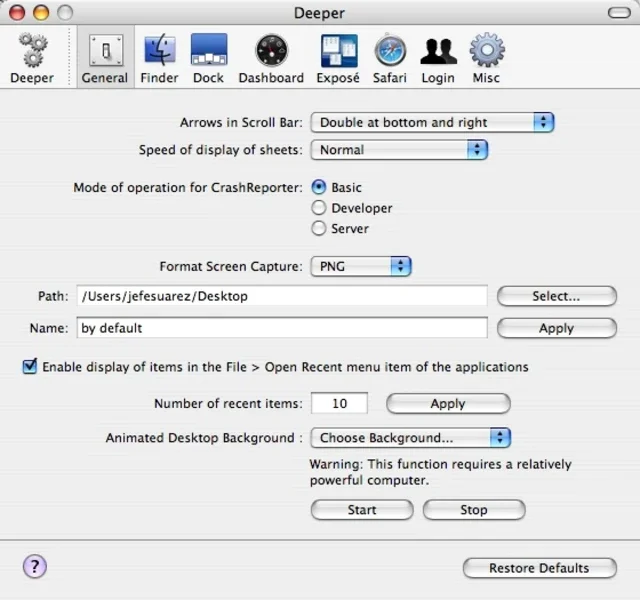
The interface is split into the main sections Deeper lets you customize. Some sections offer many adjustable settings while others, like Dashboard and Expose, are surprisingly limited. There is a setting to disable the cache automatically. A bug in the Login panel was corrected, and the help was updated.

[Release notes coming soon]

Version 3.4.1

Verify the file

Compare the SHA-256 of the file you downloaded with the value below. Files exactly as the publisher released them.

  • deeper-3-4-1.dmg

    3.4.1 · DMG · 5.9 MB

    SHA-256

    7f2c8fcfa258f1821529d08f8f46955bc952377f5410826e2b64f252589a39b9 Check on VirusTotal Get

Files exactly as the publisher released them.

Information

Seller
Titanium
Size
5.9 MB
Category
Maintenance
Compatibility
macOS
Languages
English and 4 more
Age rating
All ages
License
Proprietary
Price
Free

Version history

  • [Release notes coming soon]

    3.4.1
  • [Release notes coming soon]

    3.4.0
  • [Release notes coming soon]

    3.3.2
  • [Release notes coming soon]

    3.3.0
  • [Release notes coming soon]

    3.2.6
  • [Release notes coming soon]

    3.2.9
  • [Release notes coming soon]

    3.2.8
  • [Release notes coming soon]

    3.2.7
  • [Release notes coming soon]

    3.2.7
  • [Release notes coming soon]

    3.2.6
  • [Release notes coming soon]

    3.2.5
  • [Release notes coming soon]

    3.2.4
  • [Release notes coming soon]

    3.2.3
  • [Release notes coming soon]

    3.2.1
  • [Release notes coming soon]

    3.1.7
  • [Release notes coming soon]

    3.1.6
  • [Release notes coming soon]

    3.1.4
  • [Release notes coming soon]

    3.1.3
  • [Release notes coming soon]

    3.0.2
  • [Release notes coming soon]

    2.8.9
  • [Release notes coming soon]

    2.8.7
  • [Release notes coming soon]

    2.7.8
  • [Release notes coming soon]

    2.7.7
  • [Release notes coming soon]

    2.7.6
  • [Release notes coming soon]

    2.7.5
  • [Release notes coming soon]

    2.6.8
  • [Release notes coming soon]

    2.6.7
  • [Release notes coming soon]

    2.6.6
  • [Release notes coming soon]

    2.6.0
  • [Release notes coming soon]

    2.5.8
  • [Release notes coming soon]

    2.5.7
  • [Release notes coming soon]

    2.5.4
  • [Release notes coming soon]

    2.2.7
  • [Release notes coming soon]

    2.2.6
  • [Release notes coming soon]

    2.1.3
  • [Release notes coming soon]

    1.8.5
  • [Release notes coming soon]

    1.4.5
  • [Release notes coming soon]

    1.3.0
  • [Release notes coming soon]

    1.2.4
  • [Release notes coming soon]

    1.7.0
  • [Release notes coming soon]

    3.0.6
  • [Release notes coming soon]

    3.2.0
  • [Release notes coming soon]

    3.2.2

All versions ›