GS Auto Clicker1.2 for macOS
Clicks a chosen spot on screen on a timer, without you touching the mouse
Free · Proprietary
You are on Windows — this is the macOS version. See the Windows version
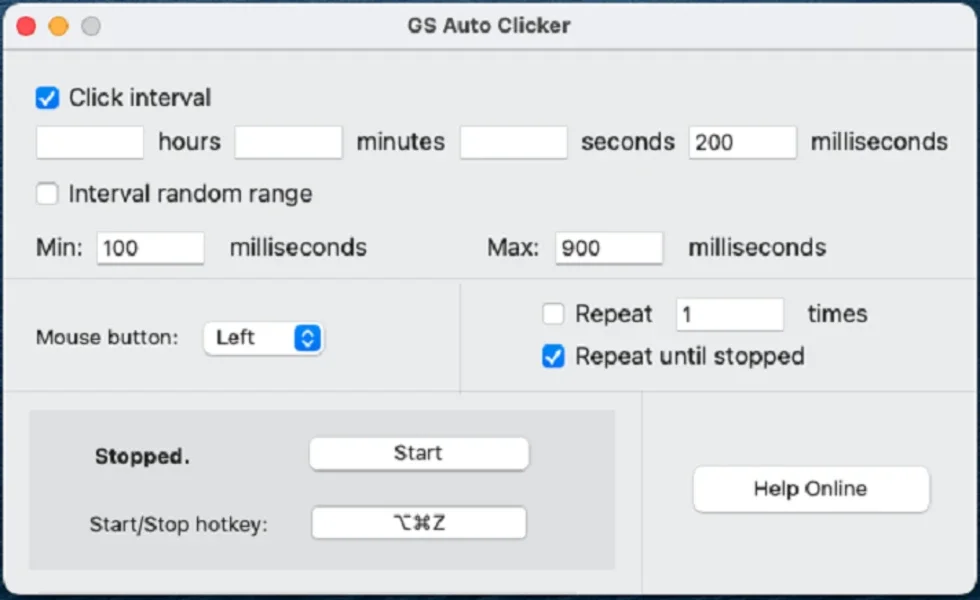
GS Auto Clicker clicks on a device without anyone pressing the mouse. You pick the point on screen where the clicks land, then set how it runs. Installation takes only seconds.
Configuring the clicks
After starting, you configure how it operates. The time interval between clicks and the number of clicks are both yours to set, and you can select single or multiple clicks. The options may seem somewhat complex at first. Pressing F8 starts the configured tasks.
It can help with routine, monotonous tasks, and it can let work progress without you being present. It can be used for playing video games too. GS Auto Clicker is free.
[Release notes coming soon]
Verify the file
Compare the SHA-256 of the file you downloaded with the value below. Files exactly as the publisher released them.
-
1.2
1.2 · ZIP · 838.2 KB
SHA-256
9451876af2b84cf10a8f4b0f65d445e55d28c6e173c6f942c242a28a50a03c5cCheck on VirusTotal Get
Files exactly as the publisher released them.
Information
- Seller
- goldensoft.org
- Size
- 838.2 KB
- Category
- Desktop Tools
- Compatibility
macOS 10.4 Tiger or later
- Languages
English
- Age rating
- All ages
- License
- Proprietary
- Price
- Free
- Platform
- Also available on Windows