
Shwidget
Show Sheets data in a widget!
Projetado para iPhone, iPad
Grátis · Compras no app
- Classificação etária4+
- CategoriaUtilidades
- DesenvolvedorAppsipaja Oy
- IdiomasInglês
- Tamanho8,9 MB
Leva à página oficial na App Store
O Download.org não hospeda nenhum arquivo de Shwidget. O botão abre a página do app na App Store, onde Appsipaja Oy o publica. Página verificada pela última vez em 23/11/2026.
Capturas de tela

Sobre
O desenvolvedor não forneceu este texto no seu idioma.
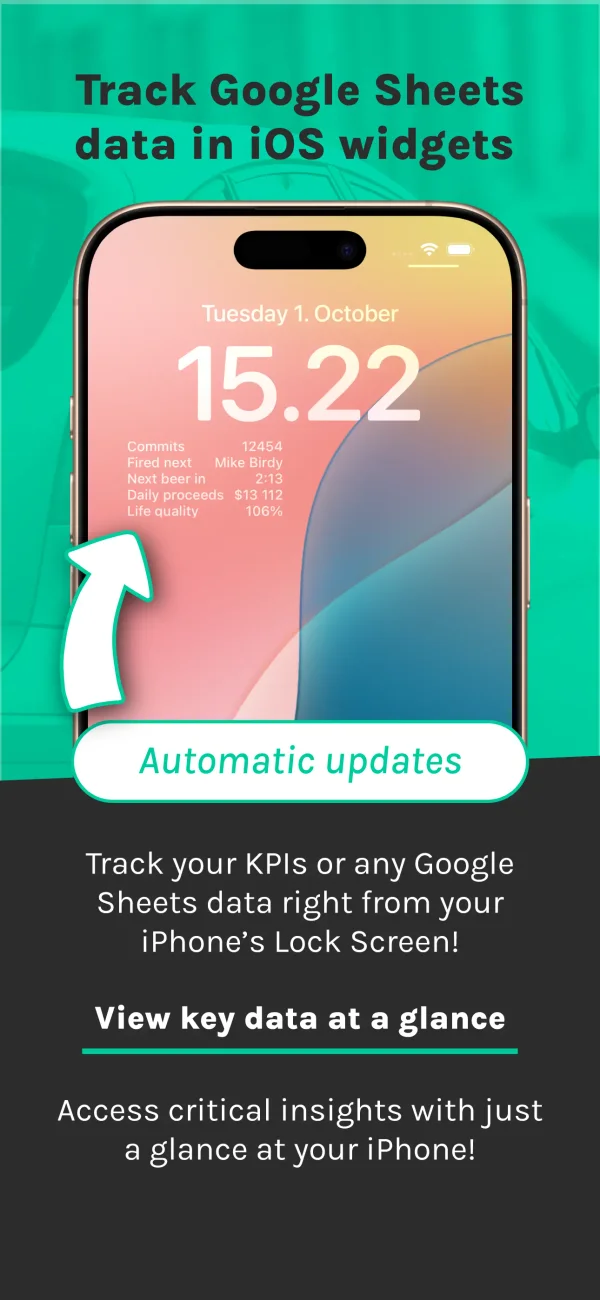
Keep your important Google Sheets values on your Home Screen, Lock Screen, or Apple Watch.
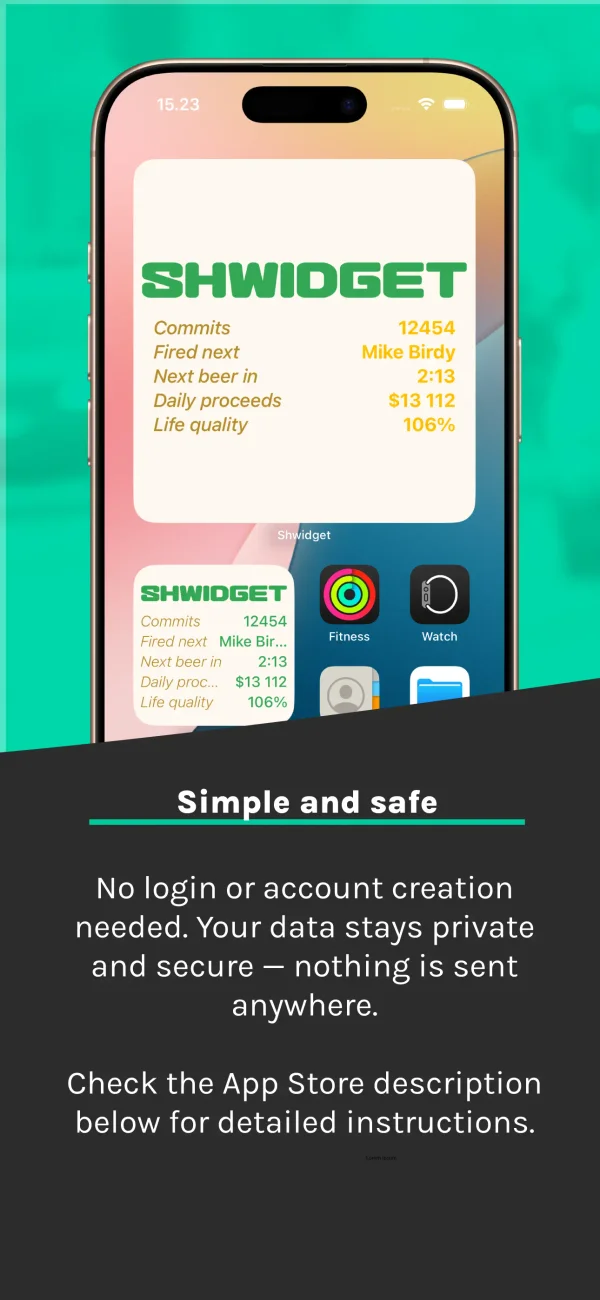
Shwidget displays values from your Google Sheets cells in widgets and Apple Watch complications. Follow KPIs, sales figures, project progress, or any other values without opening the Sheets app.
KEY FEATURES
• Home Screen widgets in multiple sizes.
• Lock Screen widgets for a quick glance at your data.
• Apple Watch complications to display values on your watch face.
• Apple Watch Smart Stack widgets.
• Automatic refreshes managed by iOS and watchOS.
• Optional titles to make your values easy to identify.
• No Shwidget account required.
Refresh timing is controlled by iOS and watchOS. Updates are periodic, and changes in your spreadsheet may not appear immediately.
GETTING STARTED
1. Open your Google spreadsheet and copy its spreadsheet ID from the URL. This is the text between “/d/” and the next slash. Keep all characters, including hyphens and underscores.
2. In the spreadsheet’s sharing settings, set General access to “Anyone with the link” and the role to “Viewer”.
3. Enter the spreadsheet ID and the cell references you want to display, such as D1 or D2, in Shwidget. Add optional titles for your values.
4. Add a Shwidget widget to your Home Screen or Lock Screen, or use Shwidget on your Apple Watch.
FINDING YOUR SPREADSHEET ID
For this URL:
https://docs.google.com/spreadsheets/d/1CMvaCWBAsrAftZjT5nXlntTUsnmkkZDlxMkXhAd_sBs/
The spreadsheet ID is:
1CMvaCWBAsrAftZjT5nXlntTUsnmkkZDlxMkXhAd_sBs
Paste only the ID into Shwidget, not the entire URL.
TROUBLESHOOTING
If your widget displays “ERROR empty cell?”, check that:
• The selected cell contains a value.
• The spreadsheet is shared with “Anyone with the link” as a Viewer.
• The spreadsheet ID and cell reference are correct.
SHARING AND SENSITIVE DATA
Anyone with your spreadsheet’s link can view it when this sharing setting is enabled. Avoid using it for spreadsheets containing confidential information.
To share only selected values, create a separate spreadsheet and use Google Sheets’ IMPORTRANGE function to bring in the cells you want to display. Use that separate spreadsheet with Shwidget and enable link sharing only for that spreadsheet.
TRY AN EXAMPLE
Use this spreadsheet ID:
1CMvaCWBAsrAftZjT5nXlntTUsnmkkZDlxMkXhAd_sBs
Try individual cell references such as D1, D2, D3, or E1 through E7. Open the example spreadsheet to compare the values with your widget.
FREE AND PRO
The free version lets you display one data field per widget.
The KPI Lover subscription unlocks additional rows per widget and lets you remove the Shwidget logo from Home Screen widgets and the branding text from Lock Screen widgets.
Questions or feedback? Contact me at mikko_a_appsipaja.fi.
Cheers,
Mikko
Terms of Use — Apple’s Standard EULA:
https://www.apple.com/legal/internet-services/itunes/dev/stdeula/
Novidades
Versão 1.4 · 18/11/2026
Support for Apple Watch Complications and Stacks.
Privacidade do app
O que Appsipaja Oy declara na App Store sobre como este app lida com os dados.
-
Dados não vinculados a você
Podem ser coletados, mas não são vinculados à sua identidade.
- Identificadores
- Diagnóstico
As práticas de privacidade podem variar, por exemplo, com base nos recursos que você usa ou na sua idade.
Informações
- Vendedor
- Appsipaja Oy
- Categoria
- Utilidades
- Versão
- 1.4
- Atualizado
- 18/11/2026
- Lançamento
- 27/09/2023
- Tamanho
- 8,9 MB
- Requer
- iOS 16.1 ou posterior
- Classificação etária
- 4+
- Preço
- Grátis
- Compras no app
- Sim
- Idiomas
- Inglês
- Copyright
- © Appsipaja Oy
Você também pode gostar
-
 Sheets WidgetsWidget de planilhas na tela
-
 SheetWidget: PlanilhasTabelas na Tela Bloqueada
-
 Tally • Quick CounterUtilidades
-
 Screens 5: VNC Remote DesktopAcesso Rápido e Seguro
-
 ntfyUtilidades
-
 Sticky WidgetsNotas nas telas do iPhone
-
 Desktop Browsersite para desktop ou celular
-
 Pushcut: Automação dos AtalhosAutomatize Workflow Casa Smart
-
 Contagem Regressiva e WidgetsContador por Pretty Progress
-
 Sticky Notes WidgetUtilidades