Juggluco
Jaap Korthals Altes- PEGI 3Yaş sınırı
- TıpKategori
- 04.11.2026Güncellendi
- ÜcretsizFiyat
tk.glucodata için resmi Google Play sayfasına bağlanır. Son kontrol: 19.11.2026.
Ekran görüntüleri




Bu uygulama hakkında
Google tarafından otomatik çeviri. Orijinal dil: İngilizce (Amerika Birleşik Devletleri).
Libre 2+/3+, Sibionics GS1, Dexcom G7/1+, Accu-Chek, CareSens Air, Linx/Aidex X
Juggluco'yu yazma motivasyonum, sensör glikoz değerlerini sadece mevcut glikoz seviyemi bilmek veya glikoz kontrolümün başarısına dair genel bir bakış elde etmekten daha fazlası için kullanma ihtiyacından kaynaklanıyordu.
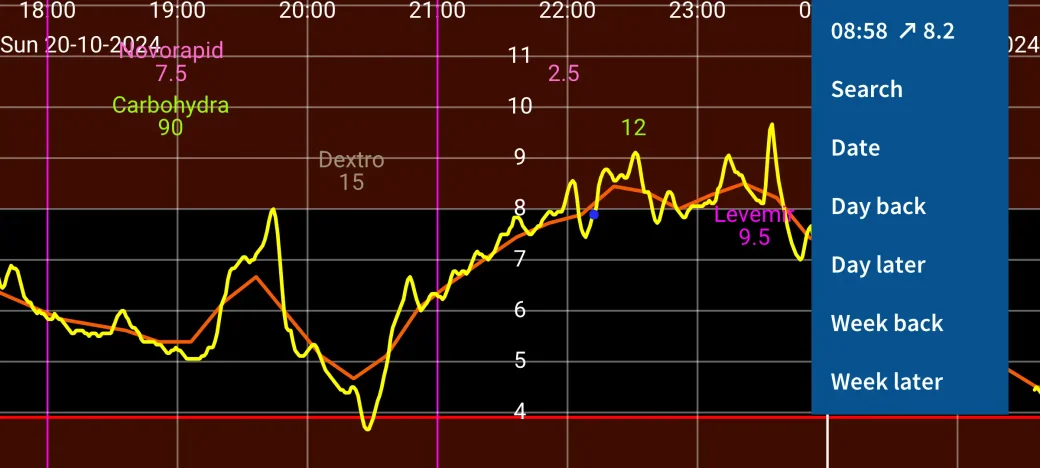
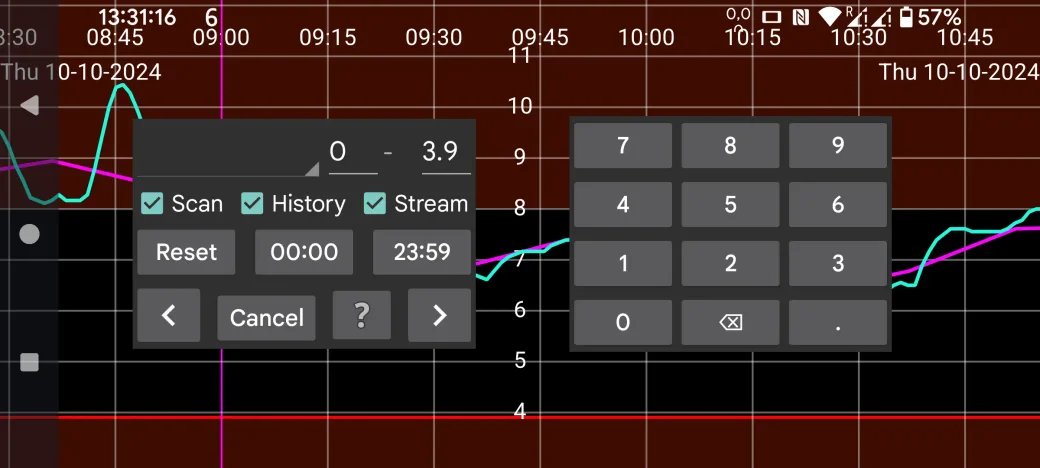
Glikoz eğrisini, önceki deneyimlere kolayca geri dönmek ve insülin dozları, karbonhidrat alımı ve aktivitelerle ilişkili olarak tam olarak nasıl gittiğini görmek için kullanmak istedim. Dikey modda küçük, izole edilmiş ve yavaşça oluşturulmuş bir eğri buna izin vermiyor.
Juggluco, Freestyle Libre 2, 2+, 3 ve 3+, Sibionics GS1Sb, Dexcom G7/ONE+, Accu-Chek SmartGuide, CareSens Air ve Linx/Aidex X sensörlerinden Bluetooth aracılığıyla glikoz değerleri alan bir uygulamadır. Ek olarak, Juggluco, NovoPen® 6 ve NovoPen Echo® Plus'ı tarayabilir ve Contour Next glikoz ölçüm cihazlarından Bluetooth aracılığıyla test sonuçlarını alabilir.
Juggluco, her türlü akıllı saate glikoz değerleri gönderebilir, sol menü→Saat→Yardım bölümüne bakın: https://www.juggluco.nl/Jugglucohelp/watchinfo.html
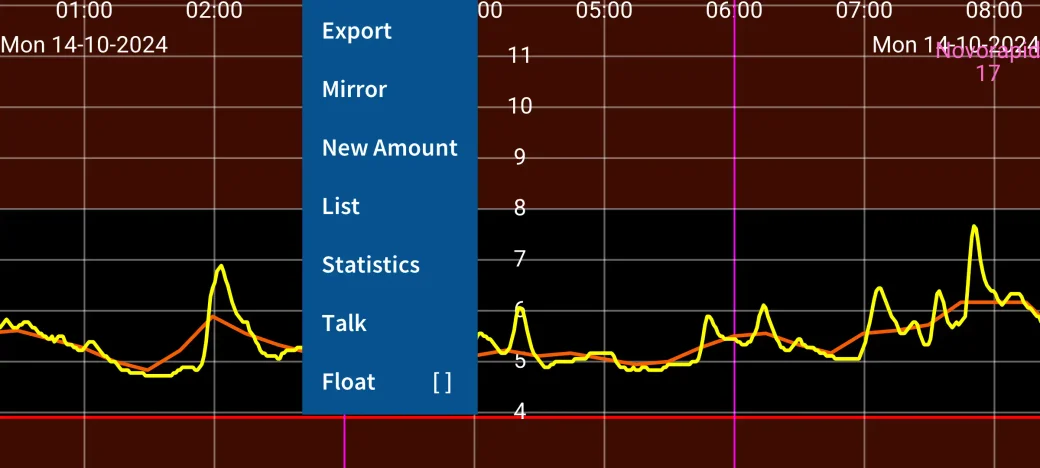
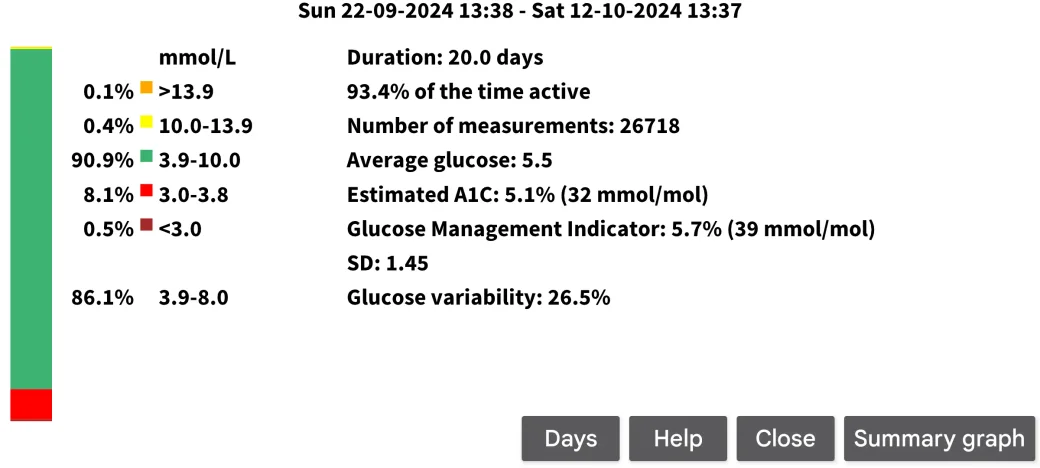
Juggluco'nun telefon sürümü, gelen glikoz değerlerini sesli olarak iletebilir, ana ekranda bir widget'ta ve diğer uygulamaların üzerinde yüzen glikoz göstergesinde görüntüleyebilir. Juggluco, olağan glikoz istatistiklerini görüntüleyebilir. Diğer uygulamalar, glikoz yayınları ve Juggluco'daki web sunucusu aracılığıyla Juggluco'dan veri alabilir. Juggluco, Health Connect, Libreview ve Nightscout'a veri gönderebilir. Veriler ayrıca bir dosyaya aktarılabilir veya başka bir telefon, tablet, emülatör veya saatteki başka bir Juggluco örneğine gönderilebilir. Düşük ve yüksek glikoz alarmları ve ilaç hatırlatıcıları ayarlama seçeneği vardır.
Juggluco ile bir Libre 2 sensörünü taradıktan sonra, Abbott'un Libre 2 uygulaması yalnızca sensörü tarayabilir (iki uygulama aynı telefonda olduğunda, her ikisi de Avrupa Libre 2 sensörlerinden glikoz değerleri alabilir, ancak bu bağlantı sorunlarına neden olabilir). Libre 3 sensörleri, Juggluco ile kullandıktan sonra Abbott'un yalnızca Libre 3 uygulamasıyla kullanılmaya devam edebilir: Juggluco'yu durdurun ve mevcut sensörü durdurup yeni bir sensör başlatmayı kabul ederek sensörü Abbott'un Libre 3 uygulamasıyla tarayın. Juggluco'ya geri döndüğünüzde tekrar taramanız gerekir.
Sol menüden → Fotoğraf seçeneğini kullanarak Dexcom G7/ONE+ aplikatöründeki, Sibionics GS1Sb ve Linx/Aidex X paketlerindeki, CareSens Air iç paketindeki ve Accu-Check SmartGuide sensörlerinin mavi kapağındaki veri matrisini tarayın. Sonuncusu için istendiğinde PIN kodunu girin. Uyarı: CareSens Air sensörleri yalnızca bir kez cihaz değiştirebilir. Bkz: https://www.juggluco.nl/Juggluco/sensors
Wear OS sürümü, glikoz seviyesini saat kadranında görüntülemek için komplikasyonlar içermektedir.
https://www.juggluco.nl/Jugglucohelp/introhelp.html
Glikoz eğrisini, önceki deneyimlere kolayca geri dönmek ve insülin dozları, karbonhidrat alımı ve aktivitelerle ilişkili olarak tam olarak nasıl gittiğini görmek için kullanmak istedim. Dikey modda küçük, izole edilmiş ve yavaşça oluşturulmuş bir eğri buna izin vermiyor.
Juggluco, Freestyle Libre 2, 2+, 3 ve 3+, Sibionics GS1Sb, Dexcom G7/ONE+, Accu-Chek SmartGuide, CareSens Air ve Linx/Aidex X sensörlerinden Bluetooth aracılığıyla glikoz değerleri alan bir uygulamadır. Ek olarak, Juggluco, NovoPen® 6 ve NovoPen Echo® Plus'ı tarayabilir ve Contour Next glikoz ölçüm cihazlarından Bluetooth aracılığıyla test sonuçlarını alabilir.
Juggluco, her türlü akıllı saate glikoz değerleri gönderebilir, sol menü→Saat→Yardım bölümüne bakın: https://www.juggluco.nl/Jugglucohelp/watchinfo.html
Juggluco'nun telefon sürümü, gelen glikoz değerlerini sesli olarak iletebilir, ana ekranda bir widget'ta ve diğer uygulamaların üzerinde yüzen glikoz göstergesinde görüntüleyebilir. Juggluco, olağan glikoz istatistiklerini görüntüleyebilir. Diğer uygulamalar, glikoz yayınları ve Juggluco'daki web sunucusu aracılığıyla Juggluco'dan veri alabilir. Juggluco, Health Connect, Libreview ve Nightscout'a veri gönderebilir. Veriler ayrıca bir dosyaya aktarılabilir veya başka bir telefon, tablet, emülatör veya saatteki başka bir Juggluco örneğine gönderilebilir. Düşük ve yüksek glikoz alarmları ve ilaç hatırlatıcıları ayarlama seçeneği vardır.
Başlangıç
Bir Libre 2 sensörünü kullanmak için, Juggluco ile tarayın. Abbott'un yalnızca Libre 3 için olan uygulamasından bir Libre 3 sensörünü devralmak için, sol menü→Ayarlar→Veri Değişimi→Libreview bölümüne giderek sensörü etkinleştirirken kullandığınız aynı hesabı girmeniz ve Hesap Kimliği Al düğmesine basarak Libreview'den bir numara almanız gerekir. Sensörü taradığınızda bu numara sensöre gönderilecektir. Libre 3 sensörü Juggluco ile etkinleştirildiğinde Libreview hesabına gerek yoktur: sensörü taramadan önce rastgele bir numara girin. İlk seferde Juggluco'nun sensörden Bluetooth aracılığıyla glikoz değeri alması 2 ila 10 dakika sürer. Paraziti önlemek için, uygulamaları zorla durdurun ve sensörle daha önce kullanılan cihazları kapatın. Juggluco'nun arka planda çalışmaya devam etmesi için arka plan etkinliğine izin verin ve Juggluco için pil optimizasyonlarını kapatın. Juggluco'nun bildirimini gizlemeyin.Juggluco ile bir Libre 2 sensörünü taradıktan sonra, Abbott'un Libre 2 uygulaması yalnızca sensörü tarayabilir (iki uygulama aynı telefonda olduğunda, her ikisi de Avrupa Libre 2 sensörlerinden glikoz değerleri alabilir, ancak bu bağlantı sorunlarına neden olabilir). Libre 3 sensörleri, Juggluco ile kullandıktan sonra Abbott'un yalnızca Libre 3 uygulamasıyla kullanılmaya devam edebilir: Juggluco'yu durdurun ve mevcut sensörü durdurup yeni bir sensör başlatmayı kabul ederek sensörü Abbott'un Libre 3 uygulamasıyla tarayın. Juggluco'ya geri döndüğünüzde tekrar taramanız gerekir.
Sol menüden → Fotoğraf seçeneğini kullanarak Dexcom G7/ONE+ aplikatöründeki, Sibionics GS1Sb ve Linx/Aidex X paketlerindeki, CareSens Air iç paketindeki ve Accu-Check SmartGuide sensörlerinin mavi kapağındaki veri matrisini tarayın. Sonuncusu için istendiğinde PIN kodunu girin. Uyarı: CareSens Air sensörleri yalnızca bir kez cihaz değiştirebilir. Bkz: https://www.juggluco.nl/Juggluco/sensors
Wear OS
Juggluco'nun telefon sürümü sensörü tarar ve bu verileri Juggluco'nun WearOS sürümüne gönderir. Hem telefonda hem de saatte Bluetooth'un açık olması gerekir. Hızlı iletim için ayrıca WIFI da gereklidir. Başlatma işleminden sonra, sol menü → Saat → Wear OS yapılandırması → Doğrudan sensör-saat bağlantısı yoluyla sensörü saatle doğrudan bağlayıp kapatabilirsiniz. https://github.com/j-kaltes/Juggluco/wiki#wearos-watches adresinde farklı saatlerin Juggluco ile ne kadar iyi çalıştığı hakkında bilgiler bulunmaktadır.Wear OS sürümü, glikoz seviyesini saat kadranında görüntülemek için komplikasyonlar içermektedir.
https://www.juggluco.nl/Jugglucohelp/introhelp.html
Orijinal metni göster
The motivation to write Juggluco was the need to use the sensor glucose values for something more than knowing my current glucose level or getting a global view the success of my glucose control.
I wanted to use the glucose curve to easily refer back to previous experiences and see exactly how it went in relation to insulin doses, carbohydrate intake and activities. A little isolated slowly generated curve in portrait mode doesn’t allow for that.
Juggluco is an app that receives glucose values via Bluetooth from Freestyle Libre 2, 2+, 3 and 3+, Sibionics GS1Sb, Dexcom G7/ONE+, Accu-Chek SmartGuide, CareSens Air and Linx/Aidex X sensors. In addition, Juggluco can scan NovoPen® 6 and NovoPen Echo® Plus and receive test results via Bluetooth from Contour Next glucose meters.
Juggluco can send glucose values to all kinds of smartwatches, see left menu→Watch→Help: https://www.juggluco.nl/Jugglucohelp/watchinfo.html
The phone version of Juggluco can talk out incoming glucose values, display it in a widget on the home screen and in floating glucose above other apps. Juggluco can display the usual glucose statistics. Other apps can receive data from Juggluco via glucose broadcasts and the web server in Juggluco. Juggluco can send data to Health Connect, Libreview and Nightscout. Data can also be exported to a file or send to another exemplar of Juggluco on another phone, tablet, emulator or watch. It has the option to set low and high glucose alarms and medication reminders.
After scanning a Libre 2 sensor with Juggluco, Abbott’s Libre 2 app can only scan the sensor (when two apps are on the same phone they can both receive glucose values from European Libre 2 sensors, but this can give connection problems.) Libre 3 sensors can still be used with Abbott’s Libre 3 only app after using it with Juggluco: stop Juggluco and scan the sensor with Abbott’s Libre 3 app, agreeing that you stop the current sensor and start a new one. When going back to Juggluco you have to scan again.
Scan with left menu→Photo the data matrix on the applicator for of Dexcom G7/ONE+, the package of Sibionics GS1Sb and Linx/Aidex X and the inner package of CareSens Air, and the blue cap of Accu-Check SmartGuide sensors. For the last enter the pin when asked. Warning: CareSens Air sensors can switch device only once. See: https://www.juggluco.nl/Juggluco/sensors
Wear OS version contains complications to display the glucose level on a watch face.
https://www.juggluco.nl/Jugglucohelp/introhelp.html
I wanted to use the glucose curve to easily refer back to previous experiences and see exactly how it went in relation to insulin doses, carbohydrate intake and activities. A little isolated slowly generated curve in portrait mode doesn’t allow for that.
Juggluco is an app that receives glucose values via Bluetooth from Freestyle Libre 2, 2+, 3 and 3+, Sibionics GS1Sb, Dexcom G7/ONE+, Accu-Chek SmartGuide, CareSens Air and Linx/Aidex X sensors. In addition, Juggluco can scan NovoPen® 6 and NovoPen Echo® Plus and receive test results via Bluetooth from Contour Next glucose meters.
Juggluco can send glucose values to all kinds of smartwatches, see left menu→Watch→Help: https://www.juggluco.nl/Jugglucohelp/watchinfo.html
The phone version of Juggluco can talk out incoming glucose values, display it in a widget on the home screen and in floating glucose above other apps. Juggluco can display the usual glucose statistics. Other apps can receive data from Juggluco via glucose broadcasts and the web server in Juggluco. Juggluco can send data to Health Connect, Libreview and Nightscout. Data can also be exported to a file or send to another exemplar of Juggluco on another phone, tablet, emulator or watch. It has the option to set low and high glucose alarms and medication reminders.
Start
To use a Libre 2 sensor, scan it with Juggluco. To take over a Libre 3 sensor from Abbott's Libre 3-only app, you need to enter in left menu→Settings→Exchange data→Libreview the same account as when activating the sensor and press Get account ID, to receive a number from Libreview. When you now scan the sensor this number will be sent to the sensor. No Libreview account is needed, when the Libre 3 sensor is activated with Juggluco: enter an arbitrary number before scanning the sensor. The first time it takes 2 to 10 minutes before Juggluco receives a glucose value via Bluetooth from the sensor. To prevent interference, force stop apps and turn off devices previously used with the sensor. To keep Juggluco running in the background, allow background activity and turn off battery optimizations for Juggluco. Don’t hide Juggluco’s notification.After scanning a Libre 2 sensor with Juggluco, Abbott’s Libre 2 app can only scan the sensor (when two apps are on the same phone they can both receive glucose values from European Libre 2 sensors, but this can give connection problems.) Libre 3 sensors can still be used with Abbott’s Libre 3 only app after using it with Juggluco: stop Juggluco and scan the sensor with Abbott’s Libre 3 app, agreeing that you stop the current sensor and start a new one. When going back to Juggluco you have to scan again.
Scan with left menu→Photo the data matrix on the applicator for of Dexcom G7/ONE+, the package of Sibionics GS1Sb and Linx/Aidex X and the inner package of CareSens Air, and the blue cap of Accu-Check SmartGuide sensors. For the last enter the pin when asked. Warning: CareSens Air sensors can switch device only once. See: https://www.juggluco.nl/Juggluco/sensors
Wear OS
The phone version of Juggluco scans the sensor and sends this data to the WearOS version of Juggluco. Bluetooth on both phone and watch needs to be turned on. For fast transmission, also WIFI. After initialization, you can switch on and off directly connecting the sensor with the watch, with left menu→Watch→Wear OS config→Direct sensor-watch connection. https://github.com/j-kaltes/Juggluco/wiki#wearos-watches collects information about how well different watches work with Juggluco.Wear OS version contains complications to display the glucose level on a watch face.
https://www.juggluco.nl/Jugglucohelp/introhelp.html
Veri güvenliği
Bu uygulamanın topladığı ve paylaştığı veriler hakkında Jaap Korthals Altes tarafından Google Play üzerinde yapılan beyan.
- Üçüncü taraflarla veri paylaşımı yokGeliştiricilerin, veri paylaşımını nasıl beyan ettikleri hakkında daha fazla bilgi edinin
- Veri toplanamadıGeliştiricilerin, veri toplamayı nasıl beyan ettikleri hakkında daha fazla bilgi edinin
Yenilikler
04.11.2026
- ATTENTION: If you use Juggluco on WearOS, you need to update Juggluco on watch and phone to the same version of Juggluco.
• Can receive activities from Health Connect: left menu→Settings→Exchange data→Activities. https://www.juggluco.nl/Jugglucohelp/activities.html
• Bug fix. Taking over sensors started with Abbotts new Libre app now also works for the non-Dutch.
Geliştirici iletişim bilgileri
- Web sitesijuggluco.nl
- E-postajaapkorthalsaltes@gmail.com
- Gizlilik politikasıjuggluco.nl
- AdresNetherlands
Bilgiler
- Sunan
- Google Commerce Ltd
- Kategori
- Tıp
- Güncellendi
- 04.11.2026
- Yayın tarihi
- 17.10.2021
- Gereksinim
- Android 8.0 veya sonrası
- Yaş sınırı
- PEGI 3
- Fiyat
- Ücretsiz
- Paket adı
- tk.glucodata
Benzer uygulamalar
-
 Luscii
Tıp
-
 David Lloyd Clubs
Sağlık ve Fitness
-
 SNAQ - Diabetes Food Tracker
Sağlık ve Fitness
-
 Yazen: medical weight loss
Tıp
-
 Blood Sugar Diary for Diabetes
Tıp
-
 Diyabet & Glisemik İndeks
Sağlık ve Fitness
-
 Owlet Dream
Sağlık ve Fitness
-
 GoCoCo - Diabetes Food Tracker
Sağlık ve Fitness
-
 Lean: Kalori ve Yapay Zekâ
Sağlık ve Fitness
-
 Kardia
Tıp
-
 Holvi – Business banking
Finans
-
 AI Calorie Counter: Calfinity
Sağlık ve Fitness