
- Yaş sınırı4+
- KategoriYardımcılar
- GeliştiriciKilian Eisenegger
- Dillerİngilizce
- Boyut2,7 MB
Resmi App Store sayfasına bağlanır
Download.org, Chronometer için hiçbir dosya barındırmaz. Düğme, uygulamanın App Store üzerindeki sayfasını açar; uygulamayı orada Kilian Eisenegger yayınlar. Sayfanın son kontrolü: 12.11.2026.
Ekran görüntüleri

Hakkında
Geliştirici bu metni dilinizde sunmamış.
Chronometer – Mechanical Watch Accuracy
This app helps you track the real-world accuracy and long-term rate performance of your mechanical watch.
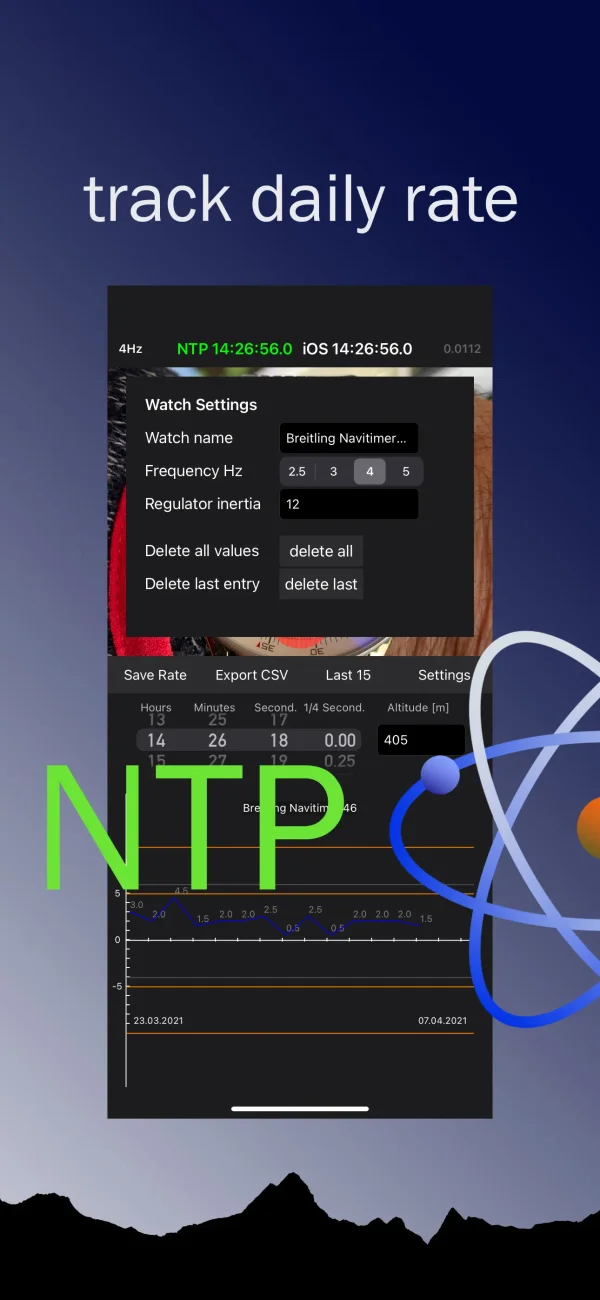
It provides an easy way to measure the daily rate of your watch against an accurate NTP time reference and to follow its performance over days, weeks or months.
Before starting a new measurement series, synchronize your watch with an accurate time reference. Do not reset the watch during the measurement period. An internet connection is required to obtain the precise NTP reference time.
How to measure your watch
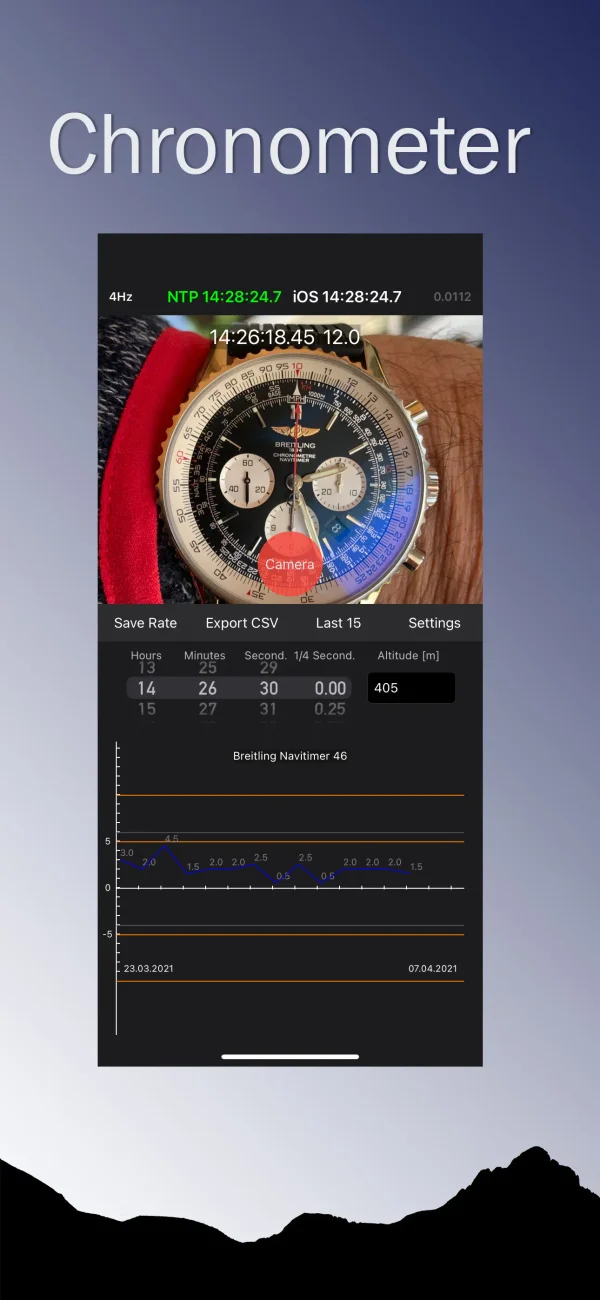
1. Start the app and wait until the NTP server has synchronized. The NTP time turns green when the reference time is available.
2. Point the camera at the watch dial. You can use pinch-to-zoom and, on supported devices, the macro capability for precise reading of the seconds hand.
3. Tap the camera button to freeze the image. The app records the corresponding NTP reference time.
4. Read the exact time from the frozen image and adjust the displayed watch time using the picker wheels.
5. If desired, enter the current altitude above sea level.
6. Tap Save Rate to store the measurement.
7. Tap the camera button again to return to the live camera view.
For the best results, measure your watch once per day at approximately the same time. If more than one day passes between two measurements, the app automatically calculates the average daily rate for that interval.
Performance evaluation
The graph shows the daily rate of your watch together with the standard COSC limits and the more demanding COSC Excellence limits.
After at least 15 measurements, the app provides an additional COSC Evaluation based on the most recent 15 daily rate values.
The evaluation includes a COSC pass/fail assessment and a Concours Score from 0 to 500 points, derived from the chronometer competition formula.
The Concours Score does not include the thermal coefficient (CT). Temperature testing, controlled positional changes, magnetic exposure and shock testing cannot be reproduced during normal everyday use. The result is therefore not an official COSC certification, but a practical evaluation of the real-world rate performance of your watch.
The complete measurement history can be exported as a CSV file for further analysis. The exported data includes the date, absolute rate difference, daily rate difference and altitude above sea level.
Time reference: Swiss NTP server ntp11.metas.ch
The app also includes a COSC NTP 4 Hz reference dial for calibration and verification of optical timing instruments.
Requires iOS 18.6 or later.
Yenilikler
Sürüm 1.9 · 20.08.2026
What’s New
- New 15-day COSC Evaluation and Concours Score
- Improved camera with macro support and zoom
- Improved daily rate calculation for measurements over multiple days
- Optimized for iOS 18
Uygulama gizliliği
Bu uygulamanın verileri nasıl işlediği hakkında Kilian Eisenegger tarafından App Store üzerinde yapılan beyan.
-
Veri toplanmıyor
Geliştirici bu uygulamadan hiçbir veri toplamıyor.
Gizlilik uygulamaları, örneğin kullandığınız özelliklere veya yaşınıza göre değişiklik gösterebilir.
Bilgiler
- Satıcı
- Kilian Eisenegger
- Kategori
- Yardımcılar
- Sürüm
- 1.9
- Güncellendi
- 20.08.2026
- Yayın tarihi
- 10.04.2021
- Boyut
- 2,7 MB
- Gereksinim
- iOS 18.6 veya sonrası
- Yaş sınırı
- 4+
- Fiyat
- ₺149,99
- Diller
- İngilizce
- Telif hakkı
- © Kilian Eisenegger
Bunları da beğenebilirsiniz
-
 ChronoLog • Watch AccuracyYardımcılar
-
 QR Code: Reader & GeneratorYardımcılar
-
 Kronometre ve ZamanlayıcıZaman sayacı ve geri sayım
-
 Blue Light FilterYardımcılar
-
 Kronometre Zamanlayıcı PlusÇoklu zamanlayıcı & kronometre
-
 QR Code Reader: Batch ScannerToplu Tarama, Barkod Oluştur
-
 GlassesYardımcılar
-
 Atomic Clock PROYardımcılar
-
 Tab - The simple bill splitterYardımcılar
-
 Norton Password ManagerSecure Password Manager