
- Độ tuổi4+
- Danh mụcTiện Ích
- Nhà phát triểnKilian Eisenegger
- Ngôn ngữTiếng Anh
- Kích thước2,7 MB
Liên kết đến trang App Store chính thức
Download.org không lưu trữ tệp nào của Chronometer. Nút này mở trang ứng dụng trên App Store, nơi Kilian Eisenegger phát hành ứng dụng. Trang được kiểm tra lần cuối: 12/11/2026.
Ảnh chụp màn hình

Giới thiệu
Nhà phát triển chưa cung cấp nội dung này bằng ngôn ngữ của bạn.
Chronometer – Mechanical Watch Accuracy
This app helps you track the real-world accuracy and long-term rate performance of your mechanical watch.
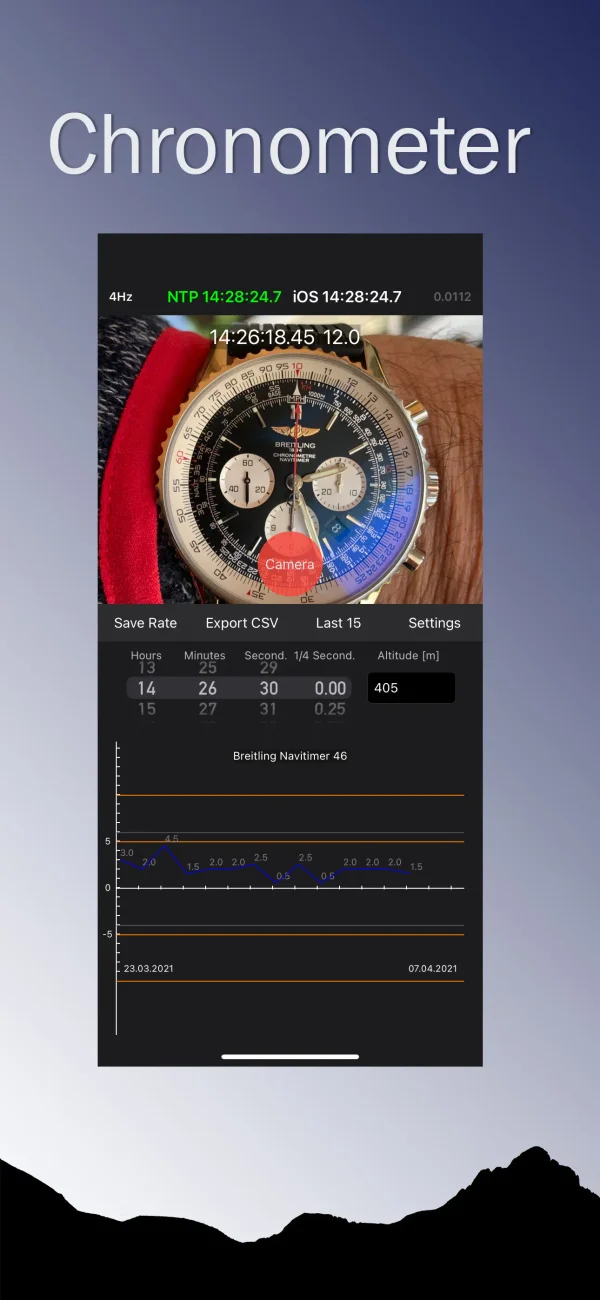
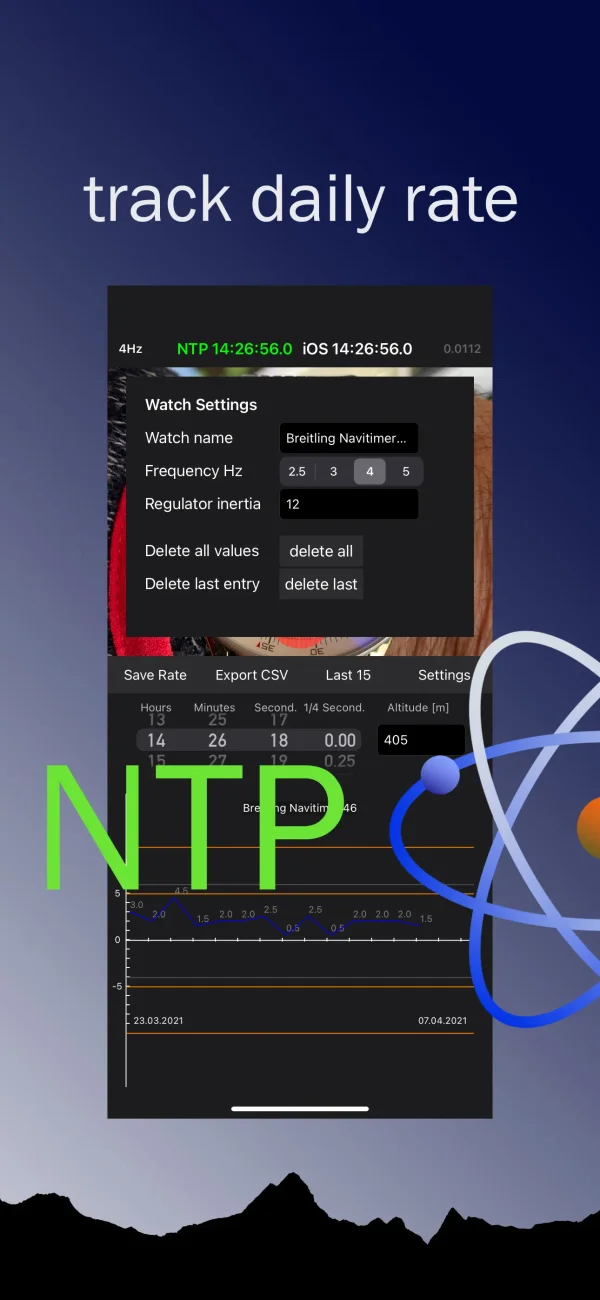
It provides an easy way to measure the daily rate of your watch against an accurate NTP time reference and to follow its performance over days, weeks or months.
Before starting a new measurement series, synchronize your watch with an accurate time reference. Do not reset the watch during the measurement period. An internet connection is required to obtain the precise NTP reference time.
How to measure your watch
1. Start the app and wait until the NTP server has synchronized. The NTP time turns green when the reference time is available.
2. Point the camera at the watch dial. You can use pinch-to-zoom and, on supported devices, the macro capability for precise reading of the seconds hand.
3. Tap the camera button to freeze the image. The app records the corresponding NTP reference time.
4. Read the exact time from the frozen image and adjust the displayed watch time using the picker wheels.
5. If desired, enter the current altitude above sea level.
6. Tap Save Rate to store the measurement.
7. Tap the camera button again to return to the live camera view.
For the best results, measure your watch once per day at approximately the same time. If more than one day passes between two measurements, the app automatically calculates the average daily rate for that interval.
Performance evaluation
The graph shows the daily rate of your watch together with the standard COSC limits and the more demanding COSC Excellence limits.
After at least 15 measurements, the app provides an additional COSC Evaluation based on the most recent 15 daily rate values.
The evaluation includes a COSC pass/fail assessment and a Concours Score from 0 to 500 points, derived from the chronometer competition formula.
The Concours Score does not include the thermal coefficient (CT). Temperature testing, controlled positional changes, magnetic exposure and shock testing cannot be reproduced during normal everyday use. The result is therefore not an official COSC certification, but a practical evaluation of the real-world rate performance of your watch.
The complete measurement history can be exported as a CSV file for further analysis. The exported data includes the date, absolute rate difference, daily rate difference and altitude above sea level.
Time reference: Swiss NTP server ntp11.metas.ch
The app also includes a COSC NTP 4 Hz reference dial for calibration and verification of optical timing instruments.
Requires iOS 18.6 or later.
Có gì mới
Phiên bản 1.9 · 20/08/2026
What’s New
- New 15-day COSC Evaluation and Concours Score
- Improved camera with macro support and zoom
- Improved daily rate calculation for measurements over multiple days
- Optimized for iOS 18
Quyền riêng tư của ứng dụng
Những gì Kilian Eisenegger khai báo trên App Store về cách ứng dụng này xử lý dữ liệu.
-
Dữ liệu không được thu thập
Nhà phát triển không thu thập bất kỳ dữ liệu nào từ ứng dụng này.
Phương thức đảm bảo quyền riêng tư có thể khác nhau, chẳng hạn như tuỳ theo các tính năng bạn sử dụng hoặc độ tuổi của bạn.
Thông tin
- Người bán
- Kilian Eisenegger
- Danh mục
- Tiện Ích
- Phiên bản
- 1.9
- Cập nhật
- 20/08/2026
- Phát hành
- 10/04/2021
- Kích thước
- 2,7 MB
- Yêu cầu
- iOS 18.6 trở lên
- Độ tuổi
- 4+
- Giá
- 99.000đ
- Ngôn ngữ
- Tiếng Anh
- Bản quyền
- © Kilian Eisenegger
Có thể bạn cũng thích
-
 ChronoLog • Watch AccuracyTiện Ích
-
 QR Code: Reader & GeneratorTiện Ích
-
 Stopwatch Timer for WorkoutTabata & hiit, chronometer
-
 Blue Light FilterTiện Ích
-
 Đồng hồ bấm giờ & Hẹn giờ PlusApp hẹn giờ và bấm giờ
-
 QR Code Reader: Batch ScannerQuét Hàng Loạt, Tạo Mã Vạch
-
 GlassesTiện Ích
-
 Atomic Clock PROTiện Ích
-
 Tab - The simple bill splitterTiện Ích
-
 Norton Password ManagerTiện Ích